How Does Voice over Internet Protocol Work? A Complete, Plain-English Explanation
Ask most people how a phone call works and the honest answer is that it is a solved mystery: you dial, it rings, someone answers. VoIP changes the mechanism completely, and because the mechanism is now running over the same connection as everything else in the business, it pays to understand it.
This guide walks the whole path — from the air moving in front of your mouth to the sound coming out of a handset somewhere else — and explains what each part does. By the end, the reason calls break up, the reason one-way audio happens, and the reason your router settings matter will all be obvious rather than mysterious.
The old way: a wire held open just for you
A traditional phone call is circuit switched. When you dialled, the network found a physical path from your phone to the other phone and reserved it for the duration of the call. That path was yours whether you were speaking or silent, and nothing else could use it.
It was reliable and simple, and it was also enormously wasteful — roughly half of a normal conversation is silence, and all of that silence was paid for. It also meant capacity was fixed: four lines meant four calls, no matter what.
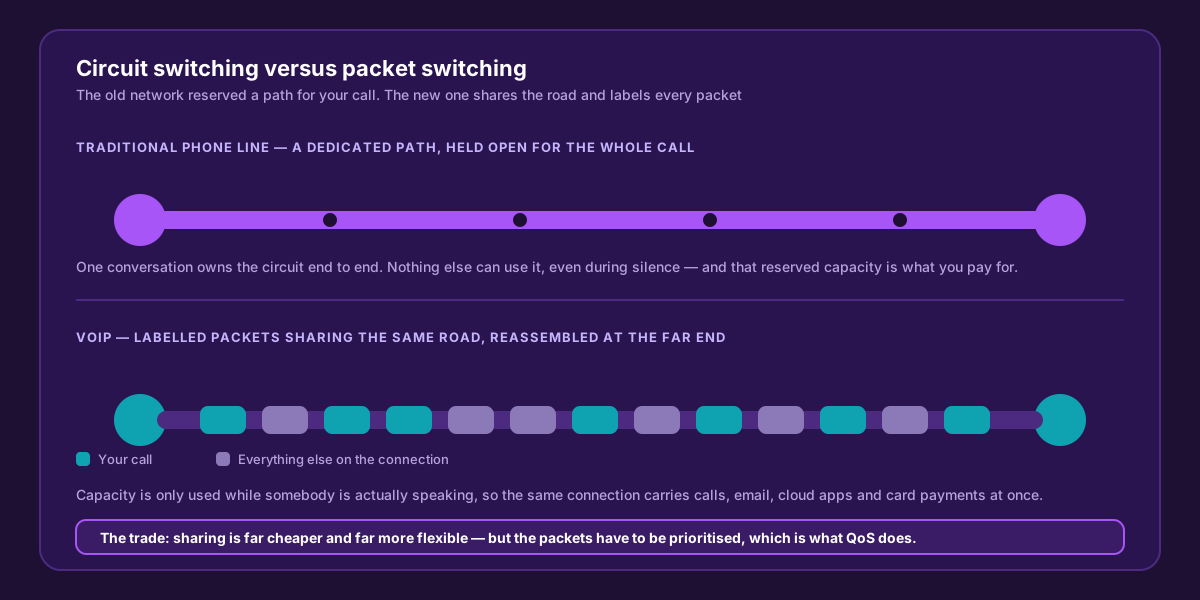
VoIP shares the road instead of reserving a lane. That is why it costs less and flexes — and why the packets need prioritising.
VoIP is packet switched. Your voice is chopped into small pieces, each labelled with where it is going and where it belongs in the sequence, and those pieces travel across a shared network mixed in with everything else. Nothing is reserved. The pieces are put back in order at the far end.
Step by step: what happens to your voice
Seven things happen between speaking and being heard, and they repeat about fifty times every second.
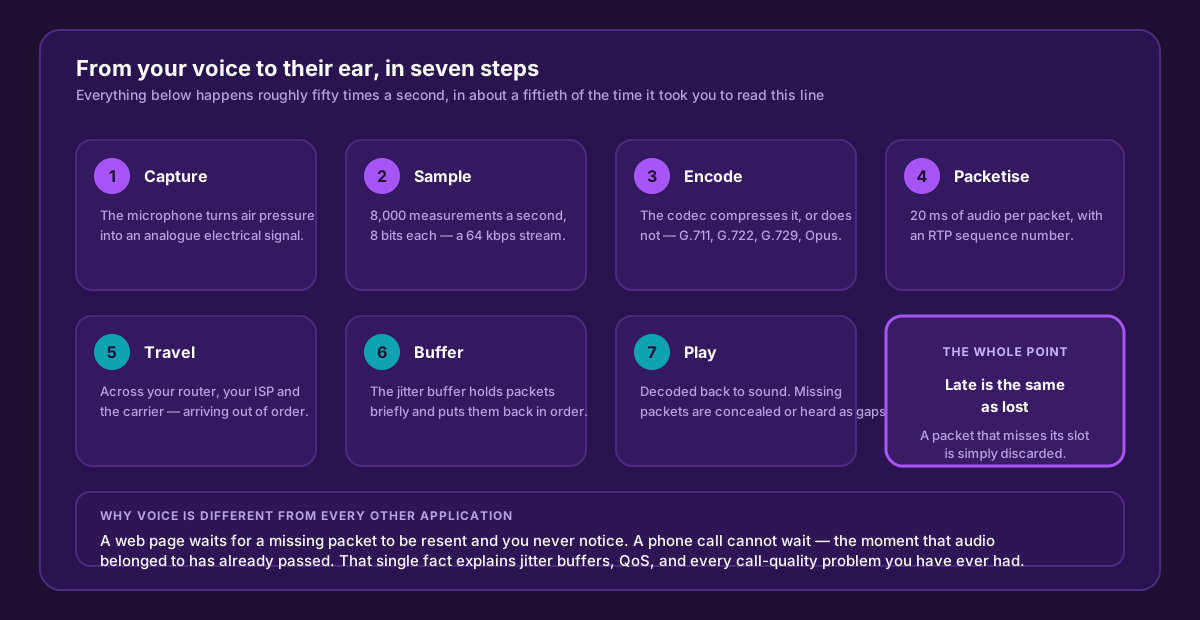
The whole chain runs in a few tens of milliseconds. The last box is the one that explains every call-quality problem you have ever had.
1. Capture
The microphone converts sound — pressure waves in air — into a continuously varying electrical signal. This part is identical to a traditional phone.
2. Sampling and digitisation
An analogue-to-digital converter measures that signal 8,000 times per second, storing each measurement as an 8-bit number. Why 8,000? Because human speech intelligibility lives mostly below 4,000 Hz, and sampling theory says you must sample at twice the highest frequency you want to reproduce. The result is a 64 kbps digital stream — the same standard the telephone network has used for decades.
Wideband codecs sample at 16,000 times per second, capturing double the frequency range. That is why an HD voice call sounds noticeably fuller: it is not louder, it simply contains sounds narrowband telephony throws away.
3. Encoding — the codec
The codec decides how that stream is represented on the wire. G.711 sends it essentially as-is at 64 kbps. G.729 analyses the speech and transmits a model of it at 8 kbps. Opus varies its rate to suit conditions. The choice trades bandwidth against fidelity and is covered in detail in our codec comparison.
4. Packetisation
The encoded audio is cut into chunks — usually 20 milliseconds each — and wrapped in headers. The RTP header adds a sequence number and a timestamp, which is what lets the far end reassemble the audio in the right order and at the right speed. Around that go UDP and IP headers with the addresses.
UDP, not TCP, is deliberate. TCP guarantees delivery by retransmitting lost data — useless for a live conversation, because the retransmitted audio would arrive after the moment it belonged to. Voice would rather lose a packet than wait for it.
5. Travel
The packets leave your phone, cross your switch and router, traverse your ISP and the carrier network, and arrive at the far end. They may take different routes. They may arrive out of order. Some may not arrive at all. This is normal packet-network behaviour, and the receiving end is built to cope with it.
6. The jitter buffer
The receiver does not play packets the instant they arrive. It holds them for a few tens of milliseconds in a jitter buffer, puts them back in sequence, and plays them out at a steady rate. This is what smooths over the natural unevenness of a shared network.
The buffer is a trade-off. A larger one absorbs more variation but adds delay to the conversation; a smaller one keeps latency low but starts dropping packets that arrive late. Most systems adjust it dynamically as conditions change.
7. Decode and play
Audio is decoded back to a waveform and played. If a packet never arrived, the codec conceals the gap by interpolating from surrounding audio — which works for a stray packet and fails audibly when several go missing together.
Here is the single most important consequence of the whole design: a packet that arrives late is treated exactly like a packet that was lost. Its moment has passed, so it is discarded. That is why jitter — variation in arrival time — damages calls just as badly as outright packet loss, and why prioritising voice on your own network matters so much.
How the call gets set up: SIP
Everything above describes the audio. Something else has to find the person you are calling, make their phone ring, and agree on which codec both ends will use. That is SIP — the Session Initiation Protocol.
SIP is a text-based protocol that looks surprisingly like an email header, and it handles registration, invitations, and teardown. Here is a complete call:
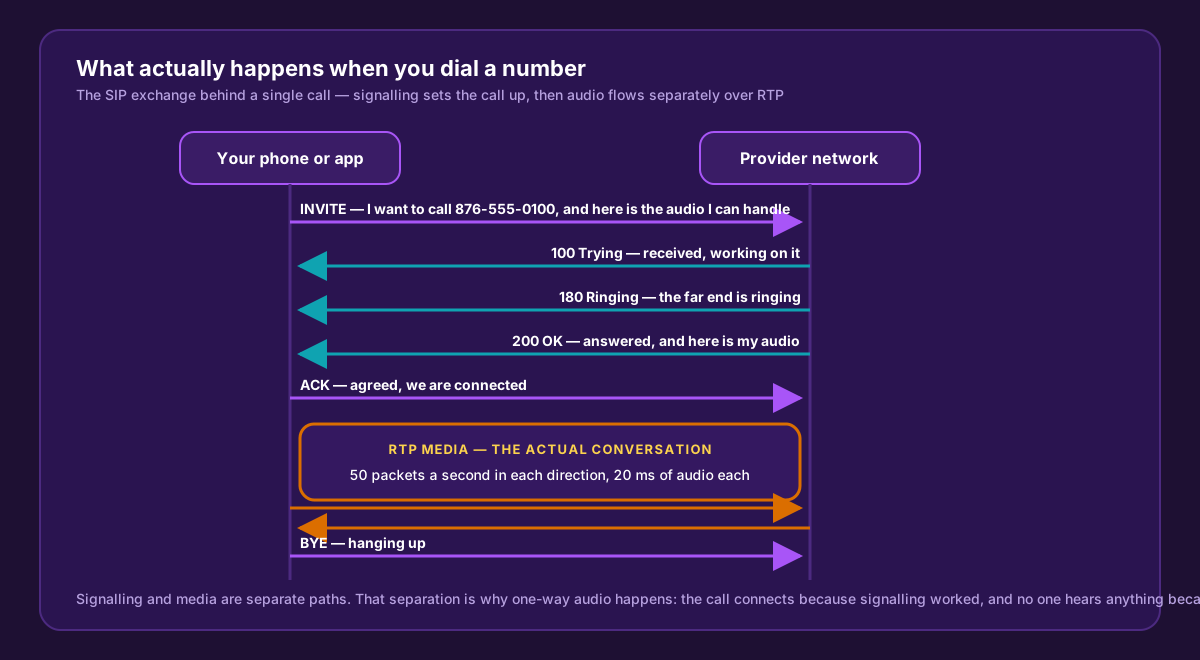
Signalling and media travel separately. That separation is exactly why a call can connect perfectly and still have no audio.
Three parts are worth knowing by name:
- REGISTER. When a phone starts up it tells the provider where it is, and repeats that periodically. If registration fails, the phone can still make calls but cannot receive them — the classic symptom of a phone that “only works one way”.
- INVITE and SDP. The invitation carries a description of what the caller supports: which codecs, and where to send the audio. The answer in the 200 OK carries the same from the other side. That negotiation is how both ends settle on a codec.
- BYE. Either end can hang up; the other confirms. If a BYE is lost, systems fall back on timers so calls do not hang open forever.
Understanding that signalling and media are separate paths explains the most common VoIP fault of all. One-way audio is almost never a “VoIP problem” — it is a media path problem, usually caused by a firewall or NAT device that permitted the signalling and blocked or misdirected the RTP.
NAT, and why VoIP care about your router
Your phones have private addresses (192.168.x.x) that mean nothing on the public internet. Your router performs Network Address Translation, rewriting the source address on the way out and reversing it on the way back.
SIP predates that arrangement and carries IP addresses inside its messages. A phone can therefore tell the far end “send my audio to 192.168.1.50” — an address that is unreachable from outside. Modern providers solve this on their side, which is why business VoIP works over ordinary broadband without special configuration.
What does not help is SIP ALG, a router feature that rewrites SIP messages in an attempt to fix this. It is enabled by default on many consumer routers and it is the cause of a remarkable share of registration failures, one-way audio, and calls that drop at exactly 30 seconds. If you take one configuration instruction from this article: find SIP ALG on your router and turn it off.
What a business VoIP system is made of
| Component | What it does |
|---|---|
| IP phone or softphone | The endpoint — a desk handset, a laptop app, or a mobile app on an extension |
| PBX (usually cloud-hosted) | The brain: extensions, ring groups, menus, hours, voicemail, recording |
| SIP trunk | The connection between your system and the public telephone network |
| DID number | A real 876 number that routes to your system |
| Session border controller | Sits at the network edge handling security, NAT and fraud protection |
| Media gateway | Translates between IP and traditional circuits, so VoIP can call landlines |
When your VoIP call reaches someone on a traditional line, a gateway converts the packets back into a circuit-switched call. The person on the other end has no idea anything unusual happened — which is the whole point.
What VoIP makes possible that copper could not
Once a call is software rather than a wire, things that were impossible become configuration:
- The same extension rings a desk phone, a laptop and a mobile at once.
- Calls route by time of day, day of week, or caller ID without anyone touching hardware.
- Numbers are independent of buildings — a hurricane closing an office does not take the number off the air.
- Adding a line is a setting, not a site visit.
- Every call generates data: who answered, how long they waited, what was missed.
- An AI receptionist can answer calls nobody reaches, take details and book appointments.
What it demands in return
VoIP depends on your internet connection, and that dependency is real. Three things must hold:
- Enough upload capacity for your peak concurrent calls — about 90 kbps per call on G.711, 35 kbps on G.729. See our bandwidth guide.
- Low jitter, which means prioritising voice at your router — the QoS configuration guide covers this for Cisco, Ubiquiti and SonicWall.
- Continuity of power and connectivity. IP phones need power and internet. A UPS for the router and switch, and a second path or mobile failover, keep the phones alive when the building is not at its best.
These are solvable engineering requirements, not reasons to stay on copper. They are simply the things nobody had to think about when the phone company supplied both the line and the power on it.
The short version
Your voice is measured 8,000 times a second, compressed by a codec, cut into 20-millisecond packets, labelled with sequence numbers, sent across a shared network mixed in with everything else, held briefly in a buffer at the far end, reordered and played back — all while a separate conversation in SIP sets the call up and tears it down.
Every quality problem you will ever have traces back to one line in that description: late is the same as lost. Fix jitter and loss on the path you control, and VoIP simply works.
Talk to people who run the network
WOCOM is a licensed Jamaican provider operating its own carrier infrastructure — Cloud PBX, SIP trunks, virtual 876 numbers and AI call answering, backed by a 99.999% uptime SLA and engineers on this island. If you want to know how VoIP would behave on your specific connection, we will test it with you before you commit to anything.
Call 876-906-7240, see the pricing page, or get in touch.
Continue exploring
Ready to upgrade your communications?
Talk to our team about the right solution for your business.
Book a Demo Contact SalesEverett Kildare is WOCOM's voice and infrastructure specialist, with more than 25 years of experience designing and running carrier-grade voice, SIP and virtualization infrastructure. Holding a BSc in Information Technology, he has built, secured and migrated phone systems for businesses of every size. Everett writes WOCOM's technical coverage of SIP trunking, cloud PBX, contact centres, business continuity and migration.