VoIP Bandwidth Requirements for Jamaica Businesses: How Much Internet Speed Do You Need?
When a Jamaica business owner decides to move from a traditional landline to a cloud phone system or SIP trunking, the very first question is almost always the same: "Will our internet handle it?" It is a fair question — and the honest answer is that internet quality matters far more than raw speed when it comes to voice calls.
This guide gives you the actual numbers, a simple formula to size your connection, and a plain-English breakdown of every internet type available in Jamaica and how each one performs for business VoIP.
Why Bandwidth Is Only Half the Story
VoIP sends voice as real-time data packets. Unlike downloading a file or streaming a video, there is no buffer — every packet must arrive on time. This means three metrics matter for call quality, not just download speed:
- Latency (ping): The round-trip delay between your phone and the call server. Under 150 ms is ideal. Above 200 ms, callers notice a conversational lag.
- Jitter: Variation in packet arrival timing. Under 30 ms is good. Above 50 ms, voices start to sound choppy or robotic.
- Packet loss: Even 1% lost packets causes audible glitches. The target is 0%.
A 100 Mbps connection with high jitter will sound worse than a 10 Mbps connection with rock-solid consistency. Keep that in mind as you evaluate your existing service.
How Much Bandwidth Does One VoIP Call Actually Use?
The amount of bandwidth a single call consumes depends on the audio codec in use. Two codecs dominate business VoIP:
- G.711 (uncompressed): Approximately 87 kbps per call, upstream and downstream. This is the default for most cloud PBX and SIP trunk providers, including WOCOM, because it delivers the clearest audio with no compression artefacts.
- G.729 (compressed): Approximately 32 kbps per call. Useful where bandwidth is severely constrained, but introduces a small amount of audio degradation.
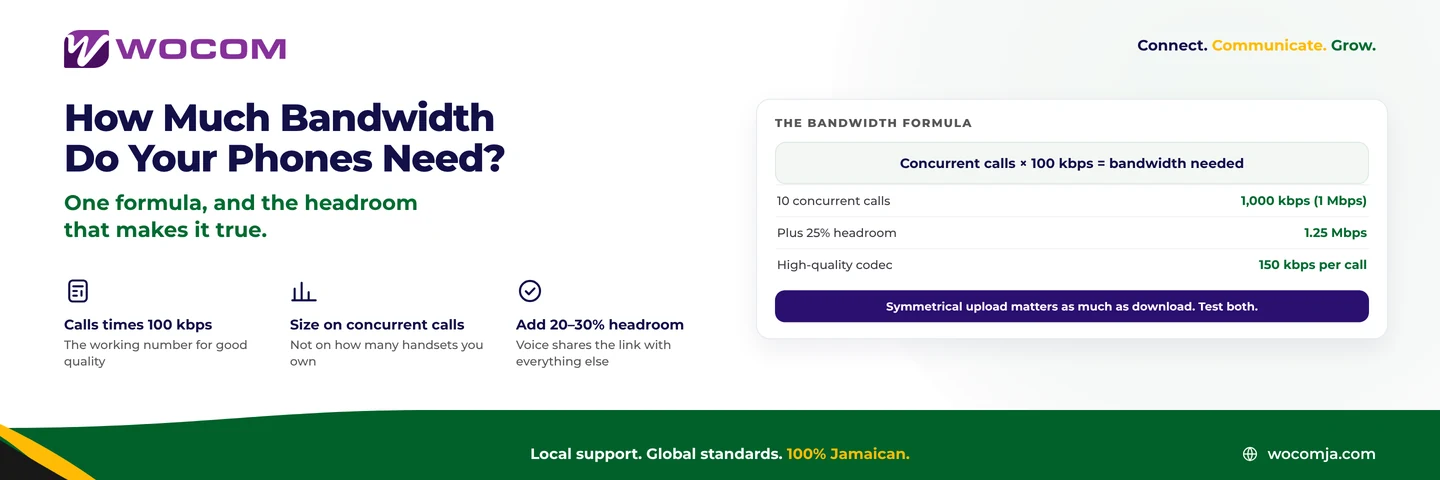
In practice, when you factor in packet headers and signalling overhead, a safe planning figure is 100 kbps per simultaneous call using G.711. That is the number to use when sizing your connection — not the raw codec rate.
Calculating Your Business's Total VoIP Bandwidth Need
The formula is straightforward:
VoIP bandwidth needed = Number of simultaneous calls × 100 kbps
Add a 20% headroom buffer, then add your existing non-VoIP data usage on top.
Here are some worked examples for common Jamaica business sizes:
- Solo operator or home office (2 lines): 2 × 100 kbps = 200 kbps for VoIP. A basic broadband package handles this easily — bandwidth is not your concern here, latency is.
- Small office in Kingston, 8 staff (4 simultaneous calls at peak): 4 × 100 kbps = 400 kbps for VoIP. Add 20% buffer = 480 kbps. With email, cloud accounting software, and web browsing layered on top, a 10 Mbps connection is comfortable.
- Mid-size business, 25 staff (10 simultaneous calls): 10 × 100 kbps = 1 Mbps for VoIP. With general data usage, target a 25–50 Mbps package minimum — and confirm your ISP's contention ratio.
- Contact centre, 30 agents (30 simultaneous calls): 30 × 100 kbps = 3 Mbps for VoIP alone. At this volume, you need a dedicated internet circuit with a guaranteed SLA, not a shared consumer-grade broadband connection.
Note that "simultaneous calls" is not the same as total staff. Most offices have peak usage of 40–60% of headcount on calls at any given moment. Use your phone records to identify your true peak if you are unsure.
Internet Types in Jamaica: VoIP Suitability Rated
Not all internet connections in Jamaica perform equally for voice. Here is a realistic assessment of each type:
- Cable broadband (shared residential/SME): Adequate for light VoIP use — one to three lines. Shared bandwidth with neighbours means quality degrades between 6 pm and 9 pm. If this is your only option, configure QoS (Quality of Service) rules on your router to prioritise voice traffic. WOCOM can assist with this during provisioning.
- Fibre (where available): The best option for VoIP. Symmetrical upload and download speeds, consistently low latency, and no contention issues. If fibre is available at your Kingston or Montego Bay address, prioritise it.
- Starlink Business: Delivers strong speeds and WOCOM has successfully deployed SIP trunking over Starlink at healthcare sites and remote locations across Jamaica. Latency averages 30–60 ms — well within VoIP tolerance. The Business tier provides priority bandwidth, which makes it far more reliable for voice than the residential plan.
- 4G/LTE mobile data: Suitable as a backup failover line for one or two calls. Not recommended as your primary VoIP connection for a team — mobile network congestion introduces unpredictable jitter, especially in busy commercial areas.
- Dedicated Internet Access (DIA): The gold standard for contact centres and high-volume operations. You get a fixed, uncontended circuit with a written SLA on latency and uptime. If your business depends on call centre operations, DIA is the correct choice — not the cheapest broadband you can find.
Warning Signs Your Internet Is Already Hurting Your Call Quality
If you are already running VoIP — or testing it — watch for these symptoms that point to an internet problem rather than a phone system problem:
- Voices sound choppy, robotic, or like they are breaking up
- Echo on the line, particularly on longer calls
- Calls drop suddenly after a few minutes with no warning
- One-way audio — you hear the caller but they cannot hear you (or vice versa)
- Call quality is fine early in the morning but degrades between noon and 6 pm (a strong indicator of contention on a shared circuit)
These are almost never caused by the cloud phone platform itself. They are network-layer problems and they are solvable — but you need to diagnose the connection first.
How to Test Your Connection Before You Switch
Do not rely on a single speed test run at 7 am on a Sunday. To get a realistic picture of your connection's VoIP readiness:
- Run speed tests at different times: mid-morning, lunchtime, and mid-afternoon on a weekday
- Use a tool that measures latency, jitter, and packet loss — not just speed. Speedtest.net's detailed results tab shows these, or ask your IT contact to run an iPerf test
- Ping a server in the United States or United Kingdom (where most cloud PBX platforms are hosted) and look for consistent results under 150 ms
- Check your router's WAN statistics for any packet loss percentage — anything above 0% warrants investigation before you go live on VoIP
WOCOM offers a complimentary pre-qualification assessment for businesses considering SIP trunking or cloud PBX. Our team will analyse your connection, identify any weak points, and advise on whether QoS configuration, a circuit upgrade, or a Starlink backup line is the right fix for your situation — before you commit to anything.
Ready to Find Out If Your Jamaica Business Is VoIP-Ready?
Getting the internet side right is the single most important step before switching your business phones to the cloud. WOCOM has been deploying voice solutions across Jamaica — from Kingston commercial offices to remote sites on Starlink — and we know exactly what each type of connection can and cannot support.
Contact WOCOM today for a free VoIP readiness check. We will assess your current connection, recommend any upgrades if needed, and give you a clear picture of what your new phone system will look and sound like before you sign anything.
Call us at 876-300-1268, WhatsApp us, or visit wocomja.com to get started. Jamaica's business phone network is moving to the cloud — make sure your internet is ready to move with it.
Continue exploring
Ready to upgrade your communications?
Talk to our team about the right solution for your business.
Book a Demo Contact SalesEverett Kildare is WOCOM's voice and infrastructure specialist, with more than 25 years of experience designing and running carrier-grade voice, SIP and virtualization infrastructure. Holding a BSc in Information Technology, he has built, secured and migrated phone systems for businesses of every size. Everett writes WOCOM's technical coverage of SIP trunking, cloud PBX, contact centres, business continuity and migration.