Business Phone Security Audit Jamaica: 8 Checks to Run Before Year-End
Why Your Phone System Is a Security Target
Most Jamaican businesses think about cybersecurity in terms of email phishing and data breaches. But your business phone system — whether it runs on a cloud PBX or connects through SIP trunks — is one of the most actively probed targets on the internet. Attackers scan for exposed PBX portals every day, hunting for weak credentials they can use to run up thousands of dollars in fraudulent international calls charged directly to your account.
The risk spikes heading into December for two reasons. First, year-end staff turnover is high, and departed employees sometimes retain credentials they should no longer have. Second, the holiday rush leaves IT teams with less time to monitor anomalies in call records. Running a structured security audit before December is one of the most practical things a Jamaican business manager can do right now.
Check 1: SIP Extension Credentials
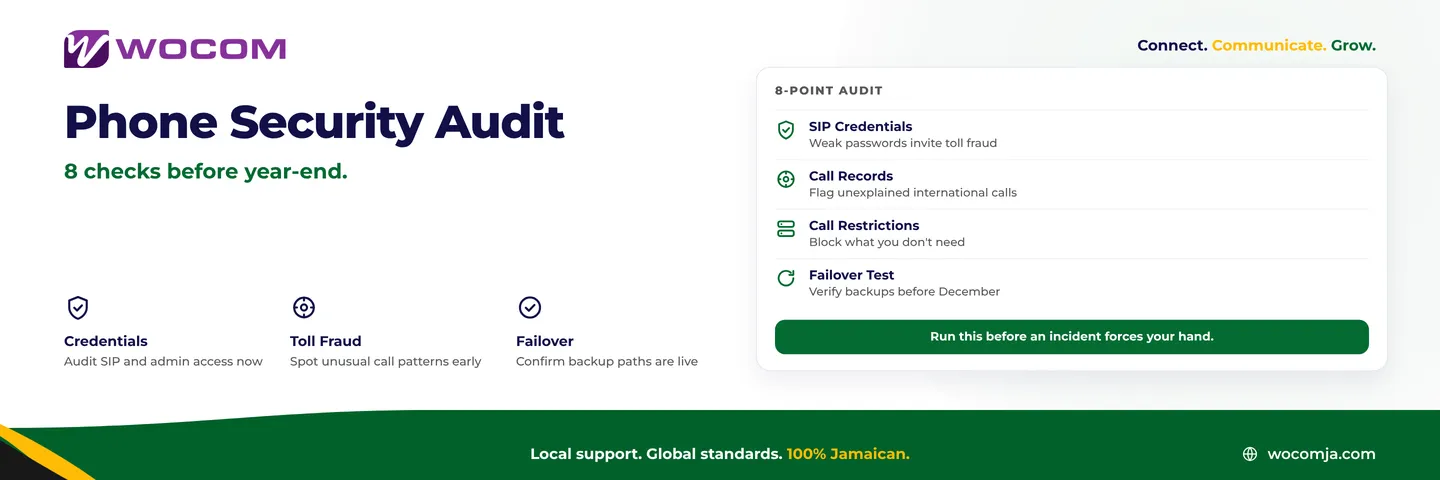
Every extension on your phone system has a username and password used to register with your SIP server or cloud PBX. Default or weak passwords — "1234", the extension number itself, the company name — are the entry point for most toll fraud incidents that hit Kingston and Montego Bay businesses.
Action: Log into your PBX admin panel and review the credential list for every active extension. Flag any that are still using default passwords, follow a predictable pattern, or belong to staff who have left the company. Reset them all with strong, randomly generated passwords. If your system supports IP-based registration restrictions — only allowing registration from your office IP range — enable it.
Check 2: Admin Access and Portal Permissions
Beyond extension credentials, your PBX admin portal itself needs a review. Who has administrator-level access right now? If a manager or IT contractor who configured the system two years ago has since left, their account may still exist with full privileges to change call routing, add extensions, and alter billing settings.
Action: Pull the complete admin user list from your cloud PBX portal. Remove accounts belonging to anyone who no longer works with your business. Ensure remaining admin accounts use strong, unique passwords and — where your provider supports it — enable two-factor authentication. This single step closes more security gaps than most businesses realise.
Check 3: Outbound Call Records for Anomalies
Toll fraud works by generating a large volume of calls to premium-rate international numbers before the fraud is detected and the account locked. The calls can accumulate in a matter of hours — often overnight or across a weekend when nobody is monitoring the system.
Action: Pull your outbound call log for the past 90 days and filter for international destinations. If your business does not routinely make international calls, any outbound international activity is a red flag. Also look for calls made outside your normal business hours, unusually long calls to the same number, and destinations your operations have no reason to reach. If you find call patterns you cannot explain, escalate to your provider immediately.
Check 4: Outbound Calling Restrictions
Even if your call records look clean today, outbound restrictions are your long-term protection. Cloud PBX platforms typically let you configure which destinations each extension or user group can dial — local only, regional, international, premium-rate, and so on.
Action: Review your current outbound dialling permissions per extension. A front-desk line serving walk-in customers in Kingston does not need unrestricted international dialling. A field technician's softphone account probably only needs to call local numbers. Applying least-privilege access to your phone system — each extension can only dial what it legitimately needs — dramatically limits the potential damage if a credential is ever compromised.
Check 5: Voicemail PIN Audit
Voicemail is frequently overlooked in phone security reviews, but it carries real business risk. A system with weak PINs can expose sensitive messages — customer contact details, pricing discussions, internal decisions — to anyone who dials your voicemail access number and guesses the code.
Action: Confirm that your voicemail system enforces a minimum PIN length of six digits or more. Check whether the default PIN has ever been changed for each extension. Remind staff to set unique PINs and to notify IT if they believe their voicemail has been accessed without their knowledge. If your team accesses voicemail only from their desk phones, consider disabling remote external access entirely — it removes an attack surface with no operational cost.
Check 6: Call Recording Access Control
If your business records calls — for compliance, staff training, or dispute resolution — those recordings contain sensitive customer information. Who can access them matters as much as the fact that you make them.
Action: Review access permissions on your call recording portal. Is access limited to authorised supervisors and managers? Are recordings encrypted at rest? Is there an audit trail showing who accessed which recording and when? Recordings that contain card payment details, medical information, or legal instructions carry additional weight under Jamaica's Data Protection Act. Ensure your retention and access policies are documented and enforced.
Check 7: Emergency Calling Verification
It is easy to assume emergency services — 119 for police, 110 for fire — will always work from your business phones. VoIP and cloud PBX systems can have gaps here, particularly when calls route through internet connections with failover paths that have not been tested in months.
Action: From each physical office location, verify that a call to emergency services connects correctly. Dialling and hanging up immediately after the call connects is enough to confirm the routing path is live — you do not need to speak to a dispatcher. If you have remote staff using softphones from home, verify their emergency calling setup separately: VoIP emergency calls behave differently when the caller's physical location changes.
Check 8: Failover Path Test
Your continuity plan may document a failover arrangement — a backup internet connection, a mobile redirect, an overflow trunk — but if it has not been tested recently, you do not know whether it actually works when needed.
Action: Simulate a failure by disabling your primary connection briefly or using your provider's testing tools to confirm calls route to your failover destination. For businesses with SIP trunks, verify that your secondary trunk activates automatically and carries calls without manual intervention. Document the test result with a date and a pass or fail outcome. A failover plan you haven't tested is not a plan — it is an assumption.
Act Before December, Not After an Incident
Phone security incidents are expensive and entirely preventable. Toll fraud victims have reported bills in the tens of thousands of dollars generated in a single weekend. Compromised voicemail has exposed customer conversations that should never have been accessed. These are not theoretical scenarios — they affect real Jamaican businesses every year.
WOCOM's cloud PBX and SIP trunking infrastructure includes built-in controls for outbound restriction, credential management, and call pattern monitoring. But the most important security layer is your own: knowing what is running in your account, who has access, and whether your backup paths work.
Running these eight checks takes less than an afternoon. Recovering from a breach can take months — and cost far more than the audit ever would.
Contact the WOCOM team today to schedule a phone system security review before December. We'll walk through your current configuration, identify any gaps, and ensure your communications infrastructure is secured heading into the busiest quarter of the year. Call us or visit wocomenterprise.com/contact to get started.
Continue exploring
Ready to upgrade your communications?
Talk to our team about the right solution for your business.
Book a Demo Contact SalesEverett Kildare is WOCOM's voice and infrastructure specialist, with more than 25 years of experience designing and running carrier-grade voice, SIP and virtualization infrastructure. Holding a BSc in Information Technology, he has built, secured and migrated phone systems for businesses of every size. Everett writes WOCOM's technical coverage of SIP trunking, cloud PBX, contact centres, business continuity and migration.