How to Calculate the Internet Bandwidth Your Business Phone System Needs
The Formula
Here is the whole calculation, and then the reasons it is not quite that simple:
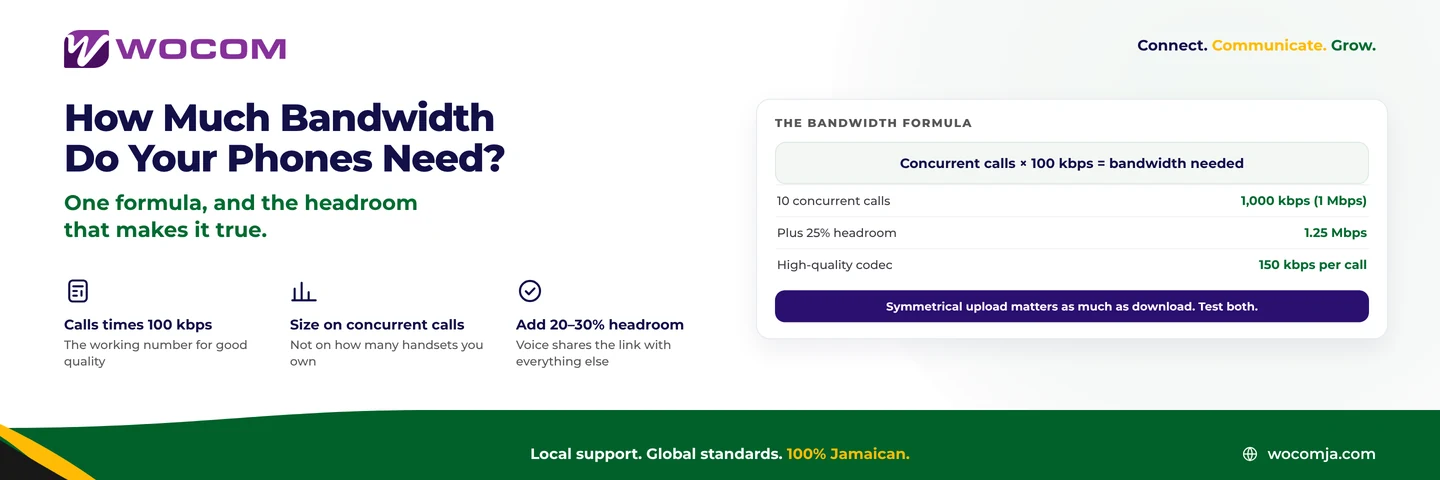
Concurrent calls × 100 kbps = bandwidth needed, in each direction
Ten calls at once needs about 1 Mbps up and 1 Mbps down. Twenty calls needs 2 Mbps each way. That is the number to start from, and for most Jamaican businesses it is close enough to make the decision with.
The two things that make it wrong are the codec you use and the headroom you fail to leave.
Where 100 kbps Comes From
A G.711 call — the standard high-quality codec, and what most business systems use by default — carries 64 kbps of audio. The rest is overhead: IP, UDP and RTP headers wrapped around fifty small packets a second. That overhead is substantial precisely because voice packets are small and frequent.
Add it up and a G.711 call consumes roughly 85–100 kbps on the wire. Rounding to 100 gives you a clean number with a little slack built in.
Other codecs change the figure:
- G.711 — about 100 kbps per call. Best quality, the sensible default when bandwidth allows.
- G.729 — about 40 kbps per call. Noticeably thinner, useful on constrained links.
- Opus — variable, roughly 50–120 kbps. Adapts to conditions, handles loss well.
- G.722 wideband — about 100–150 kbps. Better-than-landline quality where you have room for it.
Counting Concurrent Calls, Not Handsets
The single most common error in this calculation is using headcount.
Bandwidth is consumed only by calls actually in progress. A business with thirty handsets and a peak of eight simultaneous calls needs bandwidth for eight, not thirty. Conversely a five-person team running a ring group across four phones plus two outbound calls can briefly need more than five calls’ worth.
Get the concurrency figure from your reports if you have them, or count for a week at your busy hour. Our guide to how many lines your business needs works through the counting.
The Headroom That Makes It True
The formula gives you what voice needs on an otherwise empty link. Your link is not empty.
Add 20–30% on top for the ordinary business of email, cloud files, browsing, updates and video calls. Ten concurrent calls calculated at 1 Mbps becomes 1.25–1.3 Mbps of link you should be able to spare for voice at the busiest moment of the day.
Better still, do not rely on spare capacity at all — configure Quality of Service on your router so voice packets are prioritised. QoS is worth more than extra megabits, because it protects voice at exactly the moment congestion would otherwise ruin it: when somebody starts a large upload.
Upload Is the Number That Matters
This is the point where Jamaican broadband packages catch businesses out.
Voice is symmetrical. Your voice goes out at the same rate theirs comes in, so you need the calculated figure in both directions. Many residential-grade packages sold to small businesses here are heavily asymmetric — 100 Mbps down against 10 Mbps up is common, and some are worse.
Ten Mbps up sounds like plenty against a 1 Mbps requirement, and it is — until somebody starts a cloud backup, at which point the upload saturates and every call on the site degrades at once. If all three of latency, jitter and packet loss appear together, a saturated upload is the first thing to check.
For businesses where the phone is central, a symmetrical connection is worth more than a bigger asymmetric one. Our note on bandwidth and internet speed covers choosing the connection itself.
A Worked Example
A twelve-person distribution business in Spanish Town:
- Peak concurrent calls, measured over a week: 6
- Codec: G.711 at 100 kbps → 600 kbps each way
- Plus 25% headroom → 750 kbps each way
- Plus growth allowance to 8 calls → 1 Mbps each way
So: 1 Mbps of reliable, prioritised, symmetrical capacity. Not 50 Mbps, not 100. What matters is that the megabit is genuinely available at 10:30 on a Tuesday, which is a question about QoS and upload capacity rather than about the headline number on the package.
Testing Rather Than Trusting
Three checks worth doing before you commit:
- Test upload, not just download, and test it at your busy hour rather than at 7am
- Test jitter and loss, not just speed. A fast link with 3% loss is worse for voice than a slow clean one
- Run a real call while the link is busy. Start a large upload and make a call. That is your actual worst case
WOCOM can run these tests on your connection and tell you how many concurrent calls it will genuinely carry. Call 876-906-7240 in Jamaica or 877-906-7240 from the US, email support@wocomja.com, or use the contact page.
Continue exploring
Ready to upgrade your communications?
Talk to our team about the right solution for your business.
Book a Demo Contact SalesEverett Kildare is WOCOM's voice and infrastructure specialist, with more than 25 years of experience designing and running carrier-grade voice, SIP and virtualization infrastructure. Holding a BSc in Information Technology, he has built, secured and migrated phone systems for businesses of every size. Everett writes WOCOM's technical coverage of SIP trunking, cloud PBX, contact centres, business continuity and migration.