Managing a Hybrid Workforce: Routing Calls Between Office Desk Phones and Remote Laptops
Most Jamaican businesses did not plan to become hybrid. It happened — someone started working two days a week from home, the sales team stopped coming in, a branch opened, and the phone system quietly stopped matching how the company works.
The symptom is always the same. Customers dial the office and reach a phone on an empty desk. Staff give out their personal mobile numbers because it is easier. Nobody knows how many calls were missed, because half of them never touched the phone system at all.
The fix is not more phones. It is a routing model where the extension belongs to the person, not the desk — and where the caller never has to know or care where anyone is sitting.
One extension, several devices
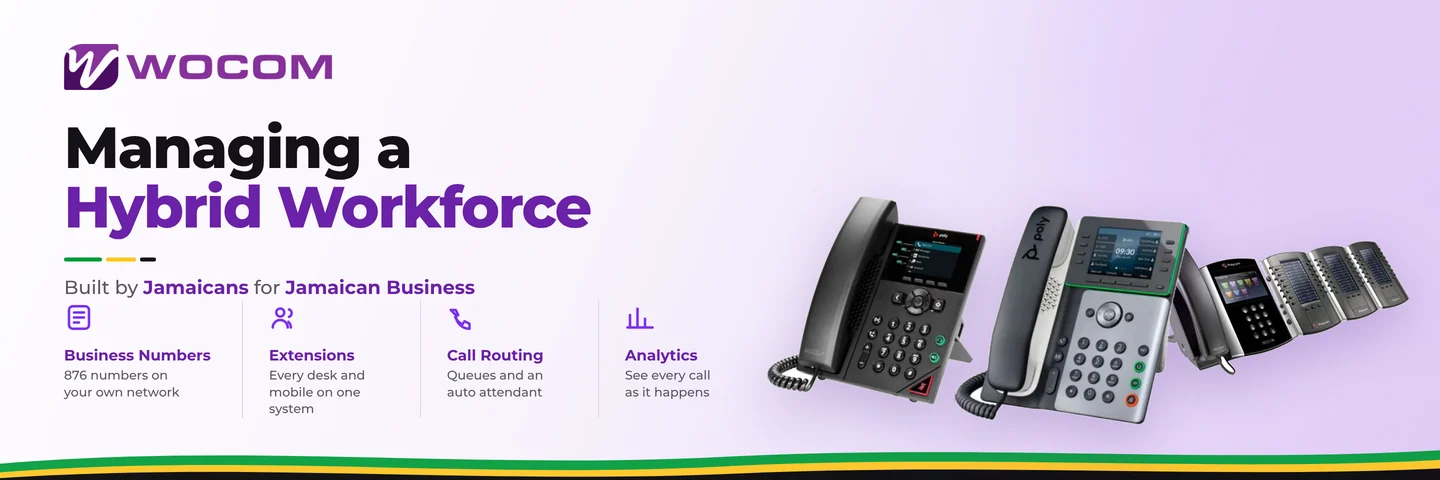
The foundation of hybrid voice is simple: a single extension can have multiple devices registered to it at once. A desk phone in the office, a softphone on a laptop, an app on a mobile — all the same extension, all ringing together, all making outbound calls that show the business number.
Which means:
- A staff member working from home is reachable on their office extension, from their laptop, with no forwarding to set up.
- Somebody in the field takes a call on their mobile app and the customer sees no difference.
- When a person moves between office and home mid-week, nothing needs reconfiguring.
- Outbound calls always present the business number, so customers call back to the business rather than to a personal phone.
Design the flow before you configure anything
Hybrid routing goes wrong when it is assembled from individual forwarding rules. Draw the whole flow first — inbound, ring group, no-answer, after-hours — and build it once.
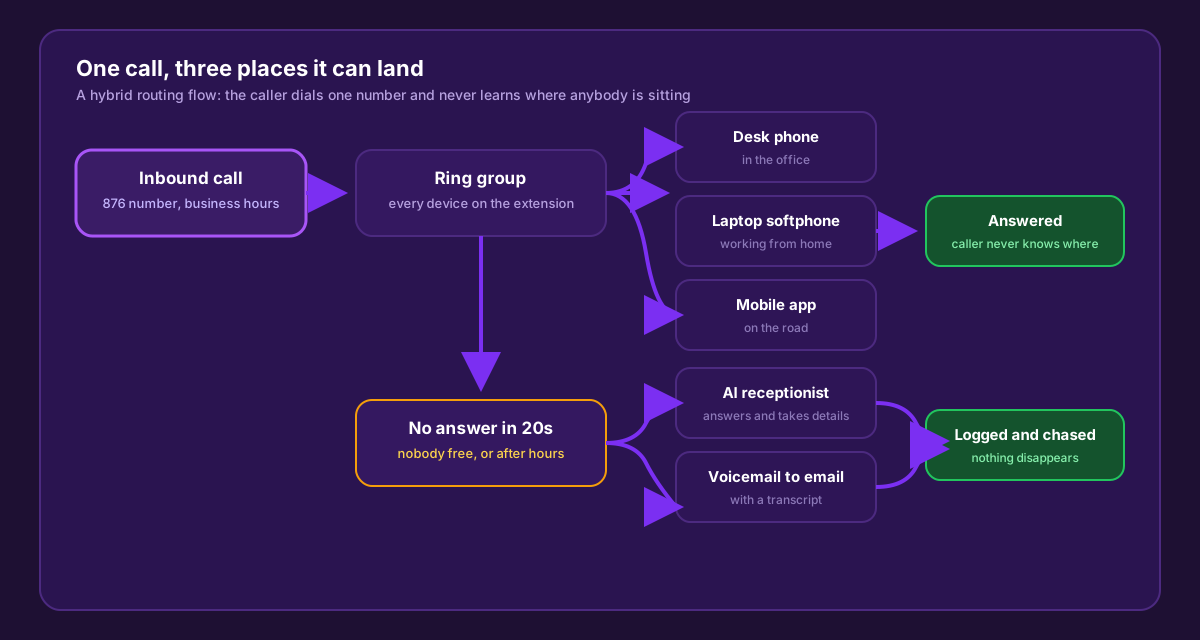
The no-answer path is the half most businesses never design — and it is where the revenue leaks.
Three decisions shape everything else:
1. Ring strategy. Simultaneous rings every device at once — fastest to answer, best for small teams. Sequential rings in a defined order — good when one person owns a queue and others are backup. Longest idle spreads work evenly — right for a team sharing inbound volume. Pick per group, not per company.
2. Timeout. Twenty seconds — about five rings — before the call moves on. Longer and callers hang up; shorter and people cannot reach a ringing phone.
3. Where an unanswered call goes. Voicemail is the default and the weakest option; most callers do not leave one. An AI receptionist that answers, identifies the caller’s need and captures details converts far more of those calls into something you can act on. Either way the call must be logged — a missed call nobody can see is a missed call that repeats.
The personal mobile problem
When the office phone stops matching how people work, staff route around it with their own mobiles. It solves today’s problem and creates four permanent ones:
- The relationship belongs to the employee, not the business. When they leave, the customer keeps calling their number — and follows them.
- There is no record. No call log, no recording, no report. If a customer says they called three times, you cannot check.
- There is no cover. Nobody else can pick up that call when the person is sick, on leave, or driving.
- Staff resent it. Their personal number is in circulation permanently, and calls arrive at 8 p.m.
A mobile app on the business extension solves all four without asking anyone to carry two phones — calls arrive on their handset, outbound shows the business number, and it can be switched off outside working hours.
Presence: the piece hybrid teams actually run on
In an office, availability is visible — you can see who is at their desk and who is on a call. Distribute the team and that disappears unless the phone system replaces it.
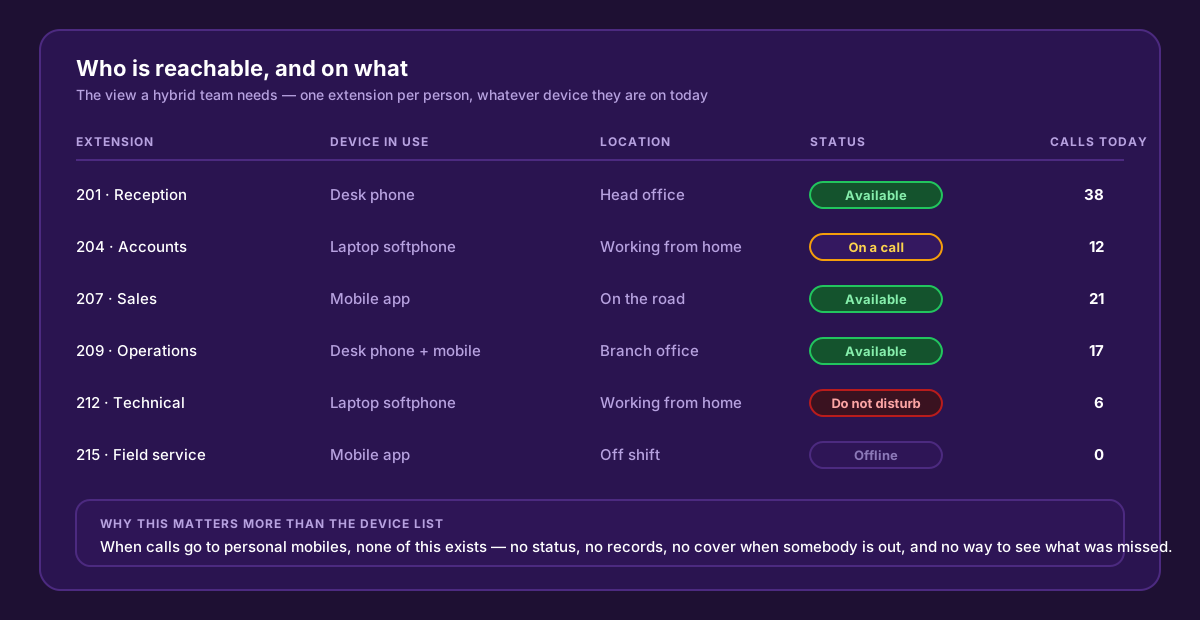
Reception can see who is genuinely free before transferring — and nobody transfers a customer to a phone that is not being watched.
Presence only works if the team keeps it honest. Two rules are enough: set yourself to do-not-disturb rather than ignoring a ringing phone, and set yourself offline at the end of your shift rather than leaving an app ringing all night. A presence indicator nobody maintains is worse than none, because people trust it.
Call quality when half the team is on home internet
You control the office network. You do not control anybody’s home connection — so the approach has to be different.
| Setting | In the office | At home or on the road |
|---|---|---|
| Device | Desk phone, cabled | Laptop softphone with a proper USB headset |
| Network | Wired, voice VLAN, QoS on the router | Ask staff to sit near the access point, or cable in if they can |
| Codec | G.711 for best quality | Allow G.729 or Opus as fallback for constrained links |
| Fallback | Second internet path | Mobile app on cellular data when home broadband misbehaves |
The headset matters more than people expect. Laptop microphones pick up the room, and a caller who hears a fan, a television and an echo does not care how good your codec is. One good headset per remote worker removes most quality complaints outright — and if calls are still poor at a specific person’s house, our call quality troubleshooting guide works through the rest.
What to measure once it is running
Hybrid working only fails invisibly, so watch four numbers monthly:
- Answer rate in business hours, split by group. A group that has quietly stopped answering is the first sign somebody’s device is not registering.
- Calls answered by location. If office staff are absorbing everything, remote extensions are not really in the rotation.
- Missed calls that were never returned. This is the money number.
- After-hours volume. Tells you whether your out-of-hours routing is worth extending — and whether staff are taking calls at times they should not be.
A short policy beats a long one
Write down five things and hybrid voice manages itself:
- Working hours per person, reflected in the system’s schedule.
- Which device is primary on which days.
- The expectation on presence discipline.
- The rule on personal mobiles: business calls go through the business system.
- Who to tell — and how — when someone will be unreachable.
Setting this up
WOCOM Cloud PBX plans include mobile office extensions alongside desk phones on the same user, so a hybrid setup does not cost extra per device. Plans start at J$15,000 per user per month with a local 876 number, an auto-attendant, call transfer and conferencing, real-time reporting, and the AI receptionist for the calls nobody reaches in time. See the pricing page for the detail, or read our desk phone versus softphone comparison if you are deciding what to give each role.
If you are moving from an older system, the 30-day migration checklist covers the sequencing. And if you would rather talk it through with someone who has built these flows for Jamaican teams, call 876-906-7240 or get in touch.
Continue exploring
Ready to upgrade your communications?
Talk to our team about the right solution for your business.
Book a Demo Contact SalesEverett Kildare is WOCOM's voice and infrastructure specialist, with more than 25 years of experience designing and running carrier-grade voice, SIP and virtualization infrastructure. Holding a BSc in Information Technology, he has built, secured and migrated phone systems for businesses of every size. Everett writes WOCOM's technical coverage of SIP trunking, cloud PBX, contact centres, business continuity and migration.