The 30-Day VoIP Migration Checklist: A Week-by-Week Plan for Switching Without Downtime
Businesses rarely regret moving to VoIP. They regret how they moved.
Almost every painful migration we are called in to rescue failed for an unglamorous reason. A number printed on the delivery vans was never in the porting list. The alarm panel was on a line that got cancelled the week before. The port was submitted with a company name that did not match the losing provider’s records, and nobody found out for eleven days. The cut-over ran on a Friday afternoon and the fault was discovered on Monday morning.
None of that is a technology problem. It is a sequencing problem — and thirty days of ordinary discipline removes almost all of it.
Here is the plan we run, with the tasks that actually matter and the reasons they matter.
How the four weeks fit together
The tracks overlap. Number porting starts as early as possible because it is the one item you cannot compress — everything else can be worked in parallel.
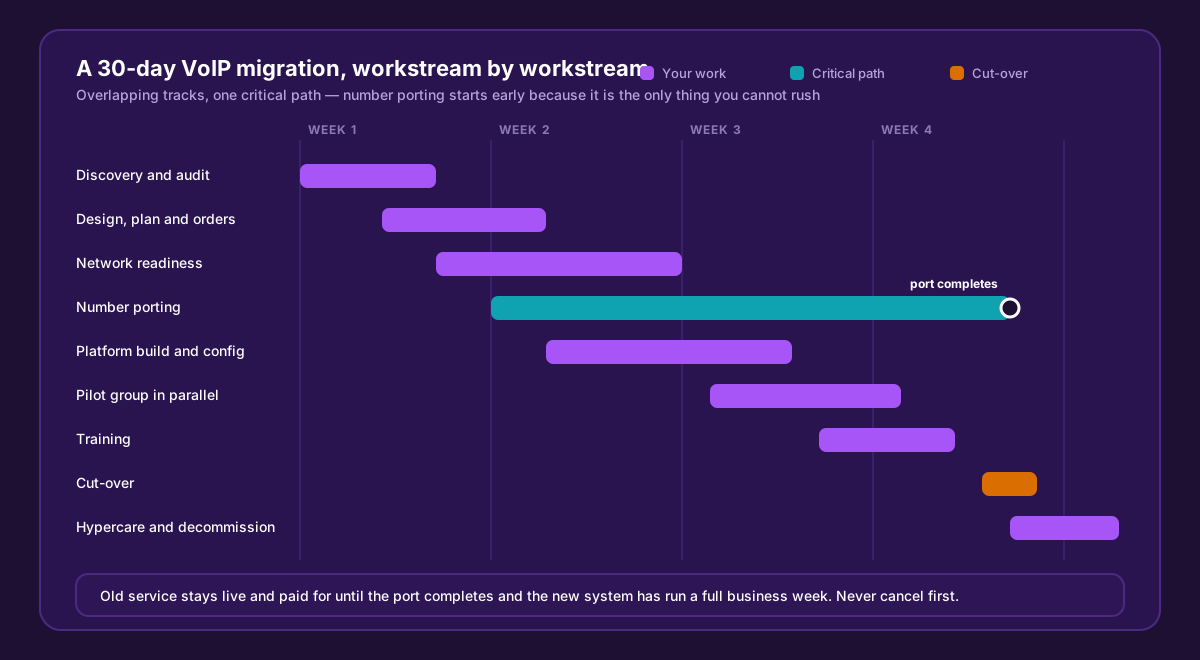
Porting is the critical path. Start it in week two and everything else has room to move; start it in week four and the whole plan is hostage to it.
Before week one begins, name two people: an internal owner who can make decisions without convening a meeting, and a provider-side contact with a direct number. Migrations drift when the person chasing has no authority and the person with authority is not chasing.
Week 1 — Discovery: find everything before you plan anything
The goal of week one is a complete inventory. Not a rough idea, a complete one. Most migration failures are discovered here or paid for later.
| Task | Owner | Why it matters |
|---|---|---|
| List every number the business owns | Internal | Main lines, direct dials, fax, the number on the vans, the one in the phone book from 2014 |
| Find where each number is published | Internal | Website, signage, Google Business Profile, invoices, directories, social profiles, printed stationery |
| Audit every non-voice line | Internal | Alarm panels, lift phones, card machines, gate intercoms, fax. These fail silently and dangerously |
| Pull 3–6 months of call records | Internal | Gives real peak concurrency, so you buy channels for what you use |
| Check the existing contract | Internal | Expiry date, notice period, early termination charges — before you commit to a date |
| Document who answers what today | Internal | Hunt groups, after-hours behaviour, who covers lunch. Rebuild it deliberately, do not lose it by accident |
| Test the internet connection under load | Provider | Confirms the link can carry the calls before anything is ordered |
The one that catches people: non-voice lines. An alarm line or a lift emergency phone on a circuit that gets cancelled is a safety issue, not an inconvenience. List them, and decide explicitly for each whether it moves, stays on a dedicated analogue line, or is replaced.
Week 2 — Design, order, and get porting moving
| Task | Owner | Why it matters |
|---|---|---|
| Confirm the plan, users and channel count | Both | Based on week-one call records, not guesses |
| Sign the order and confirm the target date | Internal | The port clock cannot start without it |
| Submit the porting request | Provider | The long pole. Everything else waits for this if it slips |
| Supply a recent bill and matching account details | Internal | Name and address must match the losing provider’s records exactly, or the port is rejected |
| Design the call flow on paper | Both | Menus, groups, ring order, after-hours, holidays — agreed before it is built |
| Order handsets and confirm PoE capacity | Provider | Lead times are real; PoE budget on the switch is often forgotten |
| Plan the network work | Both | Cabling, VLAN for voice, QoS configuration, any switch upgrades |
Two rules about porting. Never cancel the old service — cancellation invalidates a port in progress and the number can be lost permanently. And treat the port date as an estimate until it is confirmed in writing by both providers; do not print anything, brief anyone, or book a cut-over around an unconfirmed date.
Week 3 — Build, prepare the network, and pilot
| Task | Owner | Why it matters |
|---|---|---|
| Build the call flow on the platform | Provider | Menus, groups, voicemail, business hours, holiday routing |
| Record greetings and after-hours messages | Internal | Always the last thing done and always the thing that delays go-live |
| Configure QoS and the voice VLAN | Both | Shape the uplink, prioritise voice — see our router guides |
| Provision handsets and label them | Provider | Deliver to desks pre-configured, not in a box to be sorted on cut-over day |
| Run a pilot group in parallel | Both | Four or five users on the new system alongside the old one — the single highest-value step in the plan |
| Test outbound to mobiles, landlines, overseas | Both | Different paths fail differently |
| Verify emergency dialling and the registered address | Both | Confirm 119 and 110 route correctly and the address on file is the site the phone sits at |
| Test fax, alarms and card machines on the new path | Both | Before they are relied on, not after |
The pilot is what turns a migration from an event into a routine. A week of real calls on real handsets surfaces the small things — a group that rings the wrong order, a voicemail that does not email, a headset that will not pair — while the old system is still there to fall back on.
Week 4 — Train, cut over, and stay close
| Task | Owner | Why it matters |
|---|---|---|
| Train staff in short sessions by role | Provider | Reception needs different training from field staff; one long session teaches nobody |
| Leave a one-page quick reference at each desk | Provider | Transfer, hold, park, voicemail — the four things people forget |
| Confirm the port window in writing | Provider | Date and time, from both providers |
| Brief every member of staff | Internal | Including part-time and weekend staff, who are always the ones on shift when it happens |
| Agree the rollback trigger | Both | What failure looks like, and who can call it |
| Cut over — early in the day, never a Friday | Both | You want a full business day, with the provider’s engineers at their desks |
| Test every published number after the port | Both | From a mobile that is not on your network |
| Update every published listing | Internal | Only after the port completes and calls are confirmed arriving |
| Keep the old service for a full business week | Internal | Cheap insurance. Cancel only after a clean week |
The cut-over day runbook
Write this down before the day. Improvisation on cut-over morning is how small problems become outages.
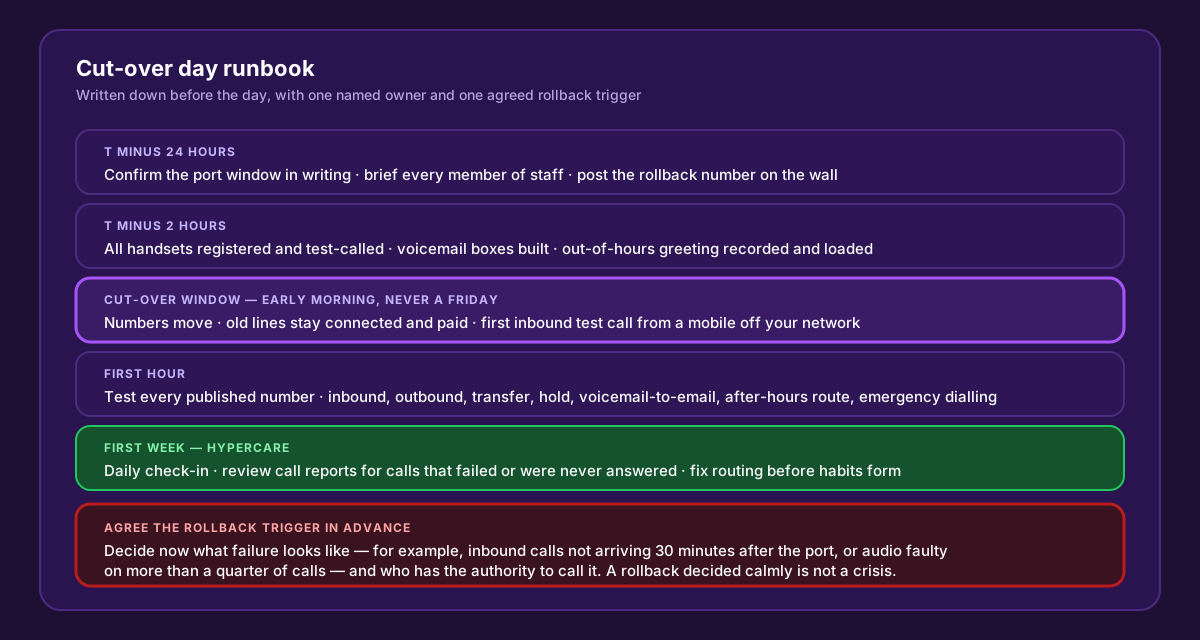
The rollback trigger is the part people skip. Deciding in advance what failure looks like turns a stressful morning into a procedure.
Your first-hour test list should cover, for every published number: an inbound call answered at the right desk, an outbound call to a mobile and to a landline, a transfer between two extensions, hold and retrieve, voicemail arriving by email, the after-hours route (temporarily forced), and emergency dialling.
Six failure modes worth naming
- The forgotten number. The one on the vans, or the fax nobody uses that the bank still sends statements to. Fixed by a thorough week one.
- Port rejection over account details. Name or address mismatch is the most common reason a port bounces, and each rejection costs days. Send a copy of a recent bill.
- Cancelling the old service too early. It cancels the port with it. Wait a full business week.
- Alarm and lift lines left in the plan by omission. Audit them explicitly and decide for each.
- Friday cut-over. Any fault discovered at 4 p.m. Friday lives until Monday. Cut over on a Tuesday or Wednesday morning.
- No pilot. Migrating forty people at once means finding forty problems at once. Five people first finds most of them.
What good looks like on day 31
- Every published number rings the right place, tested from off-network.
- Non-voice lines are accounted for and tested.
- Staff can transfer, park and check voicemail without asking.
- Call reporting shows who is answering and what is being missed.
- The old service is cancelled — after a clean week, not before.
- You know who to call, and they answer locally.
We run this plan with you
WOCOM handles the porting paperwork, builds the call flow with you before cut-over day, configures the handsets before they reach the desks, and stays on hypercare through the first week. We are a licensed Jamaican provider running our own network, so the porting and the routing are handled by the same people you call when you need something changed.
See Cloud PBX or a Flexi-SIP trunk if you are keeping your existing PBX. Before cut-over, our QoS configuration guide covers the network preparation in week three, and the telecom RFP template is worth using if you are still choosing a provider.
Ready to plan a date? Call 876-906-7240 or get in touch and we will map your thirty days against your own inventory.
Continue exploring
Ready to upgrade your communications?
Talk to our team about the right solution for your business.
Book a Demo Contact SalesEverett Kildare is WOCOM's voice and infrastructure specialist, with more than 25 years of experience designing and running carrier-grade voice, SIP and virtualization infrastructure. Holding a BSc in Information Technology, he has built, secured and migrated phone systems for businesses of every size. Everett writes WOCOM's technical coverage of SIP trunking, cloud PBX, contact centres, business continuity and migration.