What 250 AI Minutes Actually Covers, and What Happens When You Run Out
What the Allowance Is
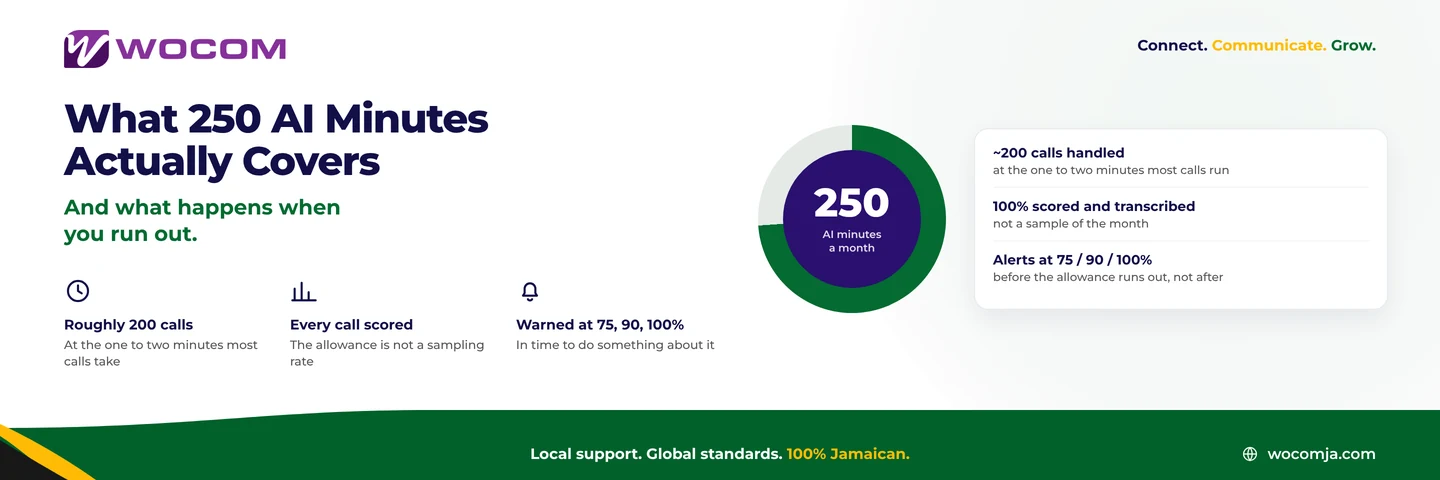
Every WOCOM Cloud PBX account includes an AI allowance at no extra charge: 250 AI minutes a month, plus 500 sentiment analyses. The minutes are consumed when the AI receptionist is actually in conversation with a caller — from the moment it answers to the moment the call ends or is transferred to a person.
Time a caller spends talking to your staff after a transfer does not consume AI minutes. Neither does ordinary call time on a line the assistant never touched.
What 250 Minutes Buys
Minutes are an awkward unit because nobody thinks in them. Calls are the useful unit.
Most AI-handled calls run between one and two minutes. An assistant that answers, understands the request, gives the answer and ends the call is often under a minute; one that takes a message or books an appointment runs longer.
At that rate, 250 minutes covers roughly 150 to 250 calls a month — call it 200 as a planning figure. For a great many Jamaican small businesses that is the entire after-hours and overflow volume, which is exactly the volume the assistant exists to catch.
Two things stretch it further than owners expect:
- A good knowledge base shortens calls. An assistant that answers in one turn uses a third of the minutes of one that takes a message and promises a callback. Writing the knowledge base properly is the cheapest way to increase your effective allowance.
- Scheduling matters. An assistant set to answer only outside business hours and on overflow uses a fraction of what one answering every call uses. See configuring business hours.
What Is Not Metered
Worth being clear, because this is where the questions come from:
- Transcription and scoring are not charged against AI minutes. Every call on the system is transcribed and scored, whether or not the assistant answered it.
- Sentiment analysis has its own allowance — 500 analyses a month, enough for most small businesses to analyse every call.
- Ordinary calls are ordinary calls. Your call minutes and your AI minutes are separate things on separate meters.
The Warnings, and Why They Exist
Usage alerts fire at 75%, 90% and 100% of the monthly allowance, to the account contact.
These exist because of a specific, unpleasant failure mode: an allowance that quietly runs out mid-month while the business carries on assuming its calls are being answered. The alerts are there so the first sign is an email at 75%, not a customer mentioning that nobody picked up.
Practical advice: make sure the alerts go to a human being who reads email, not to a shared info@ address nobody opens. This is the single most common misconfiguration we see.
When You Run Out
The allowance resets on the first of each month, automatically. Within a month, if you exhaust it, the assistant stops answering and calls fall through to whatever you have configured behind it — which is why what sits behind it matters.
Set that fallback deliberately. Sensible options are a ring group of real extensions during business hours, and voicemail-to-email outside them. What you do not want is the fallback being nothing at all, because then a call that would have been answered by an assistant simply rings out.
Configure what happens when the allowance is gone on the day you set the assistant up, not on the day it runs out.
Do You Need More Than 250?
Most businesses do not. The ones that do share a profile:
- The assistant answers first on every call, not just after hours or on overflow
- Inbound volume above roughly 300 calls a month reaching the assistant
- Long AI conversations by design — appointment booking, multi-step qualification, detailed enquiry capture
- Seasonal peaks where one month behaves nothing like the other eleven
If two or more of those describe you, larger allowances are available. They are arranged through the sales team rather than a self-serve upgrade, because the right answer usually involves looking at your call pattern rather than picking a bigger number.
Before You Buy More, Read Your Usage
Three checks that frequently remove the need for a bigger allowance:
- How many AI calls end in a message? A high proportion means knowledge base gaps, and every one of those messages is minutes spent to achieve a callback.
- What is your average AI call length? Consistently over two minutes usually means the assistant is working too hard to reach an answer it should have had.
- Is the assistant answering calls a person was available for? Check the schedule. Businesses often leave it answering first all day when they meant it to catch overflow.
Getting the Numbers for Your Account
Your actual usage — minutes consumed, calls handled, average length, how the month is trending — is in your portal, and the WOCOM team will read it with you.
Call 876-906-7240 in Jamaica or 877-906-7240 from the US, email support@wocomja.com, or use the contact page. Ask for a usage review before you ask for more minutes — it is free, and it often turns out to be the cheaper fix.
Continue exploring
Ready to upgrade your communications?
Talk to our team about the right solution for your business.
Book a Demo Contact SalesMichelle Goss is a data and AI analyst at WOCOM, where she studies how Jamaican businesses use voice, messaging and AI to win and keep customers. With a BSc in Data Science & Analytics, she turns call data, customer trends and AI receptionist performance into practical guidance owners can act on. Michelle writes WOCOM's coverage of AI call handling, call analytics, customer growth and industry trends.