New Office Phone Setup Jamaica: Checklist for Opening a Branch or New Location
Opening a new office is exciting — and overwhelming. Between lease agreements, furniture deliveries, internet installations, and staff orientation, the phone system almost always gets left until the final week. Then the first customer calls and reaches a disconnected number, a generic voicemail, or dead silence.
This checklist is for any Jamaican business opening a new location: a second branch in Montego Bay, a satellite office in New Kingston, a new contact centre floor, or a remote-work hub in Portmore. Follow these steps in order, and your phones will be fully operational before the ribbon is cut.
Step 1: Decide on Your Numbers Before You Print Anything
Your business phone number ends up on signage, business cards, Google Business Profile listings, and social media. Change it after launch and you fragment your inbound calls for months while customers hit a dead number. Start here, before anything else.
- Local DID (Direct Inward Dial): A dedicated 876 or 658 number gives the location its own identity. Customers in Kingston expect a 876 prefix — it signals a genuine local presence. Businesses in western parishes increasingly use 658.
- Toll-free (1-800): If you want a single national number that rings this office and any future branches, a toll-free DID on WOCOM SIP routes all calls centrally and removes cost as a barrier for customers calling from across the island.
- Number portability: Keeping an existing number from a previous carrier? Initiate the port request at least two weeks before opening day. Porting in Jamaica typically takes five to ten business days, and the timeline is carrier-dependent.
Rule of thumb: do not publish any number on any material until you have tested it end-to-end on an actual device.
Step 2: Map Your Call Flow Before You Touch a Single Device
A call flow is the diagram of what happens the moment a customer dials your number. Getting this right before installation prevents expensive reconfiguration later and avoids embarrassing routing errors in the first week of business.
Answer these questions first:
- Does the call hit an auto-attendant IVR ("Press 1 for Sales, Press 2 for Accounts") or ring directly to reception?
- After how many rings does an unanswered call go to voicemail — or overflow to a hunt group, a mobile fallback, or another branch?
- What happens after business hours? A recorded message with opening times, an AI receptionist, or a duty mobile number?
- Do different departments need their own direct numbers, or will everyone share the main number with extensions?
Sketch the flow on paper before configuration begins. A simple diagram saves hours of troubleshooting after go-live — and it becomes the reference document whenever your call flow changes in the future.
Step 3: Plan Your Extension Numbering Scheme
Extension numbers are internal identifiers, but choosing a logical scheme from the start means you won't need to retrain staff or reprint directories when the team grows.
- Under 50 staff — 3-digit extensions: A scheme like 100 = reception, 200–250 = sales, 300–350 = accounts, 400–450 = support is easy to remember and fast to dial.
- 50 to 200 staff — 4-digit extensions: Start at 1000. Reserve 1000–1099 for management, 1100–1199 for sales, 1200–1299 for support. Each department gets 99 slots to grow into.
- Multi-site businesses: Use a site prefix. Kingston extensions start with 1, Montego Bay extensions start with 2. A Kingston agent dials 2201 to reach Montego Bay Sales — no need to look up an external number.
- Hunt groups and ring groups should sit in a clearly reserved range — for example, 500–599 — so any employee or supervisor knows immediately that dialling 501 rings the sales queue rather than a specific person.
Leave gaps in each range. It costs nothing, and it prevents a full renumbering exercise when you hire the next ten people.
Step 4: Check Your Internet Connection Before Ordering Hardware
Cloud PBX runs on your internet connection. A poor or misconfigured connection is the single most common cause of call quality complaints in new offices — and it is entirely preventable.
Bandwidth: Each concurrent VoIP call using the G.711 codec (standard quality) needs approximately 100 kbps upload and download. Ten simultaneous calls require 1 Mbps reserved for voice. That sounds modest, but when your staff is also conducting video meetings, syncing to cloud storage, and running point-of-sale systems over the same connection, you need genuine headroom — not theoretical peaks.
Voice VLAN: If your managed switch supports VLANs, place all IP phones on a dedicated VLAN with Quality of Service (QoS) priority. This prevents a large file download in accounts from degrading a sales call happening at the same moment. WOCOM's provisioning team can walk you through the switch configuration for Cisco, Ubiquiti, and MikroTik equipment.
Backup connectivity: For any business-critical location, plan a secondary internet path — a 4G/5G mobile router, a cable internet line, or a Starlink terminal. WOCOM Cloud PBX automatically fails calls over to the backup connection or a designated mobile number if the primary link drops, with zero manual intervention.
Step 5: Choose Desk Phones, Softphones, or a Mix
New offices often default to ordering desk phones because that is what offices have always used. Cloud PBX gives you more flexibility — and in many cases, less upfront cost.
- Softphone-only: Staff use the WOCOM mobile or desktop app on their existing device. Zero hardware cost, works from day one, and is ideal for start-ups, temporary locations, or staff who are frequently away from a fixed desk. The trade-off: battery management and notification settings need attention.
- Desk phones: IP handsets like the Yealink T-series offer dedicated audio quality, physical hold and transfer buttons, and a professional feel that matters in client-facing roles. WOCOM auto-provisions supported models — plug the phone into the network and it downloads its own configuration automatically.
- Reception console: If the new office has a dedicated receptionist managing high incoming call volume, a softphone operator panel — showing all lines, extension status, and active calls at a glance — is far faster than a standard handset for transferring and monitoring calls.
A common approach for new Kingston branch offices: softphones for field or mobile staff, desk phones for reception and accounts, and an operator panel view for the main switchboard position.
Step 6: Run Every Test Before the Number Is Published
Testing is not optional. These are the minimum checks to complete before any public announcement of the new number:
- Internal end-to-end: Every extension calls every other extension. Confirm that transfers work cleanly and that hold music plays correctly.
- External inbound: Call the new number from a mobile on each major carrier. Check IVR audio clarity, menu routing, and that calls land on the correct extension or queue.
- Outbound caller ID: Make an outbound call and confirm that your business number — not a random IP string — appears on the recipient's screen.
- After-hours routing: Temporarily override the business hours setting to verify that after-hours calls receive the correct message and overflow destination.
- Failover: Unplug the primary internet router for 60 seconds. Confirm that active calls reroute to the mobile fallback number without manual intervention.
- Voicemail to email: Leave a voicemail on a test extension and confirm it arrives in the correct inbox within two minutes.
Log every test with a pass/fail result and a timestamp. If a problem surfaces post-launch, this record saves hours of diagnosis and makes it easy to isolate what changed.
Step 7: Brief Your Team Before the First Call Arrives
A cloud PBX is intuitive — but a brief orientation on day zero prevents the most common first-week mistakes: accidentally dumping a caller into voicemail mid-transfer, not knowing how to retrieve a parked call, or missing messages because voicemail was never set up.
Cover these basics in a 20-minute group session:
- Answering and ending calls on their specific device (desk phone or app)
- Blind transfer versus attended (warm) transfer — and when your business expects each
- Placing a caller on hold and retrieving them without accidentally disconnecting
- Setting up a personal voicemail greeting
- Enabling and disabling Do Not Disturb
- Logging into the WOCOM portal to view call logs, missed calls, and recordings
A one-page quick-reference card on each desk covers 90% of day-to-day tasks. Keep the training session tight — complexity can be added over the following weeks as staff become comfortable with the basics.
Open Your New Location With WOCOM Already Set Up
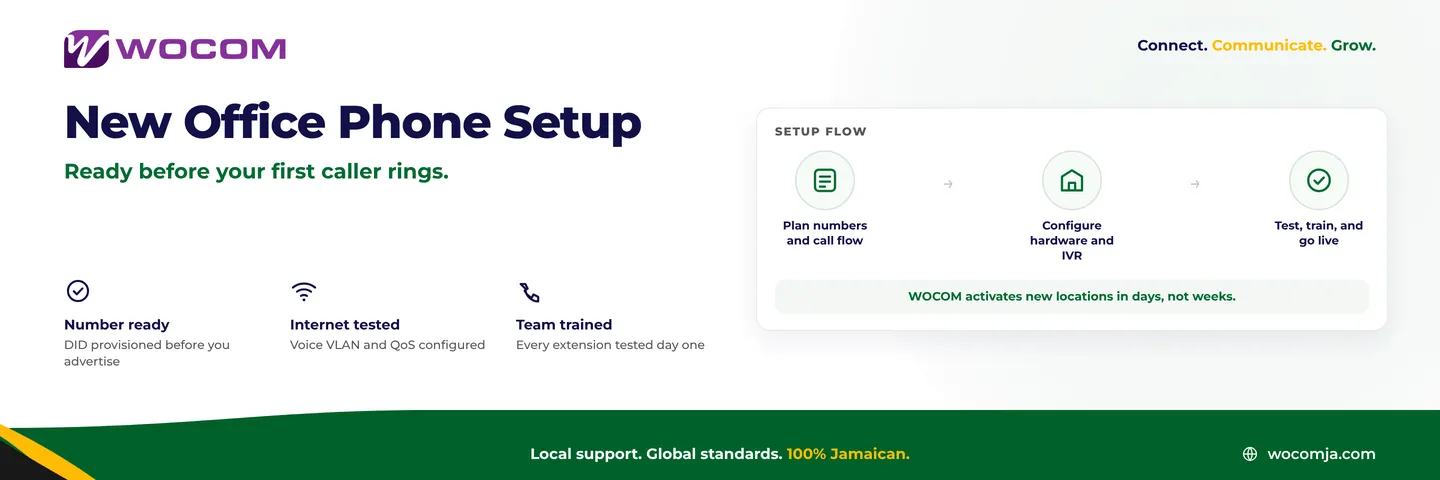
WOCOM is Jamaica's licensed telephone provider — we own the infrastructure, provision the numbers, and configure the system to match your call flow design. For a new office opening, our team typically has numbers provisioned, hardware auto-configured, IVR messages recorded, and failover tested within one week of your order. We handle the technical setup so your opening week is focused on customers, not connection troubleshooting.
Whether you are opening your second branch in Portmore, a regional office in Mandeville, or a contact centre floor in New Kingston, the process is the same: tell us your call flow, your extension count, and your opening date — and we take it from there.
Contact WOCOM at 876-295-5556, message us on WhatsApp, or visit wocomja.com to get the process started. Your opening day should be remembered for the right reasons — not for phones that weren't ready.
Continue exploring
Ready to upgrade your communications?
Talk to our team about the right solution for your business.
Book a Demo Contact SalesEverett Kildare is WOCOM's voice and infrastructure specialist, with more than 25 years of experience designing and running carrier-grade voice, SIP and virtualization infrastructure. Holding a BSc in Information Technology, he has built, secured and migrated phone systems for businesses of every size. Everett writes WOCOM's technical coverage of SIP trunking, cloud PBX, contact centres, business continuity and migration.