Do Not Disturb on Cloud PBX Jamaica: Route Calls Intelligently While You Focus
DND Is Not Just a Silence Button
Most people think Do Not Disturb means "stop ringing my phone." On a traditional desk phone, that is basically all it did. On a cloud PBX, DND is a routing instruction — you are telling the system what to do with every call that arrives while you are unavailable, not merely telling it to stop bothering you.
The difference matters enormously for customer-facing businesses in Kingston, Montego Bay, and across Jamaica. A call that hits DND and disappears into an unmonitored voicemail box is a potential customer lost. A call that hits DND and routes to a colleague or a waiting queue is a customer who still gets helped — and who never knows you were unavailable.
What Happens to a Caller When You Activate DND
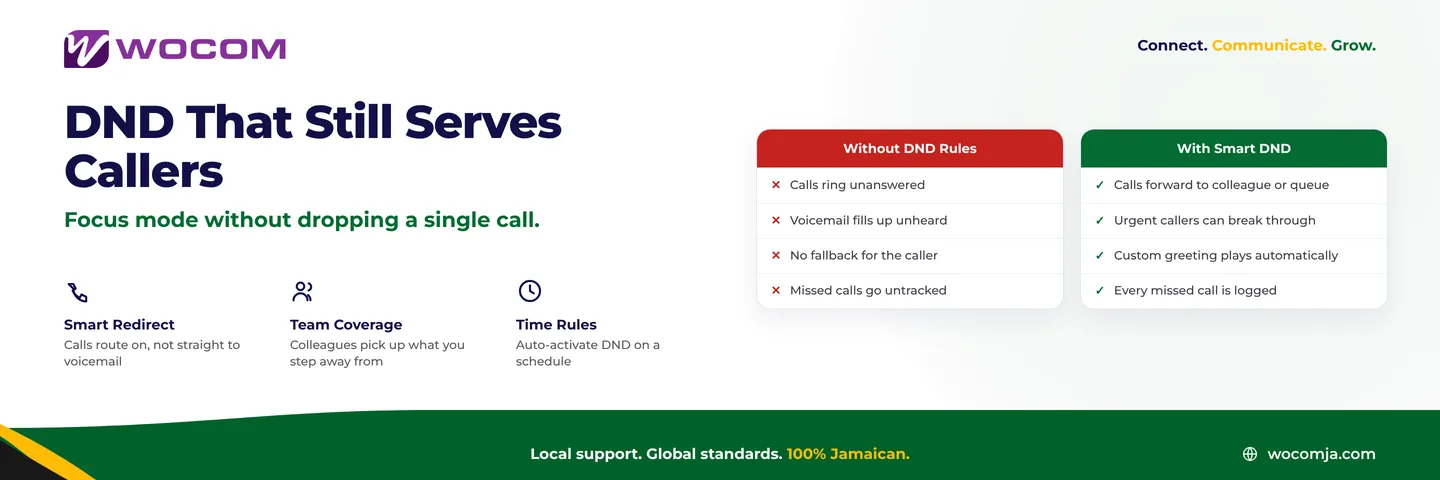
When an extension is on Do Not Disturb, the cloud PBX evaluates a follow-on rule that you configure in advance. The most common destinations are:
- Forward to a specific colleague or team extension
- Drop into a call queue where the next available agent picks up
- Send to voicemail with a custom DND greeting
- Route to a mobile number if you have stepped away from your desk
- Hand off to an AI receptionist for overflow or after-hours handling
None of these outcomes require the caller to know you are unavailable. From their perspective, the call simply reached someone helpful. That is the core value of cloud PBX DND configured correctly — it removes the person without removing the service.
When to Use DND and How to Set It Up
DND makes sense in several situations that every Jamaican business will recognise:
During client meetings. You cannot take calls while seated with a client, but that does not mean the next caller should go straight to voicemail. Configure DND to forward to your receptionist or team queue and the meeting stays uninterrupted while calls keep moving.
During lunch or a scheduled break. Use a timed DND rule so the system activates and deactivates automatically. No manual toggle to remember, no extension left ringing unanswered because someone forgot to switch it back on.
During focused work periods. A two-hour DND window with calls forwarding to a capable colleague costs nothing if the handoff is configured in advance. The caller reaches help; you stay in flow.
At end of business day. Rather than leaving your extension ringing into the evening, DND redirects calls to after-hours handling — an AI receptionist, a voicemail-to-email inbox, or an emergency mobile number for genuinely urgent matters.
On a WOCOM Cloud PBX, DND is toggled from the desk phone itself, the softphone app, or the web portal. Scheduled rules activate and deactivate automatically based on time of day, day of week, or specific date ranges — useful for the full Jamaican public holiday calendar including National Heroes Day, Emancipation Day, and Independence Day, when caller expectations still need to be managed even if the office is closed.
DND vs Call Forwarding: Understanding the Difference
This is one of the most common points of confusion for new cloud PBX users. Both features redirect calls, but they behave differently:
| Feature | Call Forwarding | Do Not Disturb |
|---|---|---|
| Your phone rings first | No — skips your extension entirely | No — silenced at your extension |
| Other phones ring before redirect | No | Yes, if a ring group is configured |
| Caller hears ringing | Yes | Yes |
| Overrides a call queue | Yes | No — queue logic still applies |
| Can be time-scheduled | Yes | Yes |
The practical difference: call forwarding moves the call unconditionally and immediately, bypassing any group routing. DND silences your extension but applies the routing logic you defined — which might include ringing a group first, then forwarding, then going to voicemail. DND is the more controlled option for busy environments where coverage needs to be shared across a team.
Managing DND Across Your Whole Team
If you administer a cloud PBX for a Kingston office with 15 or more staff, you will occasionally need visibility into who has DND active and whether it is configured correctly. A PBX admin panel shows each extension's live status: available, on a call, on DND, or unregistered.
Watch for these common problems:
- DND left on after hours. An extension still showing DND the next morning because the user forgot to deactivate it will send morning calls to the wrong destination. Automatic schedules prevent this entirely.
- DND with no fallback rule. If DND is set to reject the call outright, callers hit a disconnection tone. Every DND configuration should have a destination — even if that destination is a voicemail-to-email inbox that someone checks each morning.
- DND masking a registration problem. If an extension shows DND but no one activated it intentionally, the device may be offline and displaying DND as a default state. Check registration status separately rather than assuming the status is deliberate.
WOCOM's cloud PBX admin panel gives supervisors a real-time view of all extension statuses, so identifying a misconfigured DND takes seconds rather than a walk across the office or a chain of WhatsApp messages to figure out why calls are not being answered.
Priority Break-Through: When DND Should Not Block a Call
Some scenarios require that DND be overridable. A manager in a closed-door session should still be reachable for a genuine emergency. A front-desk extension put on DND for a brief handover should still accept calls from a specific head-office line.
WOCOM's platform supports priority routing rules that allow certain callers or ring groups to bypass DND entirely. This prevents the situation where a critical contact — a government authority requiring an urgent response, a hospital with a time-sensitive matter, a major client placing a large order — reaches a wall because an individual extension was on Do Not Disturb.
Priority break-through is configured at the ring group or IVR level, not the individual extension. It ensures that business-critical calls always find a live person regardless of what any individual user's status shows.
For Jamaican businesses where the cost of a missed call from the right person can far exceed the cost of an interruption, this level of routing control is not optional — it is how you build a professional, resilient phone operation.
Make Your DND Rules Work for Your Callers
If your staff are currently activating DND without any routing rules behind it, calls are likely disappearing. WOCOM's cloud PBX team can review your current extension configuration, set up automatic DND schedules tied to your actual business hours, and ensure every Do Not Disturb state has a proper fallback so no caller is ever left stranded.
Businesses across Jamaica — from accounting firms in New Kingston to hotel front desks in Negril — use properly configured DND routing to protect focus time without sacrificing service quality. The setup takes minutes when you know what you are building toward.
Reach out to WOCOM today to review your call routing configuration and make sure your team's availability settings are working for your callers, not against them. Visit wocomja.com/contact or speak with our team directly to get your DND rules dialled in the right way.
Continue exploring
Ready to upgrade your communications?
Talk to our team about the right solution for your business.
Book a Demo Contact SalesEverett Kildare is WOCOM's voice and infrastructure specialist, with more than 25 years of experience designing and running carrier-grade voice, SIP and virtualization infrastructure. Holding a BSc in Information Technology, he has built, secured and migrated phone systems for businesses of every size. Everett writes WOCOM's technical coverage of SIP trunking, cloud PBX, contact centres, business continuity and migration.