Virtual Office Phone System Jamaica: Cloud PBX for Coworking Spaces and Remote Teams
The Lean Business Model Is Winning in Jamaica
Coworking spaces and serviced offices are no longer just for tech startups. Across Kingston, New Kingston, and Montego Bay, consultants, accountants, architects, digital agencies, and growing SMEs are choosing flexible workspace over long-term commercial leases. The JBDC Innovation Centre and a growing number of private coworking hubs have made it possible to operate a credible business with a professional address and none of the overhead of a traditional office.
But there is one gap that most entrepreneurs do not close until a client mentions it: the phone. When your business number is your personal mobile and it rings through to a generic voicemail, you are signalling to every caller that behind this operation is one person with a smartphone. That gap between the professional front you present everywhere else and what happens when someone calls is costing Jamaica businesses leads, credibility, and sometimes contracts.
What Happens When You Use a Personal Mobile as Your Business Line
Using a personal mobile for business is almost universal among Jamaica's growing class of solo operators and small remote teams. It solves the immediate problem of being reachable — but it creates several others that compound over time.
- No professional greeting. A caller hears your name or nothing at all, not your business name and a polished opening.
- No separation between work and personal calls. You answer everything or miss everything. There is no way to route business calls to a colleague when you are unavailable.
- No call history or analytics. You cannot track how many business calls you receive, when your peak hours are, or what proportion you are missing.
- No portability. If the person whose mobile number is on your website leaves the business, the number leaves with them.
- No backup. If your phone is lost, switched off, or out of credit, your business is unreachable.
Individually, these are irritants. Together, they represent a real ceiling on how professional your business can appear to a prospective client who calls before they ever meet you.
What Cloud PBX Provides for a Virtual Office Setup
Cloud PBX — a hosted phone system managed entirely over the internet — was originally designed for businesses with physical offices. But its architecture makes it equally well-suited, sometimes better suited, to businesses with no fixed desk phones at all.
With a Cloud PBX subscription from a Jamaica provider, a virtual office or coworking-based business gets:
- A dedicated Jamaica DID number (876 or 658 area code) that belongs to the business, not to any individual
- An auto-attendant or AI receptionist that answers every call professionally with your business name
- Call routing rules that direct calls to your mobile, a colleague's mobile, or a softphone app on any device
- Voicemail-to-email so missed messages land in your inbox rather than a carrier voicemail box
- A call log showing every inbound and outbound call, with timestamps and durations
- The ability to make outbound calls that display your business number, not your personal mobile
None of this requires a desk phone, a physical PBX unit, or even a stable physical location. As long as you have internet — which your coworking space already provides — the system works exactly as it would in a traditional office building.
The AI Receptionist: Your Professional Front Desk at Any Coworking Desk
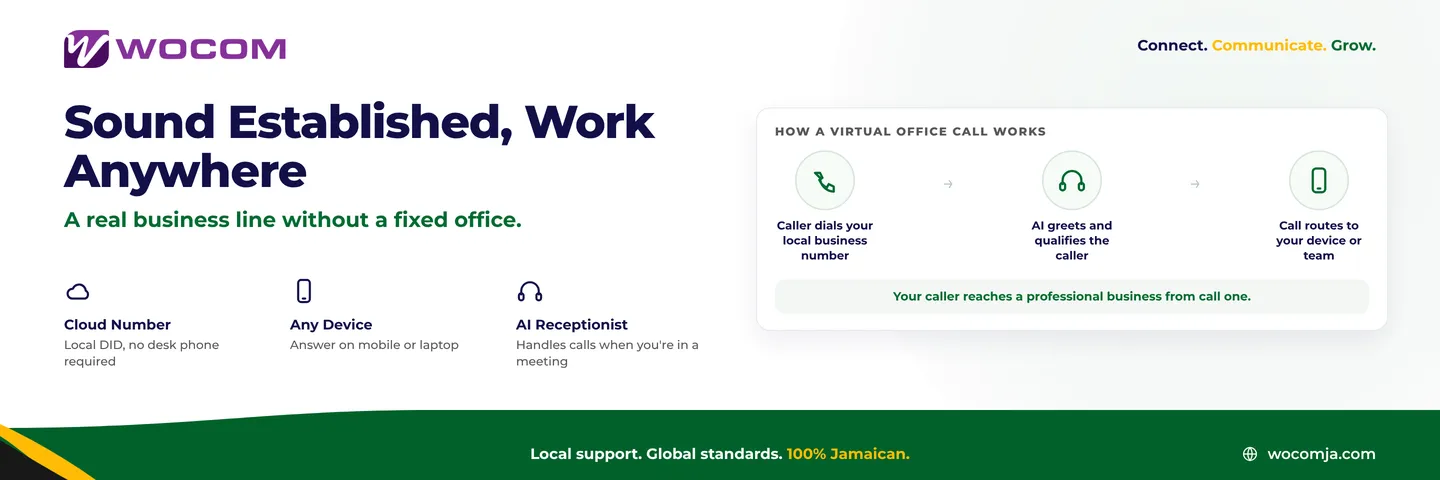
The feature that makes the biggest practical difference for virtual office businesses is an AI receptionist. When you are in a client meeting, on a site visit anywhere in Jamaica, or simply unavailable, every inbound call to your business number is still answered — professionally, immediately, and with your business name.
WOCOM's AI receptionist handles the first point of contact on every call. It greets callers by your business name, asks how it can help, answers routine questions drawn from your own information — your services, your hours, your location, how to get in touch — takes detailed messages, and connects urgent calls to a mobile number you designate. Callers experience a professional reception, not a personal voicemail greeting.
For a solo operator working from a coworking desk in New Kingston, this is the equivalent of a full-time receptionist at a fraction of the cost. For a small remote team spread across Kingston and Montego Bay, it means calls are never dropped because everyone is occupied — the AI holds the line until a human can help.
A caller who hears your business name, a professional greeting, and a clear offer of assistance has no way of knowing — and no reason to care — whether you are sitting in a glass tower or a shared workspace on Knutsford Boulevard.
How to Get Set Up in Under 48 Hours
Getting a professional phone system for your virtual office is faster than most entrepreneurs expect. The process with WOCOM looks like this:
- Choose your number. Select a Jamaica DID — a local Kingston or Montego Bay number, or a number local to wherever your clients expect you to be based.
- Set up your routing. Tell the system which mobile number or numbers should receive calls. Set business hours so calls outside those hours go to the AI or a voicemail box.
- Configure your AI receptionist. Provide a brief description of your business — services, hours, how callers should reach you — and the AI is ready to handle calls.
- Install the softphone app. On your mobile or laptop, a softphone app lets you make and receive calls from your business number. Outbound calls display your business number, not your personal mobile.
- Update your contact details. Swap the personal mobile on your website, Google Business Profile, and email signature for the new dedicated business number.
For most businesses, configuration and testing takes one working day, and the number is live by the following morning. There is no hardware to install, no engineer visit required, and no downtime on your existing lines.
What This Costs Compared to a Traditional Office Setup
A traditional office phone setup — a PBX box, desk phones, and a SIP trunk — can run into hundreds of thousands of Jamaican dollars in hardware alone, plus installation and a monthly service contract. Cloud PBX eliminates the hardware entirely. For a virtual office or coworking business, the cost is a monthly subscription per user, with no installation fee and no equipment to purchase or maintain.
For many solo operators and small teams, the monthly cost of a Cloud PBX subscription is less than the combined cost of the additional mobile credit they spend routing business calls through a personal line — and that calculation says nothing about the leads that were never converted because a call went to a voicemail that sounded like it belonged to a private individual.
The bigger cost of running a personal mobile as your business line is not the phone bill. It is the impression it makes on the caller who was about to become a client.
Build a Professional Phone Presence from Day One
Your workspace is already professional. Your proposals, your emails, your brand — all polished. Your phone system should match. WOCOM's Cloud PBX and AI receptionist are built for Jamaica businesses of every size, including the growing community of entrepreneurs and remote-first teams who work smart rather than work from a fixed address.
If you are operating from a coworking space, a virtual office, or any setup that does not include a traditional phone room, speak with WOCOM about getting a dedicated Jamaica business number and a call handling system that reflects the standard of your work. Visit wocomja.com or reach out to our team to get your business line live this week.
Continue exploring
Ready to upgrade your communications?
Talk to our team about the right solution for your business.
Book a Demo Contact SalesEverett Kildare is WOCOM's voice and infrastructure specialist, with more than 25 years of experience designing and running carrier-grade voice, SIP and virtualization infrastructure. Holding a BSc in Information Technology, he has built, secured and migrated phone systems for businesses of every size. Everett writes WOCOM's technical coverage of SIP trunking, cloud PBX, contact centres, business continuity and migration.