Contact Centre Agent Desktop Jamaica: The Six Tools Every Agent Needs on Every Call
What Is an Agent Desktop — and Why Does Yours Matter?
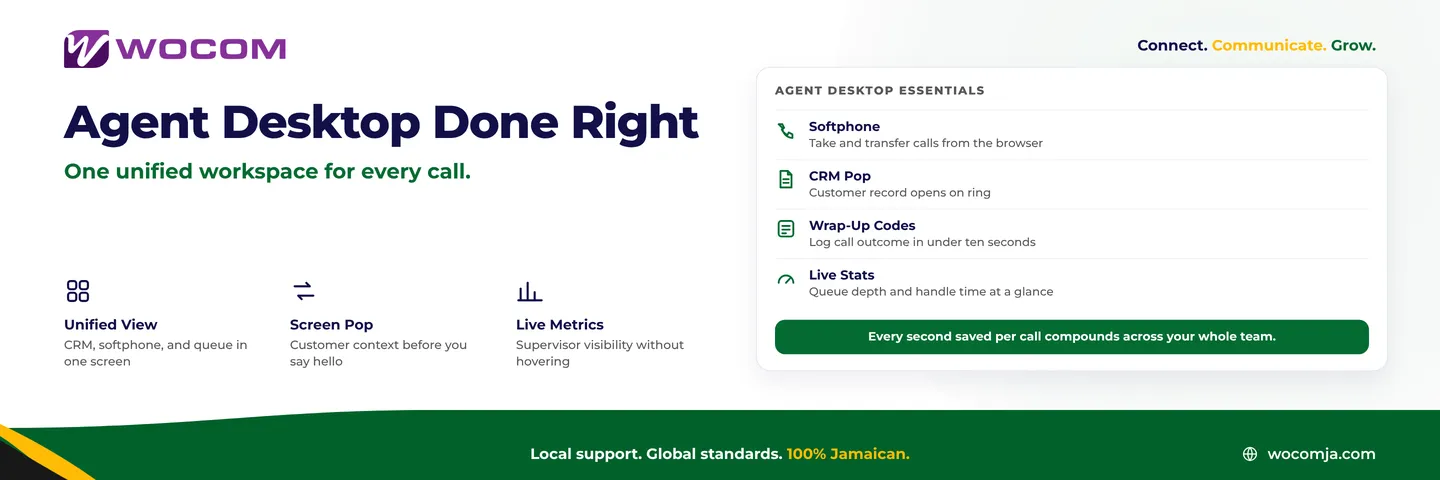
An agent desktop is the set of tools and screens an agent sees while handling calls. In a well-run contact centre, that means one unified view: softphone controls, customer history, call notes, wrap-up codes, and live queue stats — all accessible without switching applications.
In too many Jamaican contact centres, the reality looks very different. Agents toggle between a desk phone, a browser-based CRM, a shared spreadsheet, and a messaging app where supervisors issue instructions between calls. Every context switch costs two to five seconds. Multiply that by a hundred calls a day across a team of fifteen agents, and the cumulative loss runs to hours of productive capacity — every single day.
Getting the agent desktop right is not primarily a software purchase. It is a configuration discipline. This guide covers the six components every Jamaican contact centre agent needs on screen, why each one matters, and how to wire them together without a costly overhaul.
1. Softphone: The Call Control Engine
If your agents are still picking up a physical handset to answer, hold, and transfer every call, you are losing time on every interaction. A softphone — a software application that handles voice calls via your internet connection — puts all call controls one click away inside a browser or desktop app.
Modern softphones display caller ID, offer one-click hold and transfer, show live call duration, and let agents dial by searching a name rather than punching ten digits. For agents handling 60 to 80 calls per shift, that reduction in mechanical steps adds up to meaningful time savings.
WOCOM's cloud PBX includes a softphone application that works in-browser and on mobile. Agents in Kingston who are hot-desking or working remotely from Montego Bay connect to the same extension pool with no re-provisioning required — the number follows the login, not the device.
2. CRM Screen Pop: Customer Context Before You Say Hello
A screen pop is the automatic display of a customer record the moment a call comes in. By the time the agent picks up, they already know the caller's name, account status, and last interaction — without asking a single question.
Without a screen pop, the first 30 seconds of every inbound call is spent collecting information the CRM already holds. With one, agents skip that phase entirely and move straight to solving the problem.
WOCOM integrates with Zoho CRM and other common platforms via SIP-based caller ID matching. When a known number rings in, the customer record opens automatically. For contact centres handling repeat clients — utility companies, financial institutions, insurance providers — this single integration can shave 20 to 30 seconds off average handle time on high-volume call types.
Rule of thumb: If your agents ask "Can I get your account number?" more than twice per shift, you do not have a screen pop. Fix that before anything else on this list.
3. Live Queue Panel: Know What's Happening Across the Floor
Agents should not be working blind to queue pressure. A live queue panel — showing how many callers are waiting, the current longest wait, and which colleagues are available — lets agents make smarter decisions about pacing and availability.
When an agent can see that the queue has jumped to twelve callers and four colleagues are on wrap-up, they finish their own wrap-up faster and return to ready state. That feedback loop is invisible on a phone-only desk setup.
WOCOM's contact centre module displays live queue depth and agent status in the agent's browser view. Supervisors see a richer management panel; agents see a simplified version that gives them floor awareness without distraction. The result is a team that self-regulates during peaks instead of waiting for a supervisor to intervene.
4. Wrap-Up Codes: Log the Call in Under Ten Seconds
After-call work time (ACW) is one of the largest controllable drains on contact centre capacity. If agents spend 90 seconds typing freeform notes and manually selecting dispositions after each call, a team of ten agents loses roughly 150 hours of call-handling capacity every month.
The fix is structured wrap-up: a short drop-down list of call outcomes — billing enquiry, technical support, new order, complaint, callback requested — that agents click rather than type. Notes fields are optional and kept short. The record saves automatically when the agent clicks ready.
Building a clean wrap-up taxonomy for your Jamaican contact centre takes about two hours of planning with your team leaders. The payoff is lower ACW, cleaner data for reporting, and agents who feel less rushed at the end of a busy shift because logging is genuinely fast.
5. Supervisor View: Real-Time Accountability Without Hovering
Supervisors who walk the floor to find out what is happening are not managing — they are auditing. A properly configured contact centre gives supervisors a live dashboard: agent-by-agent status, call durations, wrap-up time, and queue metrics, all visible at once.
When a supervisor can see that an agent has been in wrap-up for six minutes, they can send a quiet message or use whisper coaching without disrupting the floor. When the queue spikes while two agents are on break, they can recall one early — before the service level actually breaches.
WOCOM's contact centre reporting feeds real-time data to supervisor panels. A manager at a Kingston head office can monitor agents handling calls from anywhere across Jamaica — no physical presence required.
6. Knowledge Base Access: The Right Answer in Under 30 Seconds
Agents who cannot find an answer put callers on hold while they search old emails, ask colleagues, or guess. A searchable knowledge base — articles, scripts, product specs, FAQ answers — accessible directly from the agent's desktop cuts hold time on complex queries.
The knowledge base does not need to be elaborate. A well-organised shared folder or a simple internal wiki, linked from the agent's browser homepage, is enough to give agents confidence across every call type. The discipline is keeping it current: an outdated knowledge base is worse than no knowledge base, because it produces wrong answers delivered with false confidence.
- Prioritise the top 20 query types — these likely account for 80% of calls where agents search for answers.
- Assign an owner — one person per product area who reviews and updates articles monthly.
- Measure hold rate — if agents are putting callers on hold frequently, your knowledge base has a gap.
Rolling It Out: A Five-Week Sequence for Jamaican Contact Centres
You do not need to deploy all six components simultaneously. A phased rollout reduces training disruption and gives you a measurable outcome at each step:
- Week 1 — Softphone migration: Move agents from desk phones to softphones. Resolve any audio quality issues before proceeding.
- Week 2 — CRM screen pop: Connect caller ID matching to your CRM. Test with a small group before rolling out fleet-wide.
- Week 3 — Queue panels: Enable live queue displays for agents and the full supervisory dashboard for team leaders.
- Week 4 — Structured wrap-up: Implement your disposition code list. Measure ACW before and after to quantify the improvement.
- Week 5 — Knowledge base: Publish your top 20 query articles. Link them from every agent desktop and track hold rate.
Each phase produces a number you can report — ACW, handle time, hold rate, service level. That means you can show progress before committing to the next phase, which matters when you are selling the project internally.
Ready to Build a Contact Centre That Runs on Data, Not Guesswork?
WOCOM's contact centre platform gives Jamaican businesses the softphone infrastructure, real-time reporting, and CRM integration layers their agents need — without the six-figure enterprise price tag. Whether you run a team of five or fifty, we can configure the desktop environment that fits your call flow.
Talk to a WOCOM specialist today. We work with contact centres across Kingston, Montego Bay, and beyond to design setups that reduce handle time, improve first-call resolution, and give supervisors the visibility they need. Get in touch here or call us at 876-300-1000 to schedule a walkthrough of the WOCOM contact centre platform.
Continue exploring
Ready to upgrade your communications?
Talk to our team about the right solution for your business.
Book a Demo Contact SalesEverett Kildare is WOCOM's voice and infrastructure specialist, with more than 25 years of experience designing and running carrier-grade voice, SIP and virtualization infrastructure. Holding a BSc in Information Technology, he has built, secured and migrated phone systems for businesses of every size. Everett writes WOCOM's technical coverage of SIP trunking, cloud PBX, contact centres, business continuity and migration.