Cloud PBX for Seasonal Business Jamaica: Scale Your Phone Lines Up for Christmas, Down for January
The Seasonal Business Problem Most Jamaica Phone Providers Ignore
Jamaica runs on peaks. Hotels and resorts in Montego Bay and Ocho Rios fill up from November through April. Kingston and Portmore retail shops hire extra floor staff every October ahead of Christmas. Tax and accounting firms in New Kingston take on contract workers from January through April, then let most of them go. Event companies run lean in summer and sprint through December.
The phone system question for every seasonal business is the same: do you buy capacity for your busiest day and waste money on your quietest one, or do you under-provision and miss calls when it counts most?
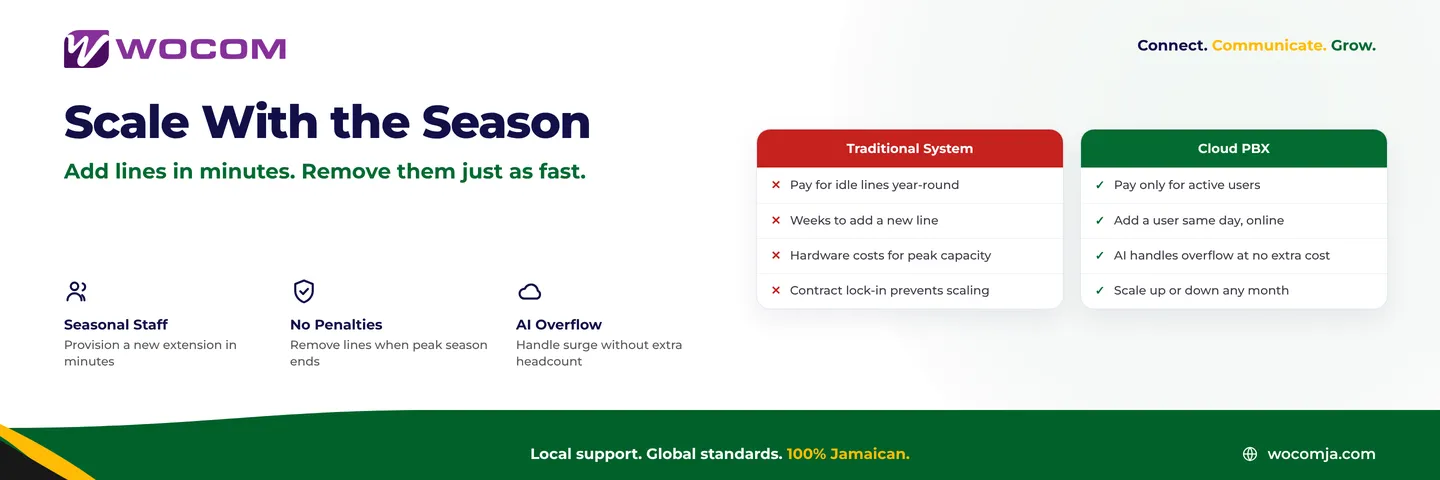
Traditional telephone systems force you into the first option. A PABX or legacy analogue line setup is sized at installation. The hardware you buy in November for the Christmas rush sits idle in June. The carrier charges you for every line whether a caller is using it or not. There is no mechanism to dial capacity up and down with the calendar.
What That Idle Capacity Actually Costs
Suppose your Kingston retail store needs eight concurrent call paths during the four weeks surrounding Christmas — enough to handle the volume of customers calling about stock, opening hours, layaway, and delivery. For the other ten months of the year, two or three concurrent calls would be more than enough.
With a traditional phone system, you buy eight lines. You pay line rental on all eight every month of the year. The hardware and installation to support eight simultaneous calls is sized for peak. You are paying December prices in May.
Cloud PBX is priced differently. Each user is a software licence. When you have eight active seasonal staff, you carry eight licences. When you return to your core team of four, you carry four. The cost moves with the headcount, not with the hardware you needed at your busiest moment.
How to Add a Seasonal Staff Member to a Cloud PBX
In a cloud PBX system like WOCOM's, adding a new user does not require a technician, a new desk phone, or a call to your provider. Here is what the process looks like in practice:
- Create the user account in the admin portal — name, email address, extension number.
- Assign them to the right ring groups so calls to the main number include them during their shift.
- Send them the softphone app credentials — they download the app on their personal phone or laptop and are ready to take calls within minutes.
- Set their schedule — business hours, availability window, and voicemail greeting.
A new seasonal employee can be fully configured and taking inbound calls on the same day they start. No desk phone to order, no cabling, no waiting on a carrier to provision a line.
When the season ends, deactivating that user takes the same amount of effort: a few clicks in the portal. Their extension goes dark, their licence is released, and your monthly cost adjusts on the next billing cycle.
A Real-World Example: A Montego Bay Resort in Peak Season
Consider a resort property in Montego Bay that runs a permanent team of five front-desk and reservations agents year-round. From November through March — when international arrivals peak — they need to double that to ten.
Under a typical PABX setup, adding five agents means ordering handsets, waiting for a technician to configure extensions, and negotiating additional lines with the carrier. The lead time is often two to three weeks. By the time everything is ready, peak season is already under way and calls are already being missed.
After moving to a cloud PBX, the property manager pre-builds the five seasonal extensions in October. The softphone credentials are ready before the staff arrive. On the first day of the high-season contract, all five seasonal agents log into the app on their mobile phones and are immediately available in the reservations ring group. The extension count goes from 5 to 10 in an afternoon.
In April, when the seasonal staff leave, the manager deactivates those five accounts. The ring group returns to the core team automatically. The monthly invoice reflects ten users for November through March and five users for the rest of the year.
AI Receptionist: Your Surge Buffer That Never Calls in Sick
Even the best-planned seasonal staffing has gaps. Call volumes spike unpredictably — a social media post about a promotion, a sudden rain shower that sends every tourist to a booking line at once, or the first week of January when the whole island is calling at the same time.
The WOCOM AI receptionist (Alex) sits at the front of every call queue and handles the volume your human team cannot absorb in the moment. Alex answers immediately — no ring, no hold music — qualifies the caller's enquiry, captures their name and contact details, and either routes them to an available agent or takes a complete message.
During peak periods, Alex operates as a pressure release valve: calls that would otherwise be abandoned get a professional response. During quiet months, Alex keeps handling first-contact calls without any change to its configuration. The capacity is constant even when your human headcount is not.
For businesses where the offering changes with the season — a hotel promoting a Christmas package, a retailer running a January clearance — Alex's knowledge base can be updated in minutes to reflect new pricing, promotions, or operating hours. There is no script to re-record and no IVR menu to rebuild.
Getting Your Seasonal Setup Ready Before the Rush
The advantage of cloud PBX is speed, but the best operators plan ahead anyway. A few steps that make peak-season scaling smoother:
- Pre-build your seasonal extensions in advance — configure them before staff arrive so day one is productive, not administrative.
- Create a dedicated seasonal ring group — include all seasonal staff here, separate from your core team group, so routing logic stays clean when headcount changes.
- Update your auto-attendant greeting — a seasonal welcome message reflecting extended hours or Christmas promotions sets caller expectations from the first ring.
- Brief the AI receptionist — update the knowledge base with seasonal promotions, temporary opening hours, and staffing details so Alex's answers are accurate from the first call of the season.
- Set a calendar reminder to deactivate — note when to remove seasonal users so you are not carrying extra licences into the quiet period.
Ready to Build a Phone System That Moves With Your Business Calendar?
WOCOM's Cloud PBX is built for Jamaican businesses that do not operate at the same pace every month of the year. Whether you are preparing for the Christmas retail rush in Kingston, the winter tourism season in Negril, or tax season in New Kingston, the infrastructure scales with you — not against you.
Speak with a WOCOM business advisor about how to structure your cloud PBX for seasonal operations. We will map your peak periods, design a ring group and extension plan that scales cleanly, and configure Alex to handle your busiest days without adding to your payroll. Contact WOCOM today and have your seasonal phone setup ready before the Christmas rush begins.
Continue exploring
Ready to upgrade your communications?
Talk to our team about the right solution for your business.
Book a Demo Contact SalesEverett Kildare is WOCOM's voice and infrastructure specialist, with more than 25 years of experience designing and running carrier-grade voice, SIP and virtualization infrastructure. Holding a BSc in Information Technology, he has built, secured and migrated phone systems for businesses of every size. Everett writes WOCOM's technical coverage of SIP trunking, cloud PBX, contact centres, business continuity and migration.