Cloud PBX Call Pickup Groups Jamaica: Answer Any Ringing Phone From Your Own Desk
Your sales rep is deep in a conversation. Their line rings a second time — a fresh inbound call. Nobody grabs it. By the time someone notices, the caller has hung up and is already dialling your competitor in New Kingston. This is the exact gap that call pickup groups are built to close.
What Is a Call Pickup Group?
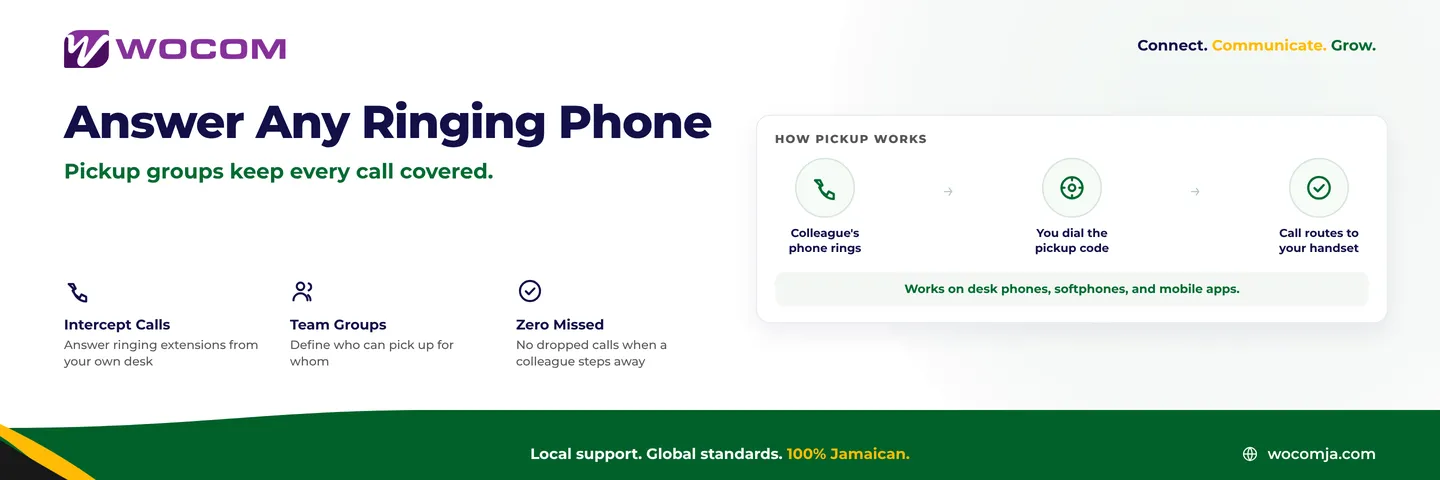
A call pickup group is a cloud PBX feature that allows any member of a defined team to answer a ringing extension — from their own desk. You do not move. You do not need to know which phone is ringing. You press a shortcode and the call routes directly to your handset.
This is distinct from a ring group, which controls where a new incoming call rings in the first place. Pickup groups are reactive: they let you intercept a call that is already ringing on a colleague's extension. Think of a ring group as the routing decision and a pickup group as the manual override your team uses when someone is momentarily away from their desk.
When Jamaican Businesses Actually Need This Feature
Pickup groups solve a specific, everyday problem: a colleague is temporarily unavailable, their phone is ringing, and the caller deserves an answer right now. Here are the situations where businesses across Kingston, Portmore, and Montego Bay use them most:
- Open-plan offices: If you can hear a phone ringing two desks away, you should be able to answer it from your seat. Walking across the floor while the caller waits costs everyone time.
- Reception cover: When your front desk agent steps away for lunch, your accounts or admin team should be able to intercept reception calls without leaving their chair.
- Small close-knit teams: A four-person firm does not need a formal call queue — they need a fast way for any partner to grab a call when the nearest colleague is occupied.
- Department backup: Your customer service team can cover for sales when the sales team is in a morning briefing or site visit.
Group Pickup vs Directed Pickup
Most cloud PBX platforms — including WOCOM's — support two pickup modes, and understanding the difference helps you choose the right tool for each situation.
- Group pickup: You dial a single shortcode (commonly
*8or a variant your administrator assigns) and the system connects you to whichever ringing extension in your group has been waiting longest. No decision needed — if a phone is ringing in your group, you just pick up. - Directed pickup: You dial a code followed by the specific extension — for example
*8201— to intercept that exact handset. This is useful when you can see which desk is ringing, or when you are deliberately covering for a named colleague.
Both modes work on IP desk phones, the WOCOM softphone app, and the WOCOM mobile client. A remote team member in St. Catherine or a field rep driving through St. James can be part of the same pickup group as your in-office staff.
How to Set Up Pickup Groups in Your Cloud PBX
Configuration in WOCOM's admin portal takes roughly five minutes. The process follows this pattern:
- Open the Groups section of the PBX admin panel and navigate to Call Pickup Groups.
- Create a new group with a name that reflects the team — "Sales Floor," "Front Desk," or "Accounts."
- Add member extensions. Any extension in the group can both have its calls intercepted and intercept calls for other members.
- Confirm the pickup shortcode. The system assigns a default; your administrator can adjust it to match existing habits or avoid conflicts with other codes.
- Test before going live by calling one extension while a colleague dials the pickup code from another handset. Confirm the call anchors correctly and the audio is clean.
An extension can belong to more than one group. A senior agent might sit in both the Sales and Management groups, giving them coverage across two teams without requiring separate logins or handsets.
Best Practices for Pickup Group Configuration
A few principles that businesses get wrong on the first attempt:
- Keep groups small. A pickup group with thirty members becomes noise — context is lost, and two people may attempt to answer the same call. Aim for five to eight members who genuinely share responsibility for the same callers.
- Train the team on the shortcode. Pickup groups only deliver value if everyone knows the code instinctively. A label on the handset or a quick note in the team chat is all it takes during the first week.
- Avoid careless overlap. If reception and sales both have pickup access to the Managing Director's extension, two staff members may answer simultaneously. Assign a primary group to each extension and add secondary groups with intention.
- Pair with presence indicators. WOCOM desk phones and the admin portal display which extensions are idle, busy, or ringing. A quick glance at presence status prevents staff from interrupting a call already being handled elsewhere.
- Set a sensible voicemail timeout. After business hours, configure a timeout so any call that clears the pickup window lands in voicemail — not in an endless ring that goes nowhere.
How Pickup Groups Fit Your Broader Call Strategy
Call pickup groups complement, rather than replace, your other routing tools. A well-configured WOCOM Cloud PBX layers them like this:
- Ring groups control the initial routing: which phones ring when a call arrives.
- Call queues manage overflow: callers wait gracefully when all agents are occupied.
- Pickup groups provide a fast manual override: if a nearby phone is ringing and you have capacity, you intercept it in seconds.
- The AI Receptionist — included free with every WOCOM Cloud PBX — handles after-hours calls and overflow so that pickup groups serve as a daytime tool rather than the last line of defence.
Together, these layers give every inbound call multiple opportunities to reach a human — or a capable AI — before it is ever lost to a competitor.
Get Pickup Groups Working on Your WOCOM Cloud PBX
If you are already on WOCOM Cloud PBX and have not configured pickup groups, your account team can walk you through setup in a single session. If you are still running a traditional PABX or juggling separate lines across departments, call pickup groups are one of dozens of everyday efficiencies your current hardware simply cannot offer.
Stop letting ringing phones go unanswered. Contact WOCOM at 1-876-625-6266 or visit wocomja.com to configure pickup groups, ring strategies, and AI call handling — all on one cloud PBX plan built for Jamaican businesses.
Continue exploring
Ready to upgrade your communications?
Talk to our team about the right solution for your business.
Book a Demo Contact SalesEverett Kildare is WOCOM's voice and infrastructure specialist, with more than 25 years of experience designing and running carrier-grade voice, SIP and virtualization infrastructure. Holding a BSc in Information Technology, he has built, secured and migrated phone systems for businesses of every size. Everett writes WOCOM's technical coverage of SIP trunking, cloud PBX, contact centres, business continuity and migration.