Business Phone System Lifecycle Jamaica: Repair, Upgrade, or Replace?
Every business phone system has a shelf life. The question is whether you know where yours stands before it forces a decision on you. Across Jamaica, many companies are still running PABX hardware purchased in the early 2010s — equipment that has long passed its useful life but keeps limping along because nobody has sat down to evaluate the real cost of staying.
This guide breaks the decision into three paths: repair, upgrade, and replace. Each is the right call under different circumstances. Knowing which applies to your business today can save significant money and prevent an emergency that takes your phones down on a busy Monday morning in Kingston or shuts down your Montego Bay front desk without warning.
Phase One: Healthy Operation (Years 1 to 3)
In the first few years after installation, a business phone system should require almost no attention. Firmware updates, the occasional handset replacement, and minor configuration changes are all you should expect. If you are calling your vendor for fault repairs inside the first three years, that is a red flag about installation quality or equipment grade — not a lifecycle issue.
During this phase, your job is documentation. Know exactly what you have: the make and model of your PABX, how many extensions, what software version it runs, and who holds the admin credentials. Many Jamaica businesses skip this step and pay dearly for it years later when a technician has to reverse-engineer a system that nobody bothered to document. Keep a simple record — even a shared document with your vendor's contact details and your system's model number is more than most businesses have.
Phase Two: Managed Decline (Years 3 to 7)
Somewhere between three and seven years, most on-premise systems start requiring more attention. Capacitors fail, power supplies degrade, and components that were once easy to source become harder to find. This is the managed decline phase — the system still works, but it is no longer effortless.
Signs you have entered this phase include:
- Random reboots or dropped calls that are difficult to reproduce consistently
- Extension cards or line interfaces that fail and cannot be quickly replaced
- Your maintenance vendor taking longer to source compatible parts
- Firmware updates that are no longer available from the manufacturer
- New features your business needs — mobile extensions, remote work support, call reporting — that the hardware simply cannot support
In this phase, upgrading can extend the system's useful life. Adding a trunk card to expand capacity, replacing a failed component with a compatible spare, or migrating your trunks from analogue lines to SIP while keeping the existing PABX chassis are all reasonable options. The test is whether the cost of the upgrade is meaningfully lower than the cost of full replacement, and whether the upgraded system will still meet your needs in another three years.
Phase Three: Forced Repairs (Years 7 and Beyond)
Beyond seven years, the economics of repair become increasingly difficult to justify. Parts are scarce. The vendor who originally installed your system may no longer service that hardware model. The manufacturer may have stopped issuing security patches. And the opportunity cost of staying — missing features like AI call handling, mobile extensions for field staff, and real-time reporting — begins to compound quietly month after month.
Forced repairs in this phase typically arrive in one of two ways. Either a component fails without warning and your business is down for hours or days while someone hunts for a compatible part, or a slow degradation in call quality erodes the caller experience until complaints make the problem impossible to ignore.
If your system is past seven years old and you have called for repairs more than twice in the last twelve months, you are not managing a phone system — you are managing a liability.
The Hidden Cost of Staying Too Long
The decision to keep repairing is rarely made on the full picture. Most business owners see the repair invoice and compare it to the capital cost of replacement. That comparison misses several categories of real cost:
- Downtime cost. Every hour your phones are down is revenue you cannot recover. A single afternoon with no incoming calls can cost a busy Jamaica business more than an entire month of cloud PBX fees.
- Capability cost. A legacy PABX cannot run AI call handling, cannot route calls to mobile staff, cannot integrate with your CRM, and cannot produce the real-time reporting that modern businesses use to manage performance. You are not just paying to maintain hardware — you are forfeiting competitive advantages your competitors may already have deployed.
- Emergency premium. When a legacy system fails outside business hours, repair call-out rates are often significantly higher. Parts that can be sourced in Miami can take three to five business days to clear Kingston customs. That emergency premium is a hidden tax on the decision to delay migration.
- Staff friction. Teams that have to work around unreliable hardware develop their own workarounds — using personal mobiles for business calls, missing transfers, losing voicemails. These habits are hard to break even after the system is eventually replaced.
How to Make the Repair, Upgrade, or Replace Decision
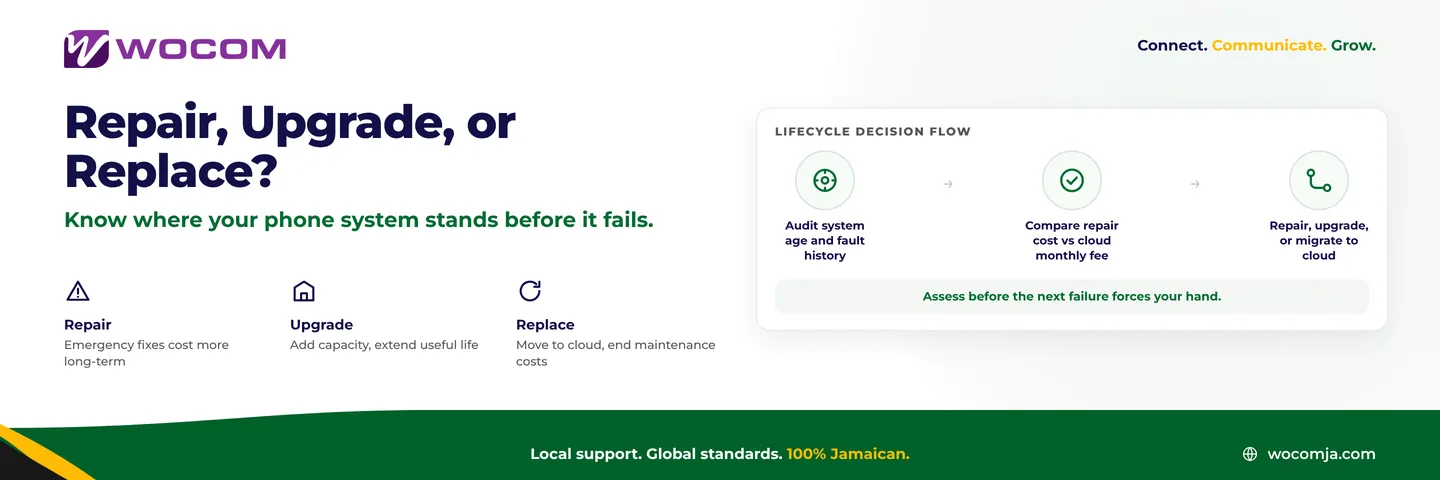
A structured approach cuts through the emotion of "but it still works." Run these three checks before your next repair invoice:
- Age and fault history. If the system is over five years old and has needed repairs twice or more in the past year, begin evaluating replacement options now — before the next failure rather than after it.
- Total annual maintenance cost. Add up every invoice paid to keep the system running over the last twelve months, including engineer call-outs, parts, and any downtime you can put a number to. Compare that figure to twelve months of cloud PBX fees for equivalent capacity. In most cases the cloud option is lower — and it includes features the legacy system cannot match at any price.
- Capability gap. List three things your business cannot currently do with your phone system that you know you need — whether that is AI after-hours handling, mobile extensions for staff working from home or in the field, or call recording for dispute resolution. If the gap is significant, the opportunity cost makes the replace decision even clearer.
The upgrade path makes sense when the system is under five years old, the component failure is isolated, parts are readily available locally, and the upgrade addresses a genuine capability gap rather than simply restoring what was already there.
Planning a Smooth Transition in Jamaica
The biggest risk in any phone system migration is the gap between old and new. The right approach is parallel running — porting your numbers to the cloud platform while the legacy system is still live, confirming every feature works correctly, and then cutting over cleanly. This eliminates the emergency scramble and gives your team time to learn the new system before it becomes their only option.
For businesses across Kingston, Montego Bay, Spanish Town, and the rest of the island, WOCOM handles the SIP number porting, configuration, and user training. You do not need a dedicated IT department. The admin panel is web-based, and most businesses are managing their own settings within the first week of going live.
The best time to plan a phone system migration is six months before you need one. The second best time is right now.
If your system is showing any of the signs described in this guide, contact WOCOM today for an honest assessment. We will tell you whether repair, upgrade, or migration makes the most financial sense for your specific situation — and give you a cost comparison that includes the numbers your current maintenance invoices are not showing you.
Call WOCOM at 876-293-5227, visit wocomenterprise.com, or send a message through the website to book your phone system assessment.
Continue exploring
Ready to upgrade your communications?
Talk to our team about the right solution for your business.
Book a Demo Contact SalesEverett Kildare is WOCOM's voice and infrastructure specialist, with more than 25 years of experience designing and running carrier-grade voice, SIP and virtualization infrastructure. Holding a BSc in Information Technology, he has built, secured and migrated phone systems for businesses of every size. Everett writes WOCOM's technical coverage of SIP trunking, cloud PBX, contact centres, business continuity and migration.