Video Meeting Security: Waiting Rooms, PINs and Who Can Actually Get Into Your Meeting
Ask most business owners how their video meetings are secured and the answer is some version of “only the people we invited have the link.” That is not a security model. It is a hope about how a URL travels.
Links get forwarded to somebody who could not make it. They get pasted into a WhatsApp group so nobody has to look it up. They sit in a recurring calendar invite that keeps working long after the person left the company. None of that requires bad intent — it is just what happens to a link that is easy to share, which is the whole point of the link.
So the question worth asking is not whether your link could reach somebody you did not invite. It is what happens when it does.
The waiting room is the actual door
A waiting room changes the link from a key into a knock. Whoever arrives is held outside — named, visible to the host, and unable to see or hear anything happening inside — until somebody decides to let them in.
Two properties make this useful rather than decorative. The first is that guests must give a first and last name to knock, so the host is admitting a person rather than a blank tile. The second is that people held in the lobby genuinely cannot see or hear the meeting; a waiting room that merely hides the video while the audio continues is not a waiting room.
On WOCOM Meet the waiting room is on by default for new meetings. That default is deliberate: security settings that must be remembered before every meeting are the ones that get skipped on the meeting that needed them.
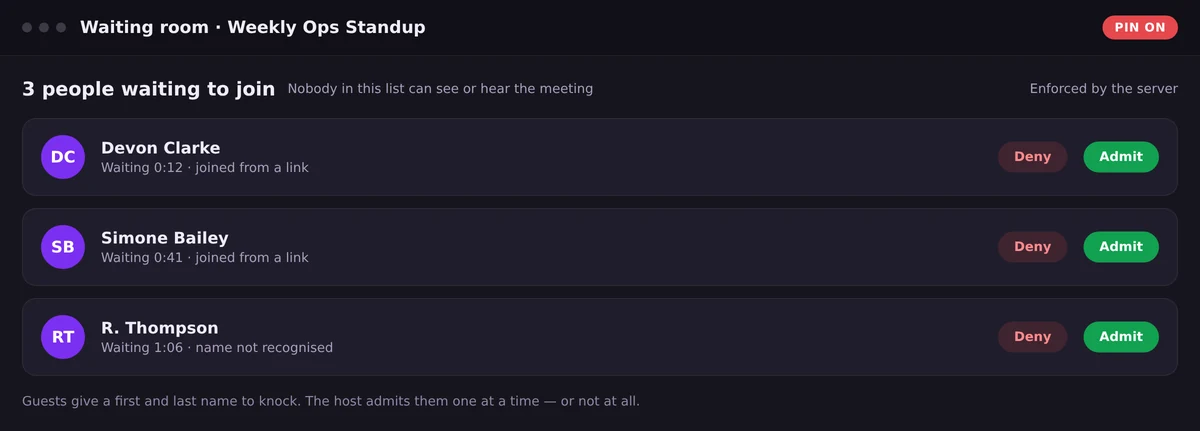
The waiting room turns the link into a knock: named guests, held outside, admitted one at a time.
A PIN, on top of the link
The waiting room controls who gets in. A PIN controls who can even knock — useful when a link is going somewhere you do not fully control: a printed agenda, a public invitation, a large distribution list, a recurring calendar entry shared across an organisation.
The combination is what makes it work. The link tells you where the meeting is. The PIN proves you were told about it deliberately. The host still decides who comes through the door. Any one of the three alone is weaker than people assume; together they are enough for the overwhelming majority of business meetings.
Enforced by the server, not by the browser
This is the distinction that separates real controls from theatre, and it is almost never on a feature list.
If a mute, a removal or a waiting room is implemented in the participant's browser, then it holds only as long as the participant is running the software you expect. A modified client, an old tab, or a page that never received the instruction can quietly ignore it. If the same control is enforced on the server, the participant's software does not get a vote: the audio is not being sent to them, the media stream is not being mixed for them, the door is not opening.
When you evaluate a platform, ask the question in exactly those terms — is this enforced server-side? — for four things: admitting a guest, muting a participant, removing a participant, and the meeting PIN. On WOCOM Meet, all four are enforced by the server rather than hidden in the browser.
Media is also encrypted in transit between participants, which addresses a different problem: not who is allowed in the room, but who could listen to the traffic on the way there.
Recording is a security decision too
The moment a meeting is recorded, the security question changes shape. It is no longer only about who is in the room — it is about who can hear the room again, six months from now.
Server-side recording helps, because the file lands in the account rather than on somebody's laptop, everyone authorised can retrieve it, and it is deleted automatically once the retention window passes. Retention that runs on a schedule beats retention that depends on somebody remembering to clear a folder.
There is a legal dimension in Jamaica as well. A recording of an identifiable person is personal data under the Data Protection Act, with expectations about notice, purpose and retention — the same ground covered in our guide to call recording and the Data Protection Act. Tell people they are being recorded, be able to say why, and be able to say when the file goes away.
The habits that matter more than the settings
Every platform can be configured well and used badly. These are the practices that prevent most real incidents:
- Do not publish the link where it will outlive the meeting. A recurring invite shared across a whole organisation is a standing invitation.
- Use a fresh meeting for sensitive conversations rather than the standing team room everyone already has.
- Read the waiting room list. A name you do not recognise is a question, not a formality — and it is the reason names are required.
- Admit before you start the confidential item, not during it.
- Decide who hosts. Controls only help if somebody in the meeting has them and is paying attention.
- Say when you are recording, at the start, out loud, every time.
Frequently Asked Questions
Can we stop uninvited people joining a video meeting?
Yes. Turn on the waiting room and admit people one at a time, and add a PIN if the link alone is not enough. On WOCOM Meet both are enforced by the server rather than by the browser, so a modified client cannot get past a door you closed.
Can people in the waiting room hear the meeting?
Not on a properly implemented waiting room. Guests held in the lobby cannot see or hear anything until the host admits them.
Do guests have to identify themselves?
They give a first and last name before they can knock, so the host is admitting a named person rather than an anonymous participant. No account is required.
Are video meetings encrypted?
Media is encrypted in transit between every participant on WOCOM Meet. That protects the traffic on its way across the network; the waiting room and PIN are what control who is allowed into the room in the first place.
Who can watch a meeting recording afterwards?
On WOCOM Meet, everyone in the account can play and download recordings, and each file is deleted automatically once the retention window passes — 30 days by default, the same on every account.
Where to start
If you run meetings for a Jamaican business, the fastest security win available today is turning the waiting room on by default and deciding who hosts. Everything else is a refinement. The controls described here are standard on WOCOM Meet, which comes with the WOCOM phone system rather than as a separate video subscription.
Continue exploring
Ready to upgrade your communications?
Talk to our team about the right solution for your business.
Book a Demo Contact SalesEverett Kildare is WOCOM's voice and infrastructure specialist, with more than 25 years of experience designing and running carrier-grade voice, SIP and virtualization infrastructure. Holding a BSc in Information Technology, he has built, secured and migrated phone systems for businesses of every size. Everett writes WOCOM's technical coverage of SIP trunking, cloud PBX, contact centres, business continuity and migration.