What Is Recorded as a Missed Call? How Your Reporting Dashboard Classifies Unanswered Calls
Every month a manager somewhere in Kingston opens the call reports, sees a missed call figure that looks alarming, and calls the team in for a difficult conversation. Half the time that conversation is unnecessary — because a large share of those "missed" calls were never a customer left hanging. They were calls that arrived at nine at night and went exactly where the system was configured to send them.
Before you can improve a missed call number, you have to know precisely what the reporting engine counts. Here is the definition, the call paths that produce it, and the one adjustment every manager should make before treating the figure as a performance score.
The short definition
A call is recorded as a Missed Call when it is not answered by a user before reaching its final destination.
That is the whole rule, and the important words are by a user and final destination. The system does not ask whether the call was handled well, whether a message was captured, or whether the customer got what they needed. It asks one question: did a live person pick up before the call ran out of places to go? If the answer is no, the call is logged as missed.
The call paths that produce a missed call record
In practice, five routes end in a missed call record:
- Calls that ring available extensions or agents but are not answered. The phones rang, nobody lifted the handset, the call moved on.
- Calls that time out before being answered. The ring timer or queue timer expired and the call was pushed to the next step in the flow.
- Calls that are redirected to voicemail after no answer. The caller did leave a message — but a live user never answered, so the call is still missed.
- After-hours calls automatically routed to voicemail. These follow the configured after-hours flow correctly and are still recorded as missed.
- Calls abandoned by the caller before being answered. Depending on where in the flow the caller disconnected, these may also be classified as missed.
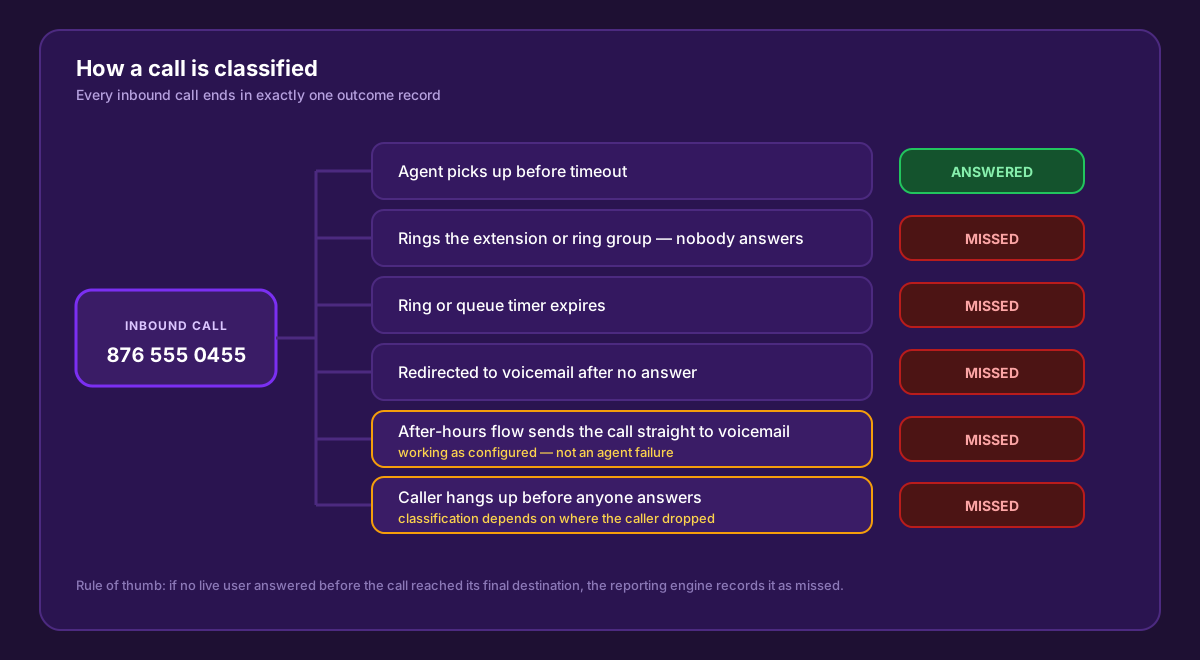
Every inbound call ends in exactly one outcome record. Only the top path — a live user answering before timeout — avoids the missed classification.
What that looks like in the report
Pull a day of missed calls and the pattern becomes obvious very quickly. The in-hours rows and the after-hours rows sit in the same list, carrying the same label, but they describe completely different events.
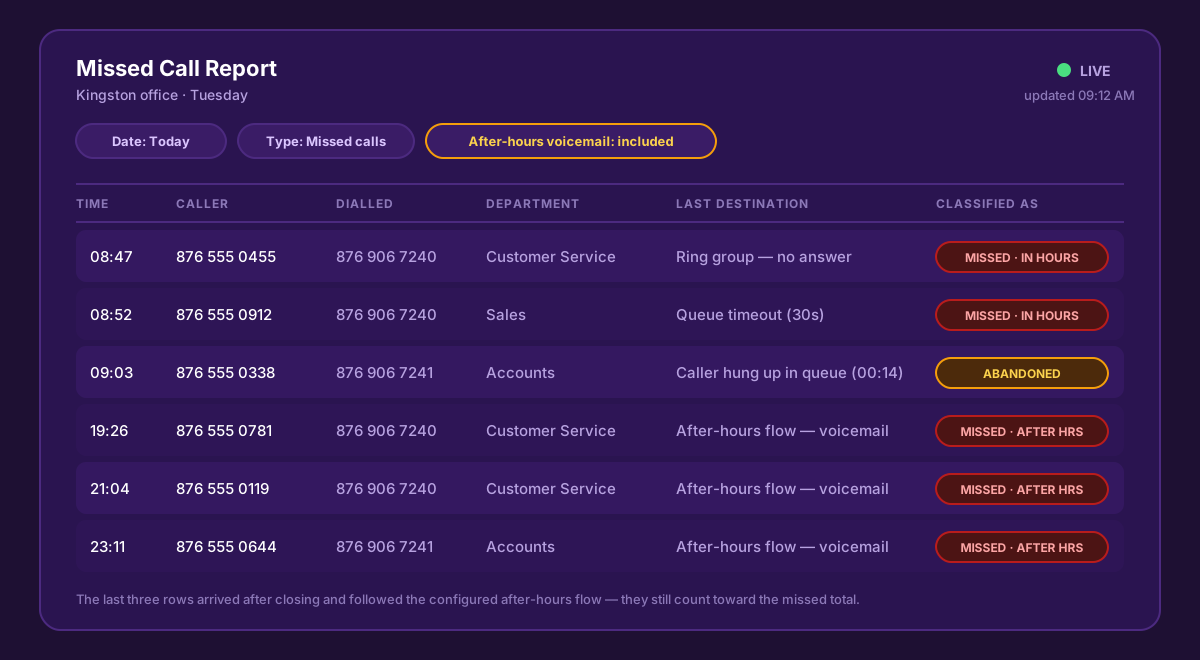
The 08:47 and 08:52 rows are genuine service gaps. The 19:26, 21:04 and 23:11 rows arrived after closing and followed the after-hours flow exactly as designed — but all five carry a missed label.
The Last Destination column is the one that does the work. It tells you where the call ended up — ring group with no answer, queue timeout, voicemail, after-hours flow — and that is what separates a failure from normal operation.
Important note on after-hours calls
This is the point that causes the most confusion, so it is worth stating plainly:
After-hours calls that are intentionally routed directly to voicemail are currently included in the Missed Call statistics. This is expected behaviour within the reporting engine. It does not indicate that a call was mishandled or that an agent failed to answer. These calls are reported as missed for one reason only — they were not answered by a live user before being transferred to voicemail.
Nothing is broken when you see this. Your evening voicemail messages are being captured, your after-hours greeting is playing, and the flow is doing its job. The reporting engine simply applies a single consistent rule to every call, and that rule does not carry an exemption for the time of day.
Abandoned calls: it depends where the caller dropped
Calls where the caller hangs up first are the grey area. Whether the call is classified as missed or as abandoned depends on the point at which the caller disconnected — whether they were still in the IVR, already sitting in a queue, or ringing an extension when they gave up.
The practical takeaway is to read your missed figure alongside your call abandonment rate rather than on its own. A rising abandonment rate almost always means callers are waiting too long, which is a queue and staffing problem — and it will usually show up in your Average Speed of Answer at the same time.
Recommendation: separate business-hours misses from after-hours voicemail
When reviewing Missed Call reports, it is advisable to distinguish between business-hours missed calls and after-hours voicemail calls. The latter are part of the normal call handling process and should not be treated as service failures. Making that distinction gives you far more accurate performance metrics for agents and departments.
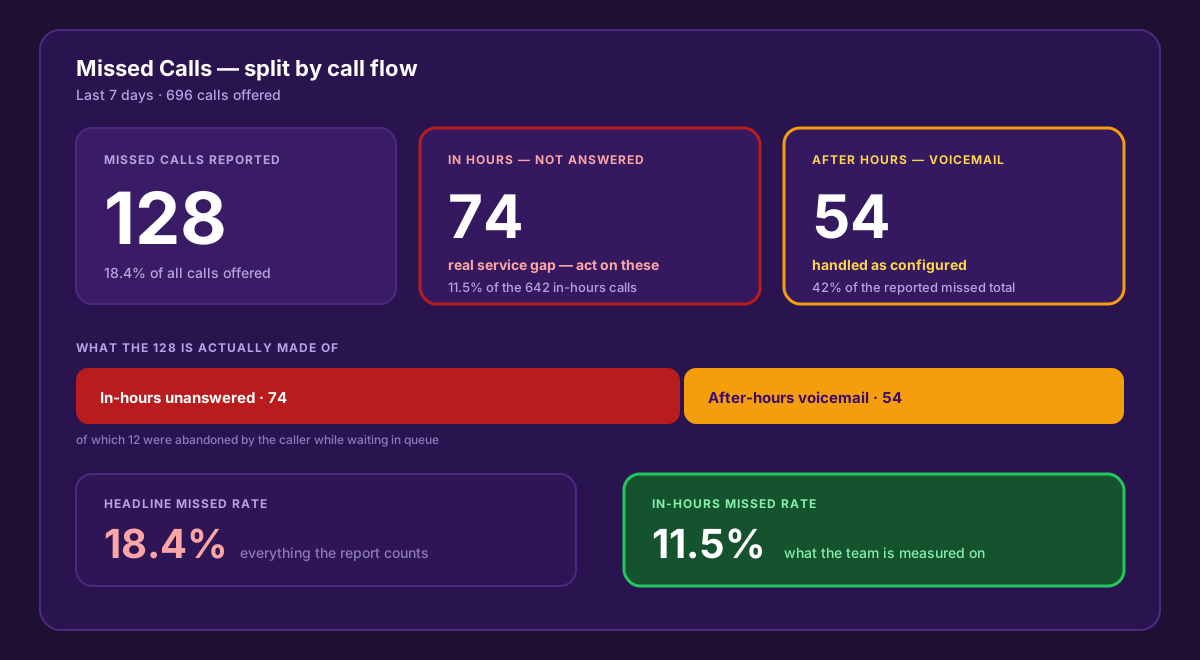
The same week, read two ways. The headline figure says 18.4% of calls were missed; once after-hours voicemail is separated out, the number the team can actually act on is 11.5%.
The split matters because it changes what you do next. A team told they missed 128 calls will get defensive. A team shown that 74 calls rang during working hours and went unanswered — and that most of them landed between 8:30 and 9:15 in the morning — has something specific to fix.
How to make the split in practice
- Filter by time of day against your published opening hours before you report the number upward.
- Report two figures, not one — a total missed count for visibility, and an in-hours missed count for accountability.
- Use the Last Destination column to isolate anything that ended in the after-hours flow.
- Judge agents and departments on the in-hours figure only. Nobody should carry a performance mark for a call that arrived at 23:11.
- Track the after-hours volume separately — it is not a failure, but it is a demand signal. Fifty-four evening voicemails a week is a strong argument for extended cover.
What to do about the in-hours number
Once you are looking at a clean in-hours figure, the fixes are usually straightforward and structural rather than disciplinary:
- Check ring and queue timers. A 15-second timer pushes calls to voicemail before a busy agent can reasonably reach the phone.
- Review ring group membership. Missed calls often cluster on one department because two of the four listed extensions no longer belong to anyone.
- Watch the peaks, not the day. Most in-hours misses happen in two or three narrow windows — first thing in the morning, and right through lunch.
- Put the numbers on a screen while it matters. A live wallboard and Live Call Management let a supervisor act on a queue that is building instead of reading about it tomorrow.
- Cover the gap automatically. A missed call text back keeps the conversation alive when the line is genuinely busy, and the free AI receptionist included with WOCOM Cloud PBX answers calls that would otherwise ring out — including at 9pm.
That last point is worth sitting with. Every after-hours voicemail in your missed report is a customer who called your business outside working hours. They are not a reporting artefact — they are demand. An AI receptionist answers those calls, captures the details properly, and takes them out of the missed column entirely, because a call that gets answered is never recorded as missed.
Missed call reporting FAQs
Get reporting you can actually manage with
WOCOM Cloud PBX gives Jamaican businesses full call reporting, live supervision and a free AI receptionist on every plan — so fewer calls reach the missed column in the first place, and the ones that do are easy to explain. Call 876-906-7240 or request a demo and we will walk through your own missed call report with you.
Continue exploring
Ready to upgrade your communications?
Talk to our team about the right solution for your business.
Book a Demo Contact SalesMichelle Goss is a data and AI analyst at WOCOM, where she studies how Jamaican businesses use voice, messaging and AI to win and keep customers. With a BSc in Data Science & Analytics, she turns call data, customer trends and AI receptionist performance into practical guidance owners can act on. Michelle writes WOCOM's coverage of AI call handling, call analytics, customer growth and industry trends.