Live Call Management Jamaica: See Every Call in Progress From One Screen
Yesterday's Report Cannot Save Today's Customer
Ask most Jamaican business owners how their phones performed yesterday and you will get one of two answers: a shrug, or a report that arrived this morning. Both are the same answer, really. By the time the numbers land, the caller who waited four minutes and hung up has already phoned somebody else, and the agent who fumbled a pricing question has repeated the same mistake eleven more times.
Call recordings and end-of-day reports are useful. They are also, by definition, an autopsy. Live Call Management is the opposite discipline: seeing what is happening on your phone lines right now, while there is still something you can do about it.
This guide walks through what a live call management screen actually shows, what each element is for, and how Jamaican teams — from a six-seat customer service desk in Kingston to a fifty-agent operation spread across three parishes — use it day to day.
What Live Call Management Actually Is
Live Call Management is a real-time view of your phone system delivered in a browser. It answers four questions continuously:
- Who is on a call right now? Every active conversation, who is on each end, and how long it has been running.
- Who is waiting? How many callers are in the queue and how long the longest-waiting one has been holding.
- Who is available? Every extension, its department, its ring group, the device it is logged in on, and whether it is genuinely reachable.
- Can I help? The ability for a supervisor to join a live call silently, coach the agent privately, or take over entirely.
Because it runs in the browser, there is nothing to install on agent machines and nothing for the agent to configure. A supervisor logs in from a laptop at head office, a phone in a car park in Ocho Rios, or a home office in Portmore, and sees the same live picture.
The Three Panels You Will Live In
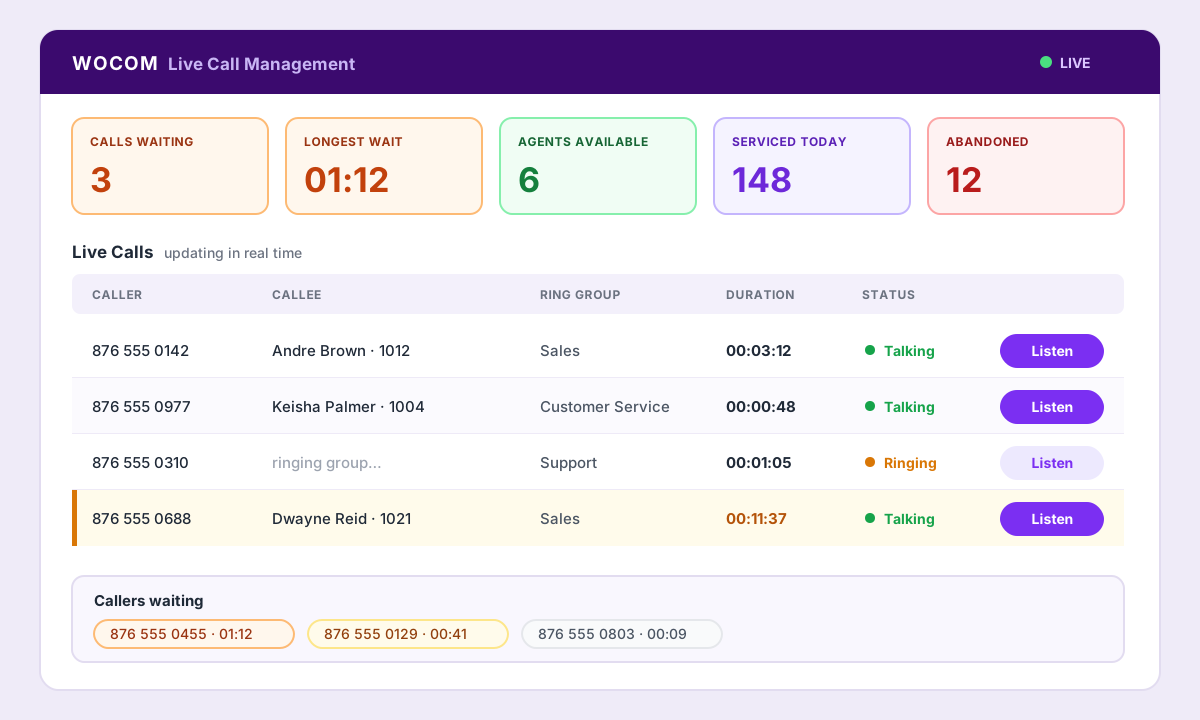
The Live Call Management screen: wallboard counters across the top, every call in progress below, and a Listen button on each row.
1. The live wallboard
A compact strip of real-time counters across the top of the screen. The ones that matter most in day-to-day Jamaican operations are:
- Calls waiting — how many people are on hold this second
- Longest wait — how long the most patient (or most annoyed) caller has been holding
- Agents available — how much answering capacity you actually have right now
- Serviced and abandoned — how many calls have been handled, and how many gave up, so far today
- Average wait and average talk time — displayed to the second, so a spike is visible immediately
The wallboard exists to trigger a decision, not to be admired. Calls waiting climbing past three with only one agent free is not a statistic — it is an instruction to pull somebody off admin work.
2. The live calls table
Every conversation currently in progress, one row each:
- Caller number
- Callee — the agent's name and extension
- The ring group the call came through
- Duration, ticking in
hh:mm:ss - Status — ringing or talking
- A Listen button on every row
The duration column is quietly the most useful thing on the page. A support call at eleven minutes is normal. A booking enquiry at eleven minutes means the agent is stuck, and that is the row you want to listen in on.
3. The agent status table
A live roster of every extension: number, name, department, ring group membership, the device they are on — desk phone, mobile app or browser — and their current status.
This is the panel that settles arguments. Jamaican businesses with branch offices or field staff run on self-reported availability: someone says they are on the road, someone else says the Mandeville branch never answers. The agent status table replaces all of that with what the phone system can actually see — whether that extension is registered, on a device, and reachable.
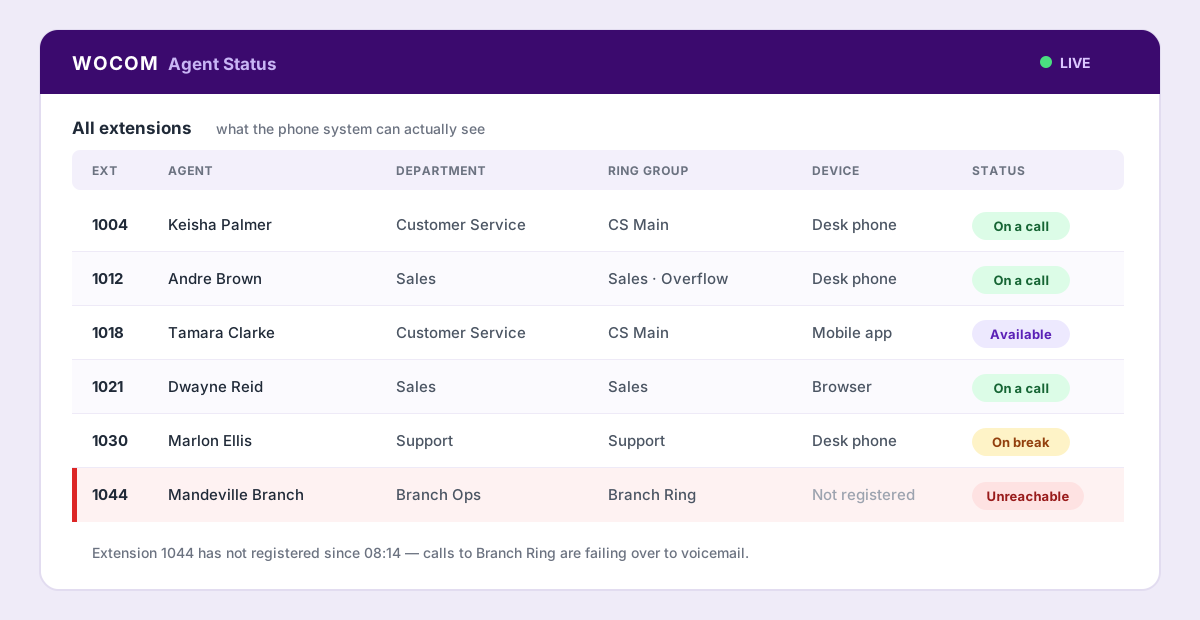
The agent status table shows real reachability — here extension 1044 has not registered all morning, so branch calls are silently failing over.
Listen, Whisper, Barge In: Three Levels of Intervention
Watching a call go wrong without being able to help is its own kind of frustration. Live supervision gives a supervisor three escalating options on any live call:
| Mode | Agent hears you | Customer hears you | Use it when |
|---|---|---|---|
| Listen | No | No | Spot-checking quality, monitoring a new hire, assessing an escalation before deciding whether to step in |
| Whisper | Yes | No | Feeding the agent an answer, a price, or a next step so the call keeps moving |
| Barge In | Yes | Yes | An escalation that needs a manager's authority right now, before the customer asks for one |
In practice supervisors move up the ladder rather than jumping to the top. You listen, decide the agent is nearly there, whisper the missing detail, and the customer never knows anyone else was on the line. Barge In is the last resort, not the default.
What This Changes on a Jamaican Floor
Holds disappear
The classic sequence — "let me check that for you", hold music, the agent walking to a supervisor's desk, the customer hanging up — is replaced by a two-second whisper. The call never pauses.
Training happens on real calls
New agents learn faster listening to a supervisor coach them through a live customer than reviewing recordings a week later. And because the supervisor can be anywhere with a browser, a manager in Kingston can coach an agent in Montego Bay without a road trip.
Queue problems get fixed the same hour
When longest wait crosses your threshold at 11:40am, you move staff at 11:41am. That is the entire value proposition. Nobody needs a report to tell them that lunch hour is busy — they need to see it while lunch hour is happening.
Escalations stop becoming complaints
Most formal complaints start as a call where the customer asked for a manager and was told one would call back. Barge In removes that gap entirely.
Practical Details Jamaican Managers Ask About
- Does it work with our existing phones? Yes — desk phones, the mobile app and browser-based extensions all appear in the same live view.
- Do agents need special software? No. There is nothing to install and nothing for the agent to switch on.
- Who can monitor? Only nominated supervisor extensions. It is not open to every user on the account.
- Can a supervisor see the whole company? Monitoring is scoped by department, so a team lead sees their own team rather than the entire organisation.
- Is it logged? Every listen, whisper and barge-in session is recorded in an audit trail.
- How do we turn it on? Live Call Management is enabled per account by WOCOM — there is no hardware to buy and no site visit required.
Where to Start
If you are running a customer-facing phone line in Jamaica and your only view of performance is a report, start small. Nominate one supervisor. Watch the wallboard for a single busy week and note what surprises you — it is almost always the abandoned count or the real availability of a branch. Then add whisper coaching for new hires.
The rest follows naturally, because once a manager has seen their phone floor live, going back to yesterday's numbers feels like driving while looking only in the mirror.
Want to see it on your own numbers? WOCOM runs Live Call Management as part of the Cloud PBX platform on our own licensed network here in Jamaica. Book a walkthrough and we will show you your live call floor, not a demo account.
Continue exploring
Ready to upgrade your communications?
Talk to our team about the right solution for your business.
Book a Demo Contact SalesEverett Kildare is WOCOM's voice and infrastructure specialist, with more than 25 years of experience designing and running carrier-grade voice, SIP and virtualization infrastructure. Holding a BSc in Information Technology, he has built, secured and migrated phone systems for businesses of every size. Everett writes WOCOM's technical coverage of SIP trunking, cloud PBX, contact centres, business continuity and migration.