Employee Offboarding and Your Business Phone System Jamaica: 7-Step Checklist
When a team member leaves your business, the usual exit checklist covers ID cards, keys, laptops, and email access. The business phone extension almost never makes the list — and that gap quietly creates problems. Calls go to a voicemail nobody checks. SIP credentials stay active on a system the former employee can still reach. And your monthly bill keeps charging for a seat assigned to someone who has been gone for months.
This is not a rare edge case. In Jamaica, where small and medium businesses have seen significant staff movement over the past two years, unchecked phone extensions are one of the most common sources of avoidable cost and security exposure. Here is exactly what to do — and when to do it.
Why Ex-Employee Extensions Become a Liability
A business phone extension is not just a dial pattern. It typically comes with SIP credentials, a voicemail box, DID assignments, ring group memberships, and a per-seat licence. When the employee leaves and nothing is changed, every one of those components keeps running independently.
- Active SIP credentials remain valid until someone explicitly revokes them. If a departing employee saved their username and password, those credentials can be used to place calls that bill directly to your account — a real toll fraud exposure.
- Unanswered calls to that extension hit voicemail and sit there. Customers and partners calling that direct number get no response, or worse, a greeting that names someone no longer at your organisation.
- Ring group entries that still include the old extension exhaust ring attempts on a dead handset before rolling over to a live agent, adding seconds of dead ringing that frustrate callers.
- Per-seat licensing continues billing every month until the seat is returned. On a cloud PBX, this is money you can recover immediately once the user is removed.
The Mistakes Jamaica Businesses Make Most Often
The most common pattern is deferral: "we'll sort it out next week." Next week becomes three months, by which point the voicemail box is full, the DID has been printed on business cards still in circulation, and revoking the credentials feels complicated enough that nobody has touched it.
The second most common mistake is a partial fix. The admin disables the email account but forgets the phone system entirely. In a cloud PBX environment, these are separate platforms with separate admin portals. Unless someone explicitly handles the phone side, it stays exactly as it was on the employee's last day.
Third: businesses permanently forward the old extension to a manager's mobile number rather than properly reassigning it. This works as a short-term patch but leaves the original extension active, the old voicemail unchanged, and no clear ownership of that number going forward. Two years later, that redirect is still running and no one remembers setting it up.
The 7-Step Phone System Offboarding Checklist
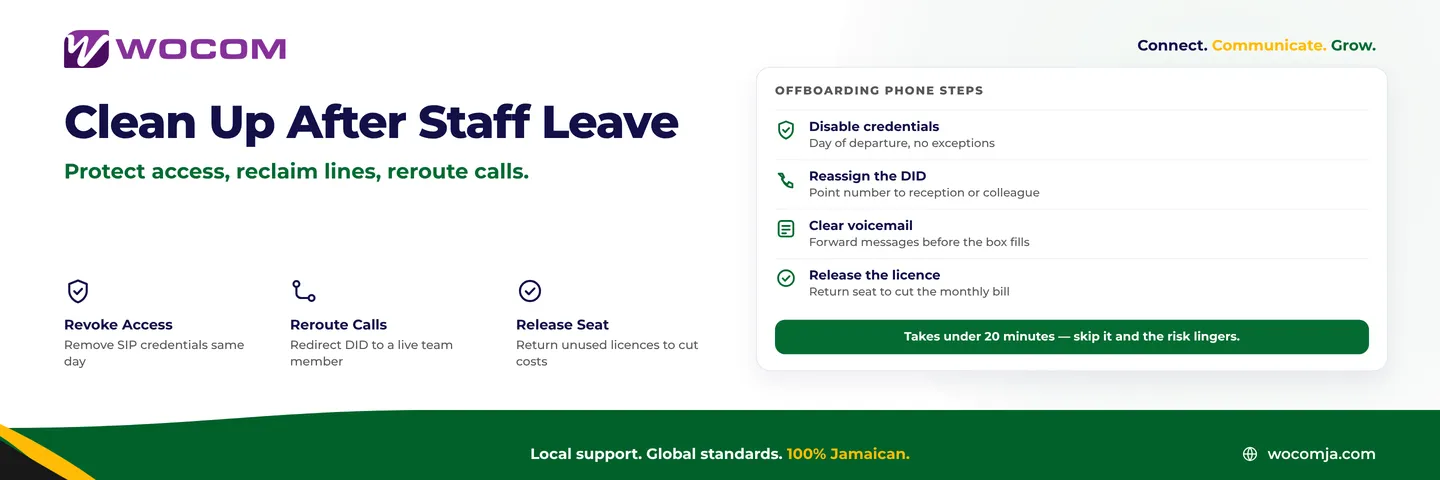
The following seven steps take under twenty minutes in any cloud PBX admin portal. Complete them on the day of departure — not the following week.
- Disable the SIP credentials immediately. Suspend or delete the user account in your cloud PBX portal. This closes the door on unauthorised call placing. Do not wait to see how the separation plays out.
- Redirect the DID to a live destination. Point the direct number to reception, a supervisor, or an appropriate hunt group. If that number appeared on marketing materials or was shared with clients, keep the redirect active for at least six months.
- Check and clear the voicemail box. Retrieve any pending messages, forward actionable ones to the relevant team member, and remove or re-record the greeting. A voicemail message that still says the former employee's name months after departure creates a poor impression with every caller who reaches it.
- Remove from all ring groups and hunt groups. Pull up every group the person belonged to and remove the extension. Most cloud PBX platforms show a user's group membership in a single view, making this quick.
- Update the dial-by-name directory. If your IVR offers a dial-by-name option, remove the departed employee's entry so callers are not routed to a dead extension.
- Audit any IVR menus referencing the extension. If your auto-attendant says "press 4 for sales" or "dial extension 207 for accounts," confirm that each extension is actively staffed by a current team member.
- Return the seat licence. On most cloud PBX platforms, releasing a user seat adjusts your billing from the next cycle. For Kingston and Montego Bay businesses managing tight margins, this is a straightforward saving with no trade-off.
What to Do With the DID Number
Whether to keep, redirect, or release the direct inward dialling number assigned to the departing employee depends on how it was used in practice.
If the number appeared on printed materials, the company website, email signatures, or was shared with clients as a personal direct line, keep it and redirect it for at least six months. Business relationships in Jamaica are often built on direct-line familiarity — a regular client who has that number saved in their phone should reach a live person, not a disconnected tone or a voicemail that never gets checked.
If the DID was purely internal — assigned but never shared externally — release it. Each DID on your account carries a monthly cost. A business with several unused DIDs from past employees is paying for numbers that serve no one.
If the DID was the employee's primary client-facing line, reassign it to whoever takes over those relationships. Update the routing in your admin portal and let the number continue to carry those conversations under new ownership.
How Cloud PBX Makes This Faster and Safer
One of the underappreciated operational advantages of a managed cloud PBX is how quickly an admin can act on staff changes. On a traditional on-premise PBX, revoking credentials and reassigning lines often required a technician visit or a support ticket to the vendor — sometimes days of waiting. On a cloud platform, the same task takes two minutes and a browser tab.
Call logs give you visibility into who was calling that extension in recent weeks, which is useful for identifying clients or partners who hold a direct number and may need to be informed of a change. Ring group views show every group membership at once. And licence management is in the same portal, so the cost impact is immediate and visible without waiting for your next invoice to arrive.
If your current phone system requires calling your provider every time you need to add, remove, or reassign a user, that overhead compounds across a year of normal staff movement. Self-service cloud PBX administration is one of the most concrete, day-to-day arguments for moving off legacy infrastructure — not just the headline features, but the time it saves on routine housekeeping like this.
Audit Your Extensions Now, Then Build the Habit
If your business has been operating for more than two years without a systematic phone extension review, there is a reasonable chance you have at least one ghost extension: an active seat assigned to someone who is no longer part of your team. Log into your admin portal today, pull the full user list, and cross-reference it against your current staff. The exercise rarely takes longer than half an hour and the findings are almost always worth acting on.
Going forward, make phone extension offboarding a formal line item in your HR exit checklist — handled the same day as revoking email access. It takes less time than collecting a parking pass and carries significantly higher risk if left undone.
WOCOM's Cloud PBX platform gives Jamaica businesses the admin tools to manage user changes entirely in-house, with no support tickets and no technician delays. If you are on a legacy system where adding or removing users is slow, opaque, or dependent on your vendor's schedule, speak with the WOCOM team about a migration that puts your team in full control of your phone infrastructure. Visit wocomenterprise.com/contact to get started.
Continue exploring
Ready to upgrade your communications?
Talk to our team about the right solution for your business.
Book a Demo Contact SalesEverett Kildare is WOCOM's voice and infrastructure specialist, with more than 25 years of experience designing and running carrier-grade voice, SIP and virtualization infrastructure. Holding a BSc in Information Technology, he has built, secured and migrated phone systems for businesses of every size. Everett writes WOCOM's technical coverage of SIP trunking, cloud PBX, contact centres, business continuity and migration.