Contact Centre Pause Code Policy Jamaica: Managing Agent Not-Ready Time Fairly
What Are Pause Codes — and Why Most Jamaican Contact Centres Don't Track Them Properly?
Every contact centre supervisor knows the frustration: your service level is slipping, callers are waiting too long, and half your agents are showing Not Ready on the wallboard — with no explanation attached. Without a structured pause code policy, that status tells you nothing actionable.
Pause codes — sometimes called AUX codes, not-ready codes, or auxiliary codes — are the labels agents select when they step off the queue. Instead of a generic "Not Ready," the system captures why: scheduled break, lunch, team briefing, system fault, personal time, and so on. With clean data, you can separate legitimate off-queue time from avoidable idle time, and have those coaching conversations from a position of fact rather than suspicion.
In Kingston and Montego Bay's growing BPO sector, and in the internal contact centres of utilities, financial institutions, and retail chains, pause code discipline is one of the fastest operational wins a supervisor can make. But it only works if you have the right codes, a written policy, and a platform that enforces both.
Pause Codes vs Wrap-Up Codes: Not the Same Thing
Before building your code set, it is worth separating two closely related categories that are frequently confused:
- Wrap-up (After-Call Work) codes — selected immediately after a call ends, while the agent completes post-call admin: updating a ticket, logging a note, arranging a follow-up. The clock starts the moment the call disconnects.
- Pause (AUX/Not-Ready) codes — selected voluntarily during a shift to step off the queue for a specific, recorded reason. The agent is present on the floor but not accepting calls.
Mixing these up produces bad reporting. Your wrap-up data will be inflated by break time, and your not-ready reports will miss post-call overruns. A well-configured cloud contact centre platform separates the two and reports on them independently — so your workforce management decisions are based on what is actually happening, not a blended average that obscures both.
Building a Pause Code List That Actually Works
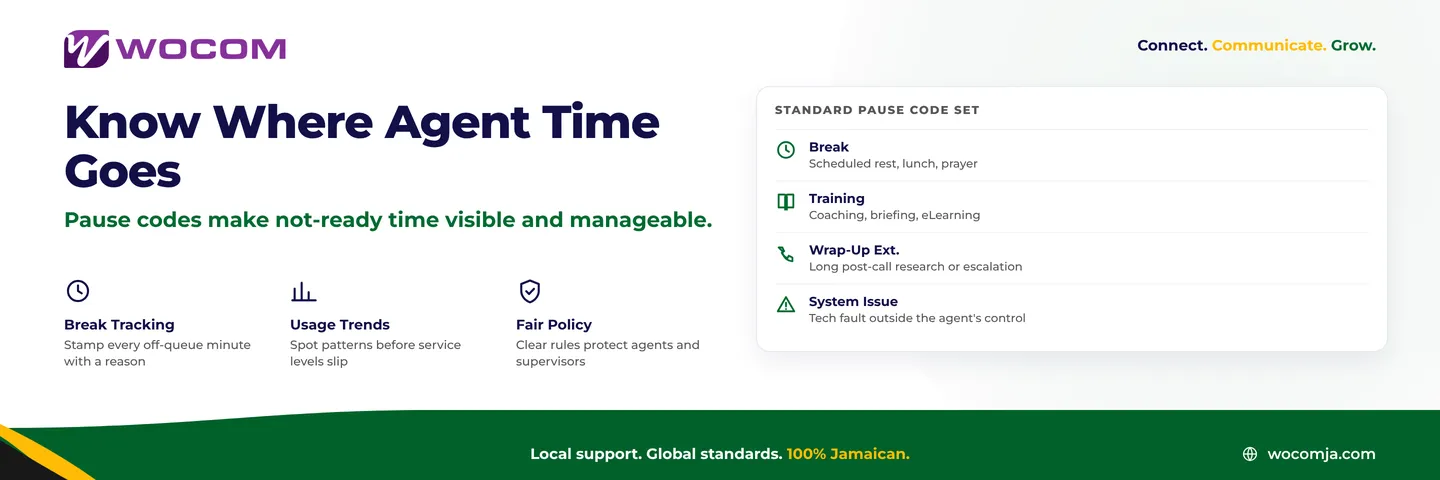
The most common mistake is having too many codes. If an agent has to scroll through twenty options to find "Comfort Break," they will pick whichever is closest to the top every time. Best practice for a Jamaican contact centre is six to ten codes, maximum. A practical starting set:
- Break — scheduled comfort break, prayer time, or brief rest
- Meal — lunch or dinner break (keep separate from Break if your reporting needs duration tracking by type)
- Team Meeting / Briefing — shift handover, morning standup, product or process update
- Training / Coaching — one-to-one session with a supervisor, eLearning module, certification work
- Extended Wrap-Up — the occasional post-call research or escalation that runs well past the standard ACW timer
- System Fault — headset failure, CRM frozen, network instability — anything the agent did not cause
- Personal — unscheduled personal time, tracked separately from scheduled breaks for accountability reporting
- Admin / Back Office — assigned non-call work: processing forms, completing compliance records, generating reports
Notice that System Fault is its own distinct code. This matters enormously during weekly reviews: it lets you cleanly separate infrastructure problems from discretionary behaviour, and escalate IT issues to the right team with timestamped evidence behind you.
Setting Time Limits on Each Code
A pause code without a duration expectation is just a label. Your supervisor console should alert — and in some configurations automatically return an agent to Ready — when a code exceeds its expected window. Reasonable thresholds for most Jamaican contact centres:
- Break: 10–15 minutes per session before a wallboard alert fires
- Meal: 30–45 minutes depending on your labour agreement or shift structure
- Team Meeting / Training: no auto-timeout — these require supervisor authorisation, so the supervisor owns the time
- Extended Wrap-Up: 5–10 minutes before a supervisor is notified; post-call work that runs beyond that usually means an escalation path is missing
- System Fault: 5 minutes before a supervisor alert; the IT team should also be looped in if multiple agents hit this code simultaneously
- Personal: 5 minutes before an alert, 10 minutes before escalation
Review these thresholds with your team during policy rollout. If agents feel the limits are punitive, you will see workarounds — agents selecting "System Fault" to buy extra personal time, for example. Explaining the data purpose — and demonstrating that the same data protects agents when tech issues cause forced not-ready time — tends to shift the culture from resistance to buy-in.
The Reports That Should Drive Your Weekly Review
Once pause codes are running cleanly, the data you can generate changes the quality of every operational conversation:
- Not-Ready Time by Code: What percentage of total agent hours went to each category this week? If "Personal" is outpacing "Break," something needs addressing.
- Not-Ready Distribution by Hour of Day: A spike in not-ready time at 10:00 and 14:30 is probably your break windows — confirm they are scheduled correctly and evenly distributed across the team.
- Agent-Level Breakdown: Which agents consistently exceed break limits? Which are using "System Fault" at a rate far above the team average? This data makes coaching conversations objective and removes the appearance of favouritism.
- System Fault Trend by Day: A rising System Fault count on Mondays often points to a weekend infrastructure issue that is not being escalated. The data surfaces it automatically.
- Unscheduled Personal Time Week-on-Week: A creeping increase in this code is frequently an early signal of team morale or workload issues — both of which you want to catch long before they show up in attrition numbers.
The goal is not surveillance — it is clarity. When a team understands that not-ready data is used to protect their schedules from overload just as much as it tracks their breaks, compliance improves on its own.
What the Policy Document Should Cover
A pause code policy does not need to be a lengthy HR document. One to two pages is enough. Cover these elements clearly:
- The full code list with plain-language descriptions — no jargon
- The expected maximum duration for each code before an alert fires
- Who can authorise extended sessions (team meeting, training, back-office work)
- How the data will be used: in weekly reviews, in coaching sessions, and in any performance improvement plans
- The escalation path when a threshold is repeatedly breached — and the point at which HR is involved
- How System Fault codes are verified and who owns resolution
Critically, the policy should state in plain terms that pause code data is used to identify systemic problems — poor break scheduling, recurring technology faults, training gaps — as well as individual behaviour. If agents read the policy as purely a monitoring tool, the culture around it will be adversarial. If they see it as evidence that management is paying attention to what the system is doing to them, it becomes something they trust.
Start With the Right Platform
Pause code tracking only delivers value if your contact centre platform supports it properly. Not every cloud phone system gives supervisors real-time visibility, configurable alerts, and the granular historical reports that workforce management requires. If your current system lumps all not-ready time into a single bucket, you are managing your team with one hand tied behind your back.
WOCOM's contact centre solution is built to give Jamaica supervisors the visibility they need — from the live wallboard to the weekly operations report, whether you are running a five-seat inbound team in New Kingston or a multi-site BPO floor in Montego Bay.
If your platform is not giving you this data, contact WOCOM today. We will walk you through what your current setup is missing and show you what proper pause code reporting looks like in practice.
Continue exploring
Ready to upgrade your communications?
Talk to our team about the right solution for your business.
Book a Demo Contact SalesEverett Kildare is WOCOM's voice and infrastructure specialist, with more than 25 years of experience designing and running carrier-grade voice, SIP and virtualization infrastructure. Holding a BSc in Information Technology, he has built, secured and migrated phone systems for businesses of every size. Everett writes WOCOM's technical coverage of SIP trunking, cloud PBX, contact centres, business continuity and migration.