Connectivity Agnostic: Why a WOCOM Business Phone System Runs Over Any Internet Connection
When we describe a WOCOM business phone system as connectivity agnostic, we are making a specific technical claim: the phone system has no opinion about how your office reaches the internet. Fibre, cable, DSL, 4G, 5G, Starlink, a hotel Wi-Fi network in Ocho Rios — if it carries IP packets, it carries your calls.
That sounds like a small detail. It is actually the single biggest difference between a cloud phone platform and the system it replaced, and it is the reason a Jamaican business can keep answering calls through a fibre cut, a hurricane, an office move or a change of internet provider without touching the phone system at all.
What connectivity agnostic actually means
A traditional PBX was welded to a physical line. The copper pair or PRI circuit coming into the building was the phone service. Your numbers lived on that line, your dial tone came from that line, and the box on the wall was configured around it. Lose the line and you lose the phone system — there is no second path, because the line and the service were the same thing.
A cloud platform separates the two. Your numbers, extensions, IVR menus, ring groups, call recordings and the AI receptionist all live on WOCOM’s carrier network. What sits in your office is just a device that registers back to that platform over the internet. The internet connection is a transport, not the service — and transports are interchangeable.
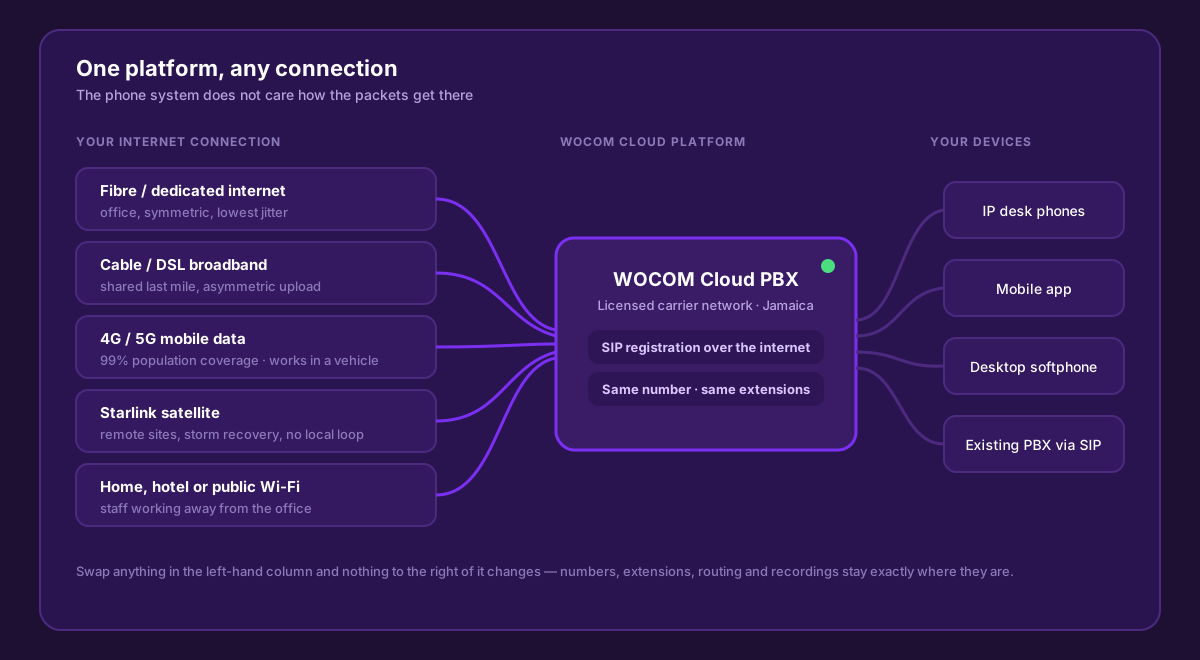
Five different connections, one platform, the same numbers and extensions on the other side. Swap the left-hand column and nothing to the right of it changes.
The connections it runs over
Fibre and dedicated internet access
The best-case scenario: symmetric bandwidth, low jitter, and a service level you can hold someone to. If you have it in the office, this is the primary path. See our guide to dedicated internet access for business voice for when the extra cost is justified.
Cable and DSL broadband
The most common connection in Jamaican offices, and perfectly capable of carrying voice. The thing to watch is the upload figure, not the headline download speed — a package advertised as 100 Mbps may only give you 10 Mbps up, and voice needs upload. We cover the details in business phones over cable internet.
4G and 5G mobile data
With roughly 99% of the population inside 4G coverage, mobile data is the most widely available transport in the country. It works as a primary connection for a small site, as an automatic backup for a bigger one, and as the everyday path for the mobile app in a staff member’s pocket. More in using 4G and 5G for your business phone.
Starlink satellite
Satellite changed the arithmetic for sites with no usable fixed line — remote clinics, rural schools, project sites, and anywhere the local loop has been washed away. WOCOM runs production phone systems over Starlink for organisations that cannot wait for a cable to be re-laid; see business phones over Starlink.
Home, hotel and public Wi-Fi
A staff member working from home in Portmore, a manager in a hotel room in Montego Bay, a director travelling overseas — the app registers over whatever Wi-Fi is available and rings on their office extension. The caller has no idea, and the caller ID they see is still your business number.
What voice actually needs from a connection
The reason all of these work is that voice is a small, extremely well-behaved stream. A single call uses roughly 100 kbps in each direction. Ten simultaneous calls need about 1 Mbps of clean upload — less than a single video meeting.
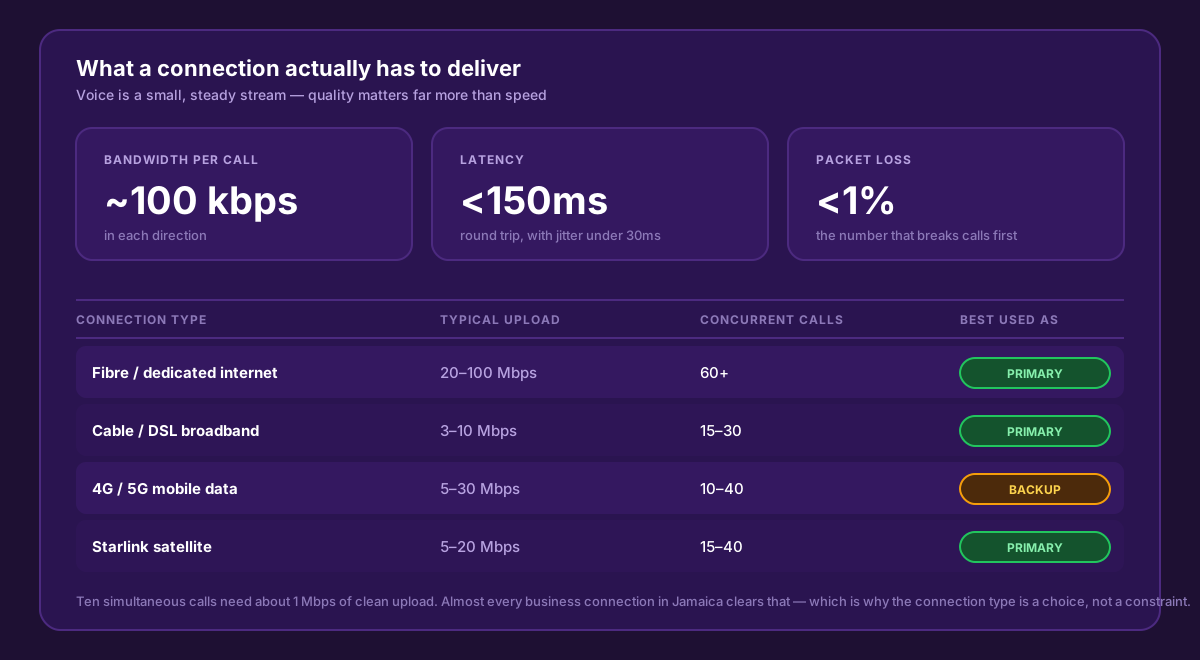
Voice is not a bandwidth problem. It is a consistency problem — latency, jitter and packet loss decide call quality long before raw speed does.
What matters is not how fast the connection is but how steady it is. Keep round-trip latency under about 150ms, jitter under 30ms, and packet loss under 1%, and calls sound clean on any of the transports above. Miss those and a gigabit fibre will still sound broken. Our VoIP bandwidth and internet speed guide goes through how to test yours.
Why this matters more in Jamaica than most places
Connectivity agnostic is a nice engineering property anywhere. In Jamaica it is an operational necessity, for four reasons:
- Fixed broadband is unevenly distributed. There are roughly 448,000 fixed broadband subscriptions nationally against 83% internet penetration — the gap is filled by mobile. A phone system that only works over a fixed line rules out a lot of viable sites.
- Weather. Hurricane season takes out poles, fibre runs and power. Businesses that survived recent storms with working phones did so because their voice service could move to a different transport within seconds.
- Multi-parish operations. A business with branches in Kingston, Mandeville and Negril rarely gets the same connection type in all three. Connectivity agnostic means one phone system across all of them anyway, with four-digit dialling between branches.
- Provider choice. Because the phone system is not tied to the internet circuit, changing internet provider is an IT decision, not a telephony project. Your numbers are not hostage to your ISP.
Failover in practice
The theory is only worth anything if the switchover is fast. Here is a real pattern from a Kingston office with a fibre primary and a 4G router as backup.
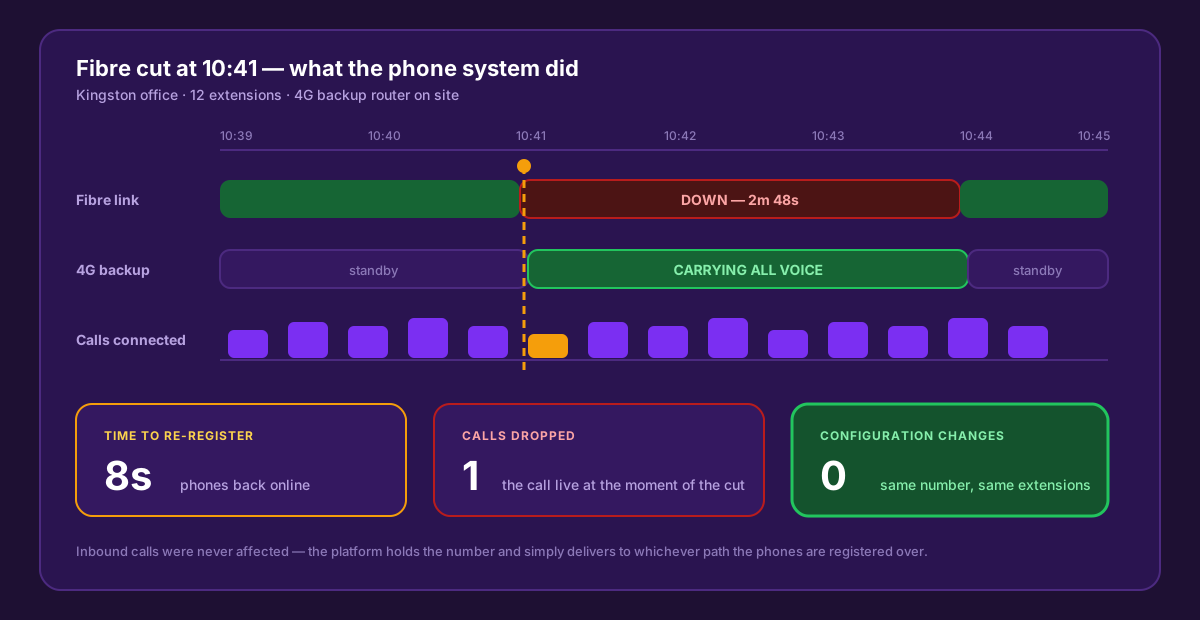
The fibre went down mid-morning. Phones re-registered over 4G in eight seconds, one live call was lost, and nobody changed a setting. Inbound callers noticed nothing.
Two things make that possible. First, the phones re-register automatically when a path disappears — there is no manual failover to perform. Second, the platform holds your number, so inbound calls queue at the network edge and are delivered as soon as a device is reachable again. If nothing is reachable at all, the call still lands somewhere useful: the AI receptionist answers it, or it follows your configured failover route to a mobile. That is the same continuity thinking covered in our failover and redundancy guide.
What it means commercially
- No lock-in to one internet provider. Change ISP, renegotiate your circuit, or run two providers side by side — the phone system is unaffected.
- Move office without moving the phone system. Unplug the phones, plug them in at the new address, and they register. No line transfer, no installation window, no number change.
- Open a site before the circuit is installed. Run it on 4G or Starlink from day one and switch to fibre when it arrives.
- Hybrid and remote staff cost nothing extra. An extension is an extension whether the person is in the building or not.
- Keep an existing PBX. If you are not ready to replace on-premise hardware, a SIP trunk into it delivers the same transport independence to the equipment you already own.
How to set it up properly
Connectivity agnostic does not mean careless. A handful of decisions make the difference between calls that ride out an outage and calls that stutter on a good day:
- Give voice priority. Enable QoS on the office router so voice packets go first when someone starts a large download.
- Turn SIP ALG off. This single router setting causes more one-way-audio complaints in the field than anything else.
- Use a dual-WAN router with automatic failover if calls are business-critical, with mobile data as the second WAN.
- Put the phones on wired ethernet where you can. Wi-Fi is fine for the app and for laptops; desk phones are happier cabled.
- Install the mobile app on every extension anyway. It is a free second path that lives on a completely separate network.
- Set a failover destination in the portal — AI receptionist, mobile number or voicemail — so a total site outage still captures the call.
Connectivity FAQs
Bring your own connection
WOCOM is a licensed Jamaican carrier that owns its own voice network — and we will run your phone system over whatever internet you already have, or help you design a primary-plus-backup setup that keeps calls up when one path fails. Call 876-906-7240 or book a demo and we will look at your connections with you before you commit to anything.
Continue exploring
Ready to upgrade your communications?
Talk to our team about the right solution for your business.
Book a Demo Contact SalesEverett Kildare is WOCOM's voice and infrastructure specialist, with more than 25 years of experience designing and running carrier-grade voice, SIP and virtualization infrastructure. Holding a BSc in Information Technology, he has built, secured and migrated phone systems for businesses of every size. Everett writes WOCOM's technical coverage of SIP trunking, cloud PBX, contact centres, business continuity and migration.