Cloud PBX User Roles Jamaica: Set the Right Permissions Before the Wrong Person Changes Your Settings
One Accidental Change, Hours of Chaos
A Kingston accounting firm recently experienced a two-hour period in which every inbound call reached a dead end. The auto-attendant recording played correctly, but no option connected to a live extension. The cause was not a network outage or a carrier fault — a junior staff member with admin access had been testing a new IVR menu and had inadvertently broken the routing logic in the process.
Cloud PBX platforms give your business an impressive set of controls: call routing schedules, IVR menus, ring groups, recording libraries, voicemail boxes, and user extensions. Every one of those features is one click away from being broken by someone who should never have had that permission. The solution is not to lock the admin panel away from everyone — it is to give each person exactly the access their role requires, and nothing more.
The Four Role Tiers Every Jamaican Business Should Know
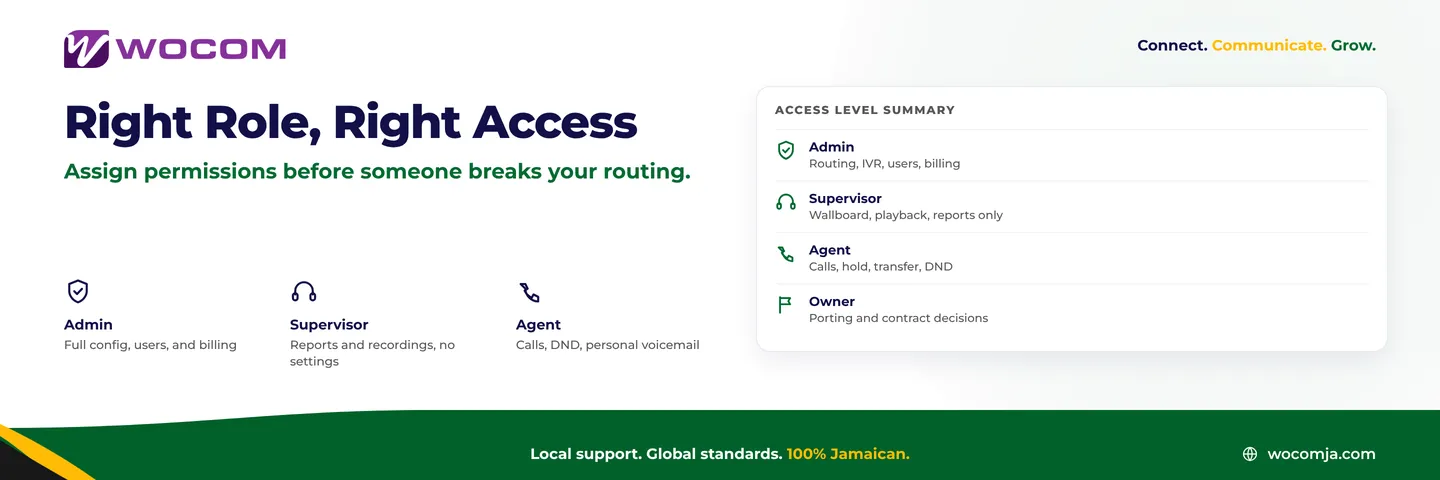
Most Cloud PBX platforms, including WOCOM's hosted system, organise access into four distinct levels. The labels may vary by provider, but the underlying logic is consistent across the industry.
Owner / Account Holder. The owner role belongs to whoever holds the service contract — a director or business proprietor, not an IT technician. Owners can authorise number porting, approve billing changes, and grant admin rights to others. There should be exactly one owner per account, and that person should be a named individual, not a shared company login.
Administrator. Administrators handle day-to-day system management: creating extensions, editing IVR menus, adjusting call routing schedules, enabling features, and adding or removing users. In a small Montego Bay tourism operation, this is typically the office manager or IT lead. In a larger Kingston contact centre, it is often a dedicated telephony administrator. This is a high-trust role — the admin can change how every call into your business is handled. Treat it accordingly.
Supervisor. Supervisors can view live call activity, pull historical reports, access the wallboard, and play back recordings for quality assurance — but they cannot change system configuration. This is the correct level for team leaders who need visibility into what their agents are doing without carrying the risk of altering live routing.
Agent. Agents can make and receive calls, transfer, place calls on hold, access their own voicemail, and toggle Do Not Disturb. Nothing else. This is the appropriate level for the majority of your staff — and it is precisely where most Jamaican businesses leave access far too open.
The Permission Mistakes That Cost Businesses
The most common mistake is assigning admin access to anyone who needs to just check something. Once a staff member has admin rights, they can inadvertently change a ring group, delete a time schedule, or redirect your main business number to the wrong destination. On a Cloud PBX, those changes take effect immediately — there is no approval step, no sandbox, and no undo button that notifies you first.
A practical rule of thumb: if a person cannot explain what a SIP trunk is, they probably should not have admin access to one.
A second common mistake is relying on a single shared admin credential. If that password is distributed across your team and one person leaves the business, you have no clean way to revoke their access without resetting the entire account and updating every other admin's login at the same time. Every administrator should have their own named, individual account.
A third mistake is neglecting offboarding. When a staff member resigns, their extension is deactivated — but their system login is often not. Ex-employees retaining admin access to a live phone system is a security exposure that Jamaican businesses routinely overlook, and one that falls squarely within the territory the Data Protection Act considers inadequate safeguarding of business systems and customer data.
What Each Role Can and Cannot Touch
| Feature | Owner | Admin | Supervisor | Agent |
|---|---|---|---|---|
| IVR menu editing | Yes | Yes | No | No |
| Call routing schedules | Yes | Yes | No | No |
| Add or remove users | Yes | Yes | No | No |
| Access call recordings | Yes | Yes | Yes | No |
| Pull call reports | Yes | Yes | Yes | No |
| Live call monitoring | Yes | Yes | Yes | No |
| Personal voicemail | Yes | Yes | Yes | Yes |
| DND and personal forwarding | Yes | Yes | Yes | Yes |
| Number porting | Yes | No | No | No |
| Billing and contract changes | Yes | No | No | No |
Structuring Roles as Your Business Grows
A sole trader running five extensions in Portmore has simple needs — one admin (the owner themselves) and everyone else on agent access. But as you scale, the model needs to be deliberate rather than inherited from however the account was first set up.
- 5–15 staff: Owner plus one named administrator, all others as agents. The admin handles system changes; no one else requires that access to do their job.
- 15–50 staff: Owner plus one or two admins, team leaders assigned as supervisors, everyone else as agents. Supervisors can pull performance reports for their department without touching configuration.
- 50+ staff or a contact centre: Owner, a dedicated telephony administrator, multiple supervisors per team, and agents. At this scale, consider requiring owner sign-off for any IVR or routing change, even one initiated by the admin — a change log with dual approval protects you when something breaks during a busy period.
If your business spans multiple locations — say, a head office in Kingston with branches in Ocho Rios and May Pen — decide whether branch managers need supervisor access for their local team or whether a single centralised administrator manages everything from one panel. Both models work. The important thing is that the decision is made intentionally, not by default.
Run Your Access Audit This Week
If you have never reviewed who holds admin rights on your Cloud PBX, here is a straightforward process to do it now:
- Log in to your admin panel and pull the full user list with each person's assigned role.
- Identify anyone with admin access who no longer works at the company, or whose daily duties genuinely do not require system configuration.
- Downgrade those accounts to agent or supervisor level, or deactivate them entirely.
- Confirm that the owner credential is held by a named director or decision-maker — not a shared IT account with a generic password.
- Enable login notifications if your platform supports them, so you are alerted when and from where admin logins occur.
This audit takes less than thirty minutes and closes a security and operational gap that most Jamaican businesses do not realise they have left open.
Get the Right Access Structure From Day One
WOCOM's Cloud PBX platform is built around precise, scalable access control. Whether you are a single-location business in Mandeville or a multi-branch organisation spanning the island, our team can help you design a role framework that protects your routing configuration while giving supervisors the visibility they need and agents the simplicity they deserve.
Call 1-800-WOCOM, visit wocomja.com, or send us a message through the website. We will review your current access setup and have a clean permission structure in place before the end of the business day.
Continue exploring
Ready to upgrade your communications?
Talk to our team about the right solution for your business.
Book a Demo Contact SalesEverett Kildare is WOCOM's voice and infrastructure specialist, with more than 25 years of experience designing and running carrier-grade voice, SIP and virtualization infrastructure. Holding a BSc in Information Technology, he has built, secured and migrated phone systems for businesses of every size. Everett writes WOCOM's technical coverage of SIP trunking, cloud PBX, contact centres, business continuity and migration.