What Happens to Your Business Phone System When the Internet Goes Down?
The Question Everyone Asks Before Moving to VoIP
“What happens to my phones if the internet goes down?” It is the right question, it is asked by almost every Jamaican business considering a cloud phone system, and it deserves a straight answer rather than reassurance.
The straight answer is: it depends entirely on what you configured beforehand. With no plan, your phones stop working. With a plan that takes about twenty minutes to set up, your customers never find out anything happened.
What Actually Breaks
Be clear about what goes and what stays.
What stops: desk phones at the affected site cannot make or receive calls. Softphones on the office network stop. Internal extension dialling between those handsets stops.
What does not stop: your phone number still exists, and calls to it are still arriving at your provider’s network. Your PBX is in the cloud, so it is still running — it is your site’s connection to it that is broken, not the system itself. Staff on the mobile app over cellular data carry on working normally.
That distinction is the whole basis of failover. The call is reaching your provider perfectly well. The only question is where your provider has been told to send it when your office does not answer.
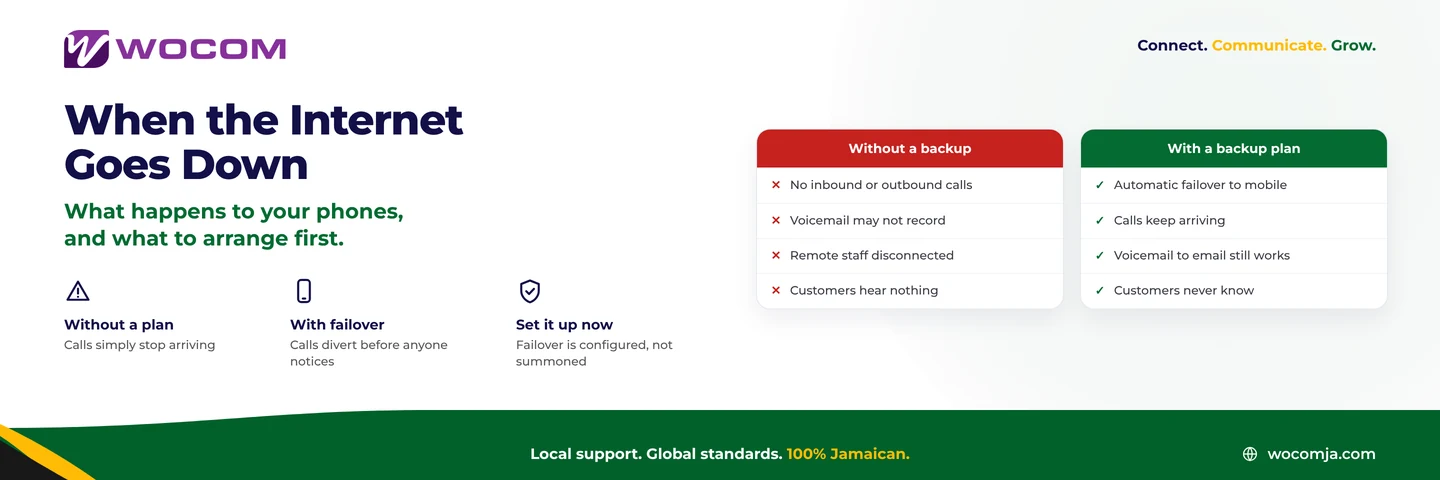
Without a Backup Plan
If nothing has been configured, the sequence is unglamorous:
- Inbound calls ring into a system that cannot reach your handsets
- Callers hear ringing that goes nowhere, or a failure message
- Outbound calling from the office is impossible
- Depending on configuration, voicemail may or may not capture anything
- Remote staff continue working, which is confusing for everyone else
The cost is not the outage — it is the calls. Our analysis of what downtime costs per hour puts numbers on it for a typical Jamaican business, and they are larger than most owners assume.
With a Backup Plan
Four mechanisms, in the order you should set them up.
1. Automatic failover to mobile. The simplest and most effective. If the system cannot deliver to your office extensions within a few seconds, it forwards to a nominated mobile number or a small group of them. Configured once, it needs nobody to do anything on the day. This alone covers most of the risk.
2. The mobile app. Staff with the app on their phones keep their extension over cellular data. They keep their number, they can transfer to each other, and internal dialling still works. The office is down; the phone system is not.
3. Voicemail to email. Messages left during the outage arrive as email, readable from any phone on mobile data. Nothing sits trapped on a handset in an empty office.
4. Dual-WAN failover. A second connection — typically a different technology on a different path, such as 4G or Starlink alongside fibre — that the router switches to automatically. This is the only option that keeps the desk phones themselves working, and it is worth it for businesses where the phone is the business.
Failover is configured, not summoned. Every one of these has to exist before the outage, because during one nobody can reach the portal to set it up.
The Jamaican Specifics
Two local realities shape the plan.
Power and connectivity fail together. A power cut takes your router, your switch and your desk phones even if the line itself is fine. A UPS covering the router and switch buys thirty to sixty minutes; without one, dual-WAN does not help because the equipment doing the switching is off. See power outages and business communications.
Storm season is predictable. Between June and November, brief outages are normal rather than exceptional. That argues for automatic mechanisms over manual ones — a plan that needs somebody to remember to do something at 3am is not a plan.
A Twenty-Minute Setup
In order of return on effort:
- Set failover forwarding to two or three mobile numbers, with a short timeout
- Install the mobile app on every phone that matters, and have people log in now — not during the outage
- Turn on voicemail to email and check the address is one somebody reads
- Put the router and switch on a UPS, even a small one
- Test it. Unplug the internet at a quiet moment and call your own number. This is the step everyone skips and the only one that proves the rest.
Then add dual-WAN if the phone is central to your revenue.
The Comparison Nobody Makes Fairly
Traditional lines are often assumed to be immune to this. They are not — they fail too, in storms, in floods, and when copper is cut or stolen. The difference is that when a copper line fails you wait for a repair, and there is no configuration that can route around it. When an internet link fails, the call is still arriving at a cloud system that can send it somewhere else in milliseconds.
Resilience did not disappear when phones moved to the internet. It moved from being a property of the wire to being a property of the configuration — which means it is now something you control.
Get Your Failover Configured
WOCOM will set up failover, the mobile app and voicemail-to-email on your account, and test it with you rather than leaving you to hope. The connection options guide covers what to run as a second path.
Call 876-906-7240 in Jamaica or 877-906-7240 from the US, email support@wocomja.com, or use the contact page.
Continue exploring
Ready to upgrade your communications?
Talk to our team about the right solution for your business.
Book a Demo Contact SalesEverett Kildare is WOCOM's voice and infrastructure specialist, with more than 25 years of experience designing and running carrier-grade voice, SIP and virtualization infrastructure. Holding a BSc in Information Technology, he has built, secured and migrated phone systems for businesses of every size. Everett writes WOCOM's technical coverage of SIP trunking, cloud PBX, contact centres, business continuity and migration.