Blocking Spam Calls on a Cloud PBX Jamaica: What Works and What Doesn't
Why Jamaican Businesses Are Drowning in Junk Calls
If your Kingston office receives a wave of calls from unfamiliar numbers — numbers that hang up the moment a staff member answers, or that deliver the same thirty-second script about an overseas prize or debt relief service — you already know the cost. Robocalls, scam dialers, and persistent cold-callers now account for a meaningful share of inbound traffic on Jamaican business lines. Every junk call that reaches a staff member is a distraction. Across a team of ten, those interruptions add up to lost focus, longer handling times on genuine enquiries, and real customer frustration when lines seem perpetually busy.
The good news: a Cloud PBX is not a passive pipe. It carries a full set of call-control tools that let you decide — before the phone rings — which traffic is worth your team's attention. This guide walks through every lever available on a WOCOM Cloud PBX, from the simplest to configure to the most nuanced.
Know Your Enemy: Three Types of Unwanted Calls
Before you start blocking, it helps to categorise what you're actually dealing with. Different nuisance call types need different responses:
- Robocalls and auto-dialers. Recorded-message calls, often pushing scams or overseas lottery wins. These typically come from rotating number pools, so blocking a single number rarely solves the problem for long.
- Persistent cold-callers. Real human callers — usually from lead-generation outfits — who call the same number repeatedly. These often have identifiable originating numbers or number ranges that can be blocked directly.
- Anonymous or withheld-number calls. Calls that present no caller ID, which local scam operators use to avoid being traced. A legitimate Jamaican business almost never withholds its number.
Each category has a different control mechanism in your Cloud PBX. Matching the right tool to the right problem is what makes blocking effective — without catching real customers in the net.
Cloud PBX Native Controls: Start Here
WOCOM's Cloud PBX gives administrators several blocking options that can be configured from the management portal without any specialist technical knowledge.
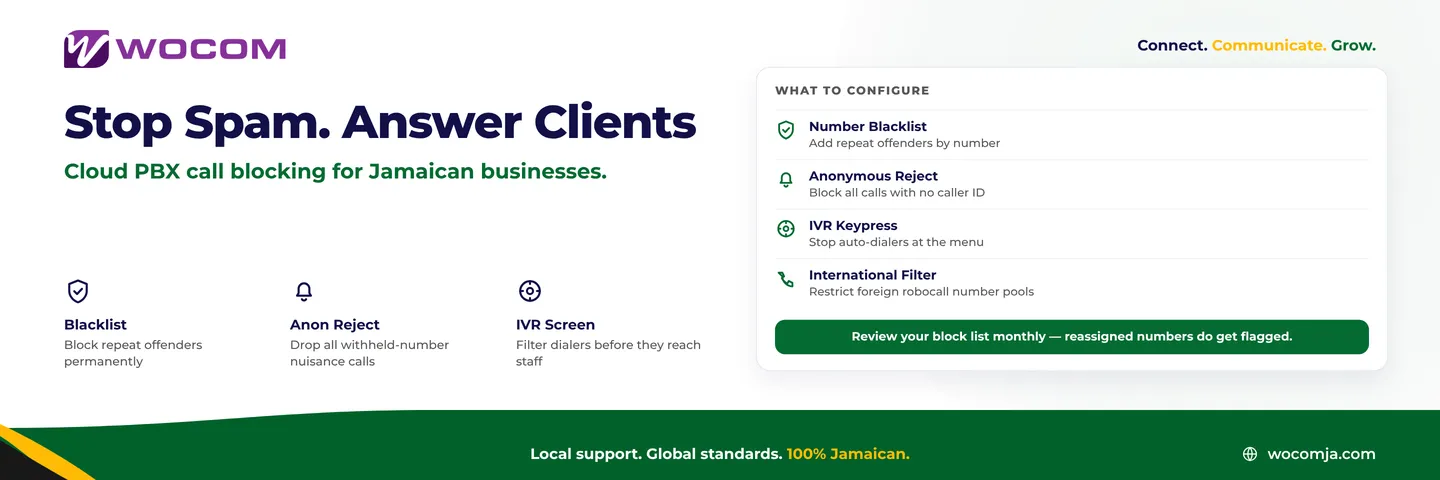
Number Blacklist
The most direct control. Add a specific number to your blacklist and every call from that number is rejected before it reaches your auto-attendant, your hunt groups, or any extension. This is ideal for repeat offenders — a vendor that calls four times a day after you've declined their service, or a known scam number your team keeps logging. Numbers can be added one at a time or in bulk if you receive a list from a trade body or peer business.
Anonymous Call Rejection
A single-toggle feature that drops any inbound call presenting no caller ID. Because legitimate Jamaican businesses — banks, hospitals, courier companies — virtually always present a number, this setting cuts a large proportion of scam traffic with almost zero risk of blocking real clients. The caller receives a message that your line does not accept withheld-number calls and is invited to call back from an identifiable number.
International Call Restrictions
If your business serves a local Jamaican customer base, you can restrict inbound calls to Jamaican and known Caribbean prefixes. Calls from foreign number ranges that commonly originate robocall traffic — certain US VoIP number pools, for example — are blocked at the trunk level before they enter your system at all. This is a coarser filter, but effective for businesses with a genuinely local customer profile.
Smarter Screening: Use Your Auto-Attendant as a First Filter
Blacklists work on known-bad numbers, but robocallers rotate numbers constantly. A more durable defence is to use your auto-attendant to separate humans from automated dialers before any call reaches your staff.
Configure your initial IVR prompt to require a keypress — "Press 1 to speak with our team" — before routing the call onward. Automated dialers that are not programmed to interact with IVRs hang up at this step. Real callers press 1 and proceed normally. This single configuration change eliminates a substantial share of robo-traffic without requiring any number blacklisting at all.
If you have WOCOM AI enabled, Alex can go one step further: greeting every inbound call, collecting the caller's name and purpose, and routing only calls that pass a basic intent check to your staff. Callers who cannot articulate a genuine need — or who are clearly scripted recordings — never reach your team. For Montego Bay businesses handling high tourist-season call volumes, this layer is particularly valuable.
Building and Maintaining Your Block List Over Time
A block list that was built six months ago and never revisited is probably both over-inclusive and under-inclusive. Numbers get reassigned. Scam operations shift prefixes. Vendors that once called persistently become valued suppliers. A monthly block-list review is a low-effort habit that keeps your filters accurate:
- Pull rejected-call logs from your Cloud PBX portal. Look for any number that appears in your blocked list but also in your inbound customer records — this flags a potential false positive worth investigating.
- Check for new repeat offenders in staff call logs. If the same number appears unanswered three or more times in a week without a voicemail or message, it is a strong blacklist candidate.
- Coordinate with peers. Kingston Chamber of Commerce members and sector-specific WhatsApp groups regularly circulate known scam numbers. Add those proactively rather than waiting for your own staff to encounter them.
WOCOM's Cloud PBX portal lets you export your block list as a CSV, which makes cross-referencing against inbound call history straightforward — a five-minute monthly task.
Common Blocking Mistakes to Avoid
A few approaches look appealing but create more problems than they solve:
- Blocking entire area codes. Blocking all calls from a US +1 area code catches some robocallers but also blocks any Jamaican diaspora client calling from that area. Be specific, not broad.
- Relying solely on a blacklist for robocalls. Rotating-number robocallers are back on a new number the next day. Pair blacklisting with IVR screening for lasting results.
- Applying anonymous call rejection without informing staff. Team members sometimes call in from personal withheld lines when working in the field. If you activate anonymous rejection, communicate this so staff know to present their number when calling the office.
The right test: configure your blocking so that a first-time legitimate customer — one who has never dealt with your business before — will always get through. Protect your staff from junk without ever closing the door on new business.
Take Back Your Business Lines
Spam calls are not a minor inconvenience. They erode response times, frustrate your team, and in the worst cases mask real customer calls that go unanswered while staff handle junk. Your Cloud PBX already has the tools to push back. You just need to switch them on correctly.
WOCOM's support team can walk you through configuring anonymous call rejection, setting up your blacklist, and tuning your IVR to filter automated traffic — usually in a single session. If you're already a WOCOM Cloud PBX customer, these changes can be made today at no additional cost. If you're still on a legacy line without these controls, this is one more practical reason to move.
Call us at 876-WOCOM-JA, email info@wocomja.com, or visit wocomja.com to speak with a solutions advisor.
Continue exploring
Ready to upgrade your communications?
Talk to our team about the right solution for your business.
Book a Demo Contact SalesEverett Kildare is WOCOM's voice and infrastructure specialist, with more than 25 years of experience designing and running carrier-grade voice, SIP and virtualization infrastructure. Holding a BSc in Information Technology, he has built, secured and migrated phone systems for businesses of every size. Everett writes WOCOM's technical coverage of SIP trunking, cloud PBX, contact centres, business continuity and migration.